
Low-code tools like Microsoft Power Platform are transforming the way businesses build solutions. Suddenly, anyone with a good idea can automate a process, build an app, or create a dashboard. It’s empowering, but it also creates new risks if growth goes unchecked. Without the right guardrails, organisations can quickly find themselves facing security gaps, compliance issues, or simply too many untracked apps to manage effectively.
That’s where a Power Platform Centre of Excellence (CoE) comes in. By combining visibility, governance and the right security tools, a CoE helps organisations balance freedom with control. It’s not about slowing down innovation. It’s about creating the right environment for it to thrive safely. Here, we’ll explore how a CoE gives organisations a future-proof approach to low-code governance.
Every Power Platform environment is secured by Microsoft Entra ID (formerly Azure Active Directory). This means only authenticated users in your tenant can access apps or automations. Role-based access controls ensure the right permissions are applied, and mobile users also require tenant authentication before connecting.
A Centre of Excellence builds on this foundation by giving organisations visibility of what’s actually happening across their environments. With a CoE in place, IT leaders can see which apps exist, who created them, and how they’re being shared. That visibility is the first step to meaningful low-code governance.
One of the most powerful features for low-code governance is Data Loss Prevention (DLP) policies. These let you control which connectors can be used together, preventing sensitive information from flowing to inappropriate apps or services. For example, stopping a member of your team from accidentally tweeting our confidential SharePoint data.
The CoE adds value here by storing DLP information and allowing admins to run impact analysis before applying new rules. This matters because changing a DLP policy without understanding the effect could unintentionally break dozens of critical flows. With CoE, organisations can preview what will be affected and act proactively.
Governance isn’t just about rules. A successful CoE changes the way an organisation approaches innovation. Instead of restricting people, it creates a culture of trust and empowerment, where business users or citizen developers have the confidence to experiment safely.
Clear guidance and onboarding resources help new innovators start strong including best practice guides that reduce the risk of duplication and ensure consistency across apps and automations. IT teams aren’t seen as gatekeepers but as enablers of business creativity.
This cultural shift matters because low-code success depends on people as much as technology. With the right framework, organisations get the best of both worlds: rapid business-led innovation, and confidence that it’s happening in a safe, controlled way.
One of the biggest risks with low-code is the ‘app graveyard’, solutions created with enthusiasm but left without owners or orphaned when staff move on. These abandoned apps still have access to business data, creating both security and operational risks.
A CoE addresses this head-on by setting up clear lifecycle management practices:
With these practices, organisations can keep their Power Platform environments healthy, sustainable, and free from digital clutter. It’s a way of futureproofing innovation so that today’s solutions don’t become tomorrow’s risks.
In highly regulated industries like healthcare, finance or the public sector compliance isn’t optional, it’s fundamental. A Power Platform Centre of Excellence provides the structure to ensure every low-code solution is developed in a way that meets standards and stands up to audit.
This framework gives clarity on which connectors and data sources are permitted, removing ambiguity and reducing risk. It also introduces robust audit processes that record who has built an app, how it is being used, and whether it continues to operate within defined guidelines. Crucially, it ties each solution back to IT strategy and regulatory requirements, creating a consistent and defensible approach.
The result is an environment where innovation can happen with confidence. Business users understand the boundaries they can work within, IT teams retain the oversight they need, and compliance officers can be assured that new solutions won’t compromise security or governance. In this way, a CoE doesn’t restrict innovation, it safeguards it.
One of the most powerful outcomes of low-code governance is the ability to take success in one area and replicate it across the business. Without a framework, apps and automations often remain isolated within a single team, delivering value only locally. But with a Centre of Excellence in place, organisations can identify high-impact solutions and scale them to other departments, turning individual wins into organisation-wide improvements.
Imagine an HR app that simplifies employee onboarding. With CoE support, that same approach can inspire finance to streamline expense approvals, or equip field teams with mobile apps that capture real-time data. These solutions no longer live in silos; they form part of a connected ecosystem where ideas and practices flow across teams. The outcome is a multiplier effect; innovation spreads, efficiency grows, and the whole organisation benefits from the creativity of its people.
Strong governance can be seen as restrictive, but in reality it’s an enabler. With a well-established CoE organisations can safely open the door to more citizen developers. IT leaders gain confidence that new apps won’t introduce risk, compliance officers can demonstrate control to regulators, and business users can innovate faster without waiting for central IT to build everything for them.
The outcome is a win-win:
Low-code innovation has huge potential, but it needs strong governance to be sustainable. A Power Platform Centre of Excellence gives organisations the structure to balance freedom with control. It’s a smarter way to govern, protecting your data and ensuring every new app or automation supports the bigger business picture.
If you’re looking to unlock innovation with confidence, now’s the time to review your governance approach and explore what a Power Platform CoE can do for you.
Your organisation might already have a handful of Power Apps and cloud flows humming away, bolted together in the default environment quietly serving your business’ needs. Which is great progress, until it isn’t. Without safeguards, a single typo or mistaken update can pull the rug out from under vital processes.
That’s why the Power Platform Centre of Excellence (CoE) Starter Kit is essential, but it’s only the first step to citizen developer governance. The real impact comes when you transform that foundation into a full-fledged governance engine that empowers your team to innovate within a safe and structured environment.
A Power Platform Centre of Excellence (CoE) is a strategic hub that brings together the right people, processes, and governance to enable organisation-wide collaboration and ensure deployments align with the organisation’s needs. By establishing a CoE, organisations can break down silos, stimulate sustainable growth, maintain compliance, and drive innovation, while promoting effective governance and aligning technology initiatives with overall goals.
The Power Platform Centre of Excellence (CoE) Starter Kit is a solid technical foundation for governance, monitoring, and adoption using low-code tools like Power Apps, Power Automate, Copilot Studio, and Dataverse. It delivers ready-made dashboards, app inventories, and automation. Everything you need to get visibility on who’s building what and where.
Key parts of the Power Platform Centre of Excellence toolkit include:
But it is what it says on the tin, a starter kit. A complete Centre of Excellence needs strategy, people, process and culture as much as it does tools.
The most common pitfall is organisations with a Power Platform presence (often messy and unmanaged) have it in their default environment. Leaving no separation between citizen developer flows and apps and your live data. With no barriers there’s no safety net, no rollback and major risk to your data.
Individual users creating flows to manage their inbox and improve their efficiency is a great thing, low risk and should be encouraged to foster individual innovation. However, once a flow starts reaching further afield, for example interacting with spreadsheets from external partners, manipulating data or spreading across teams, the citizen developer has crossed into enterprise territory. This calls for governance, lifecycle management and compliance to keep your data and environment safe.
That’s where Application Lifecycle Management (ALM) comes in. ALM gives you a structured deployment pipeline that typically looks like:
Build in development, check and validate in test then launch to production once everything is given the all-clear. ALM done well minimises downtime and errors as your organisation’s capability leaps forward.
Microsoft recommends an ALM strategy that aligns environments with deployment stages and ensures version consistency.
Once you extend the Power Platform Centre of Excellence starter kit beyond its basic components, you can build a stack of robust governance tools that enable your team to innovate without risking your data.
Here are some examples of what you can build on top of that foundation:
These featured enable you to shift governing development from a manual task to one that runs in the background, consistently and regularly.
The payoff for developing your Power Platform Centre of Excellence? It enables you to scale confidently and securely, while giving your innovative team the tools they need to do their work more efficiently.
When your CoE is structured with tools and frameworks like ALM, automated governance and clear boundaries, your citizen developers don’t feel boxed in and they can deliver solutions to everyday challenges quickly and safely. Your IT team avoids outages and data loss, remain compliant and free up their time for strategic improvements over firefighting.
With the sudden and urgent need to work from home during this global pandemic, there has been a boom in Cloud-based remote working solutions. This includes an unprecedented jump in the use of Microsoft Teams to a huge 75 million daily active users in April 2020. With the announcement of Microsoft Dataflex for Teams during Microsoft Inspire 2020, expectations are that this number will continue to soar!
Dataflex for Teams is the new enterprise data storage mechanism for Power App solutions, built specifically for Microsoft Teams. Previously, if you wanted to create a Power App solution that required scalability that SharePoint or Excel couldn’t provide, you would need to look at the premium licensed Common Data Service (now Dataflex Pro) or SQL Server. However, organisations that were looking to create Power App solutions but were limited by their licensing restrictions now have the ability to create a 2GB relational database per Microsoft Team.
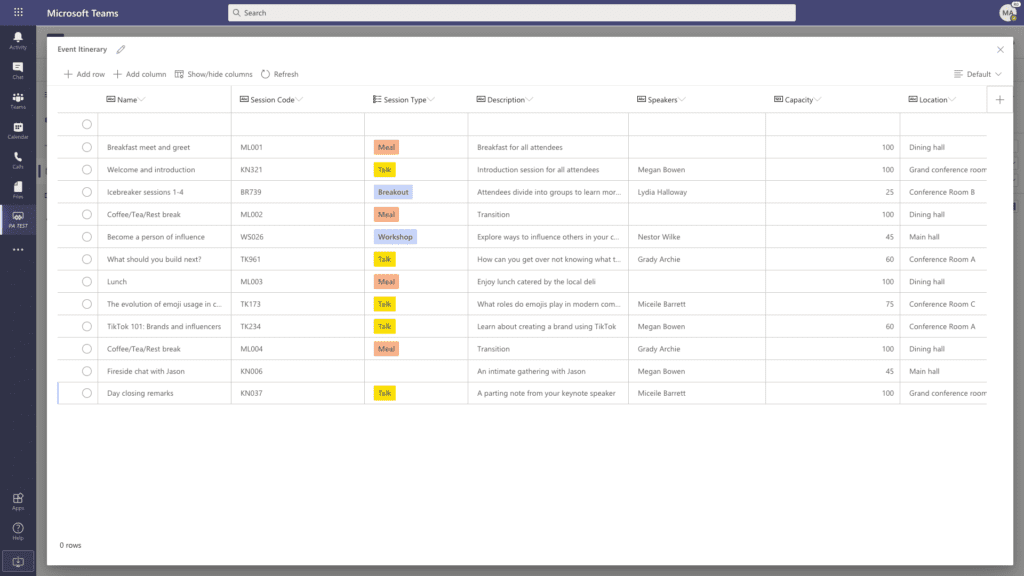
Creating a relational database within Teams is as easy as creating an Excel Spreadsheet, and with the new editable grid you can quickly create and populate new tables with your data. This powerful data storage solution is also included within your current Teams licencing, so no premium licencing is required.
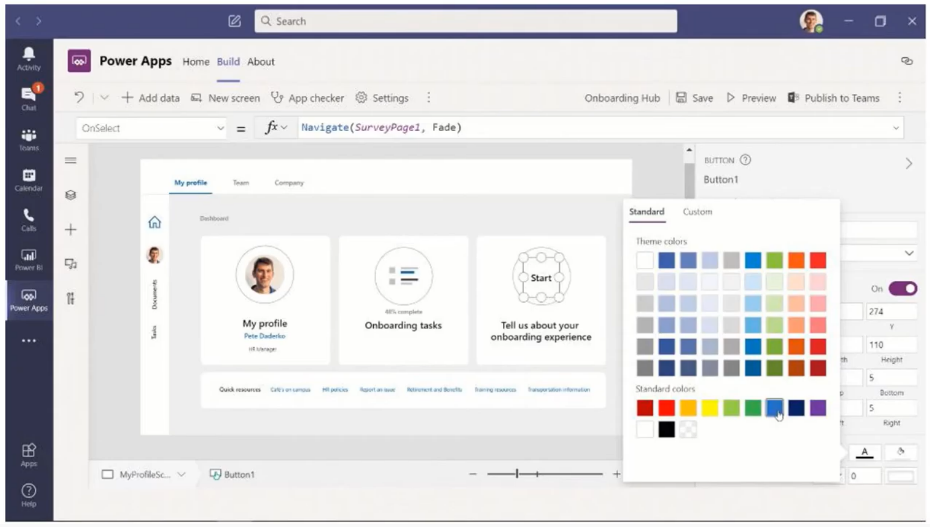
 With Dataflex data storage underpinnings in place within Teams, you can now create Canvas Power Apps directly within your Team to interact with your newly-created relational databases. Apps are built with responsive templates in exactly the same way as within the full Power Apps Studio, so your Teams Power Apps will provide a streamlined experience across all devices (web, tablet, mobile).
The Teams-integrated Power Apps Studio still has access to all your favourite connectors and access to Power Automate, so your application experiences will be maintained. As the authoring is done directly within Teams, it becomes hassle free when you are ready to publish.
With Dataflex for Teams, the Teams application is about to become your single port of call for all your data, application, automation and chat bot needs, bringing tighter integration between Teams and the Power Platform.
Power Automate flows can be authored natively from within Teams, so Instant, Scheduled and Automated flows can interact with your Team relational database and any PowerApps or Virtual agents in the Team.
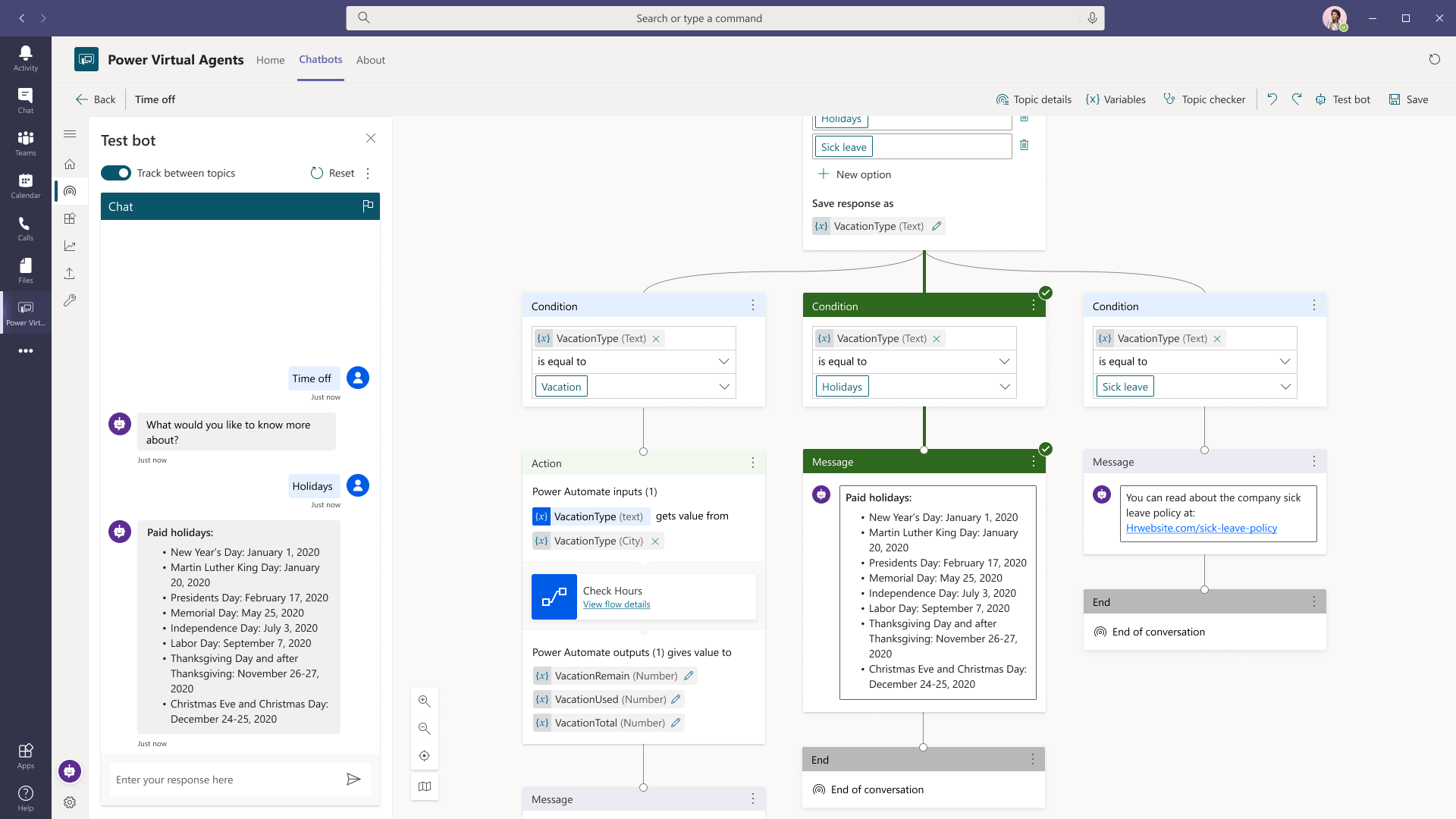 Microsoft Power Virtual Agents utilise CDS for storage and with Dataflex for Teams, the Virtual Agents can now be written in place within a Team. This offers SME chat bot capability deployed directly within your team for all members to use.
* In Public Preview from September 2020
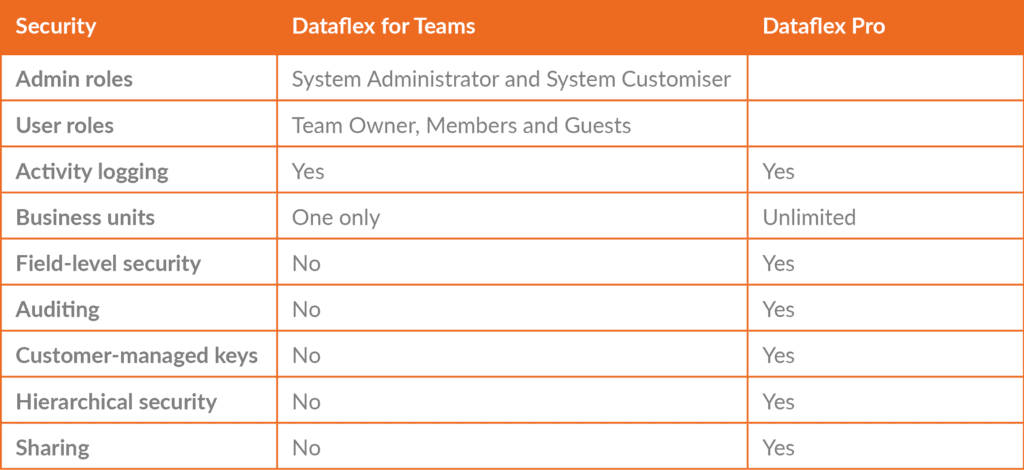
Dataflex for Teams uses the Teams security model for the securing of data stored. Security is set on a per-Team basis and not globally across your Teams environment.
As collaboration in Teams happens with people inside and outside of an organisation, the security model needed to support this is easy to use. In Dataflex for Teams, access is pre-configured with a security role based on their membership type (Owners, Members and Guests).
The table below shows the differences between Dataflex for Teams and Dataflex Pro:
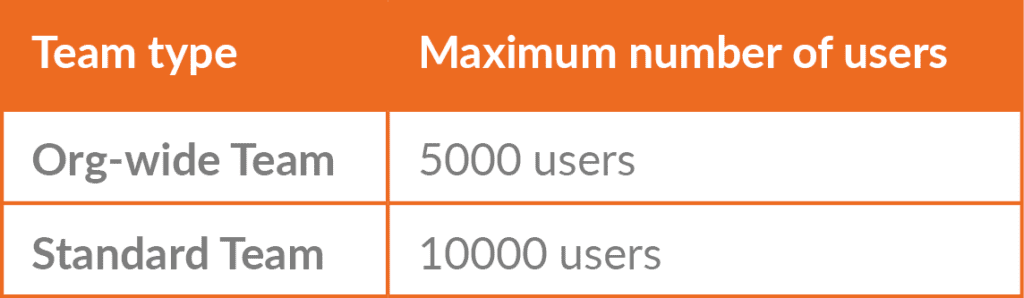
Dataflex for Teams limits the data storage to an individual team to 2GB. This should give approximate capacity of 1 million rows of data across all tables that are created within the team, although this will be considerably lower if files and images are stored.
If this limit is reached, Dataflex allows for the promotion of a Dataflex for Teams environment to be promoted to Dataflex Pro. This will, in turn, require the premium licencing of all users of the data, including guest users of the Team.
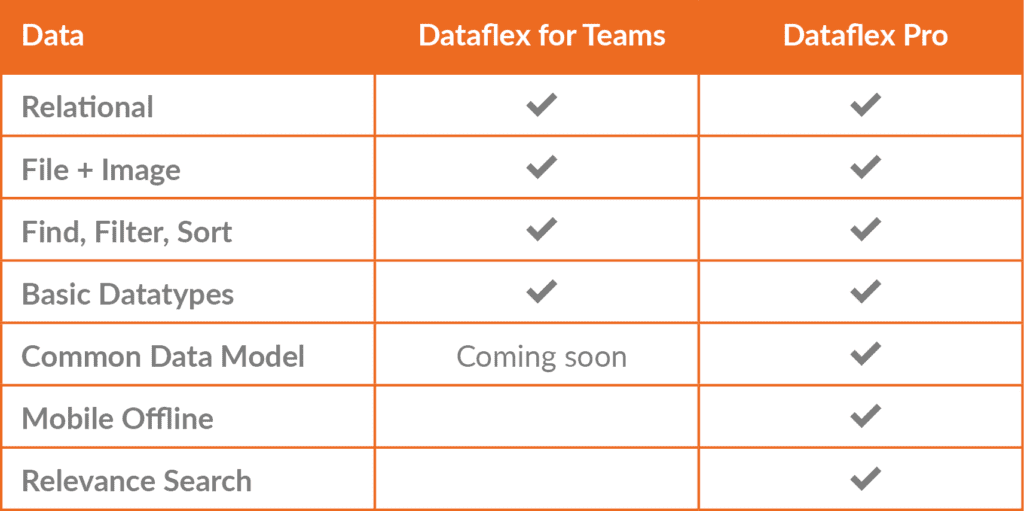
Dataflex for Teams supports relational data and includes capabilities to find, filter and sort that data. It includes support for basic data types, as well as complex data types like images and files and a version of the currency data type found in Dataflex Pro. It also offers other popular features, such as the ability to do roll up and calculated fields.
Dataflex Pro includes a host of additional capabilities over Dataflex for Teams, including non-relational data (logs), managed data lake, relevance search, and offline data for mobile. It includes support for advanced data types and robust support for the Common Data Model (CDM) today.
Activities and Activity Feed tables are included in Dataflex Pro only and were not included in Dataflex for Teams, as similar concepts were already present in Teams.
Transparity are offering complimentary consultations to organisations wanting to know more about Microsoft Dataflex in Teams. Just click below and one of our experts will get in touch to discuss your available options.
