
When you’re building solutions in Azure, it’s fair to say you’re spoilt for choice. There are countless ways to architect a solution and a dozen different services to achieve the same outcome. But whether you’re building a simple app or a complex enterprise platform, every successful project needs one thing: a solid foundation.
Think about building your dream home. You go to an architect with your wish list, open plan kitchen, south-facing garden, home office. If you went to three different architects, you’d get three completely different designs. They’d all look different, but underneath the surface? They’d all rely on the same fundamental things: load-bearing walls, solid floors, and a roof that doesn’t leak.
Architecture in Azure is exactly the same. No matter how you choose to meet your workload requirements, there are fundamental principles you just can’t ignore.
What is the Well-Architected Framework?
This is where the Azure Well-Architected Framework comes in. It’s essentially a set of guidelines, a blueprint for architectural excellence, that ensures you’re not just building something that works, but something that lasts.
The framework is built on five main pillars:
Surrounding these pillars are supporting elements like Azure Advisor, Reference Architectures, and Design Principles that help you stay on track.
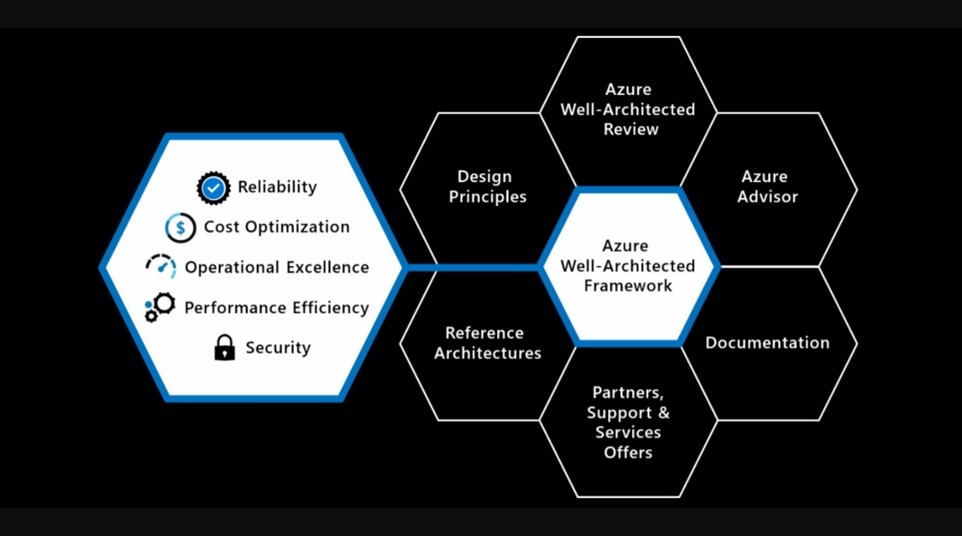
Figure 1 – Five Pillars of architectural excellence surrounded by six supporting elements.
In this series, we’re going to walk you through the framework, starting right at the beginning. Our aim? To give you the knowledge (and the confidence) to know that your design decisions are correct, best practice, and future-proof.
Reliability: Keeping the Lights On
Let’s talk about the first pillar: Reliability.
In simple terms, reliability is the ability of your system to take a hit and keep on moving. It means your workload can recover from failures and continue to function exactly as you intended.
Here’s the thing about the cloud: it requires a different mindset to traditional on-premise computing. When you design for the cloud, you have to assume that things will fail. It sounds pessimistic, but it’s actually liberating. Once you accept that failure is a possibility, you can architect your solution to recover automatically.
When designing for reliability in Azure, here are the core principles you need to live by:
- Define your targets: Know your SLAs (Service Level Agreements), RPO (Recovery Point Objective), and RTO (Recovery Time Objective) inside out.
- Design for resilience: Build your applications so they can handle errors gracefully, not crash at the first sign of trouble.
- Plan for disaster: Test your disaster recovery scenarios. Hope for the best, plan for the worst.
- Don’t forget the data: Ensure both your application and your data platforms are designed for reliability.
- Foundations matter: Make sure core services, like networking, are rock solid.
- Scale it up: Implement scalability wherever you can to handle spikes in demand.
- Monitor everything: Constantly measure and test your fault tolerance.
The Services That Have Your Back
Azure provides a whole toolkit of services designed specifically to help you sleep better at night. When you’re architecting for reliability, these are the tools you should be reaching for:
- Availability: Use Availability Sets, Availability Zones, or Paired Regions to ensure your VMs stay up, even if a data centre goes down.
- Traffic Management: Keep traffic flowing smoothly with Load Balancers, Traffic Manager, Application Gateway, Azure Front Door, or Zone-redundant Gateways.
- Data Consistency: Protect your data with Business Critical SKUs or Zone Redundant Storage.
- Scalability: Handle growth effortlessly with Virtual Machine Scale Sets or Autoscaling for PaaS services.
- Recoverability: Get back on your feet fast with Azure Site Recovery and Azure Backup.
Making Your Applications Resilient
Using the right platform services is only half the battle. Your actual application needs to be built to take advantage of them.
When you’re creating an application, you need to build resiliency directly into the code. This means understanding exactly where faults could happen and ruthlessly eliminating single points of failure.
Think about your dependencies. These are the components your application needs to do its job. If one dependency fails, what happens to your app? Does the whole thing fall over? All your dependencies need to meet your workload SLA. If they don’t, they drag your overall reliability down with them.
Review Your Workloads Today
We’ll be diving into the other four pillars: Security, Cost, Operations, and Performance, later in this series. But before we go, there’s a tool you should know about right now.
Microsoft provides a free tool called the Well-Architected Review. It takes about 30 minutes, and it’s brilliant. It examines your specific workloads through the lens of all five pillars. It can even pull recommendations directly from Azure Advisor in your tenant to give you tailored advice.
It’s a great way to get a health check on your current setup. And if you want a more in-depth look? We can help you unpack the results and build a roadmap to a more reliable, robust Azure environment.