The digital landscape is continuously evolving, prompting organisations to prioritise secure and efficient identity management systems. The rapid evolution, and occasional rebranding, of Microsoft’s Identity-as-a-Service (IDaaS) offerings can leave developers and architects a little confused.
This article covers a few of the options of Microsoft Identity Management Solutions.
What is IDaaS?
Identity-as-a-service (IDaaS) refers to cloud-based solutions that provide identity and access management (IAM) functionalities. These services help organisations manage user identities, authenticate users, and control access to resources in a secure and scalable manner.
Entra ID (formerly Azure Active Directory, Azure AD)
Microsoft introduced Active Directory as an Identity Management solution with Windows 2000 a quarter of a century ago, and after countless enhancements, it is now the standard for user authentication and management within organisations. AD offered enhanced security, scalability and improved integration, providing a single sign-on experience across multiple systems within an enterprise, reducing the number of passwords users needed to remember and simplifying the management for IT staff.
In 2008 Microsoft took AD into the cloud to create Azure Active Directory (now Entra ID).
Entra ID features include
- Single sign-on (SSO)
- Multi-factor authentication (MFA)
- Conditional access
- Self-service password reset
- Integration with Microsoft 365
- Multi-language support: provides a user interface in multiple languages
Although designed primarily to manage users within a single Azure tenant, Entra ID does allow authentication of users from other directories through federation, guest users, or by registering multi-tenant apps with bespoke authorisation rules.
Azure AD Business-to-Consumer (B2C)
Without cluttering up your AD with large numbers of inactive guest users, the only option for securing public-facing web applications was once to create a bespoke identity solution. Microsoft introduced Azure AD B2C in 2015 to solve this problem, allowing an app developer to use multiple third-party identity platforms for authentication.
The idea of a third-party identity provider seems counter-intuitive but it’s not much different to the idea of passports. I have a passport issued by HM Passport Office; if I travel to the USA, I can use my passport for identification because the USA government trusts HM Passport Office. Similarly, if you are developing an app, you can decide which of a number identity providers that you want to trust, e.g. Google, Facebook. But, just as a UK passport won’t grant me entry to the USA without a visa granted by the USA government, a token from a third-party ID provider serves only as a means of identification and does not convey permissions – the owner of the tenant in which the app resides has full control over who is allowed in and what they are allowed to do once they’re in.
AD B2C features, beyond those of Entra ID:
- Customisable user journeys: fully customisable processes for sign-up and sign-in, including MFA, conditional access and a branded user interface
- Social and local account integration
- Self-service sign-up and password reset
- Scalability: designed to handle millions of users and transactions
Limitations
Although highly customisable, once you move past the limited number of out-of-the-box options available through the Azure portal, customisation becomes exponentially more complex. In our experience at Transparity, most implementations require custom policies, generated from lengthy hand-authored XML files. The lack of developer tools for customisation, the complexity of customisation, and ongoing management create a large technical overhead in many implementations.
Although still fully supported, Azure AD B2C is now considered by Microsoft to be a ”legacy solution”.
Comparison
Common features of Entra ID, Entra External ID and Azure AD B2C:
- Cloud native
- Single sign on (SSO)
- MFA
- Authentication of users from external Entra ID directories
- Custom user profile attributes
- Custom token claims
- Conditional access policies
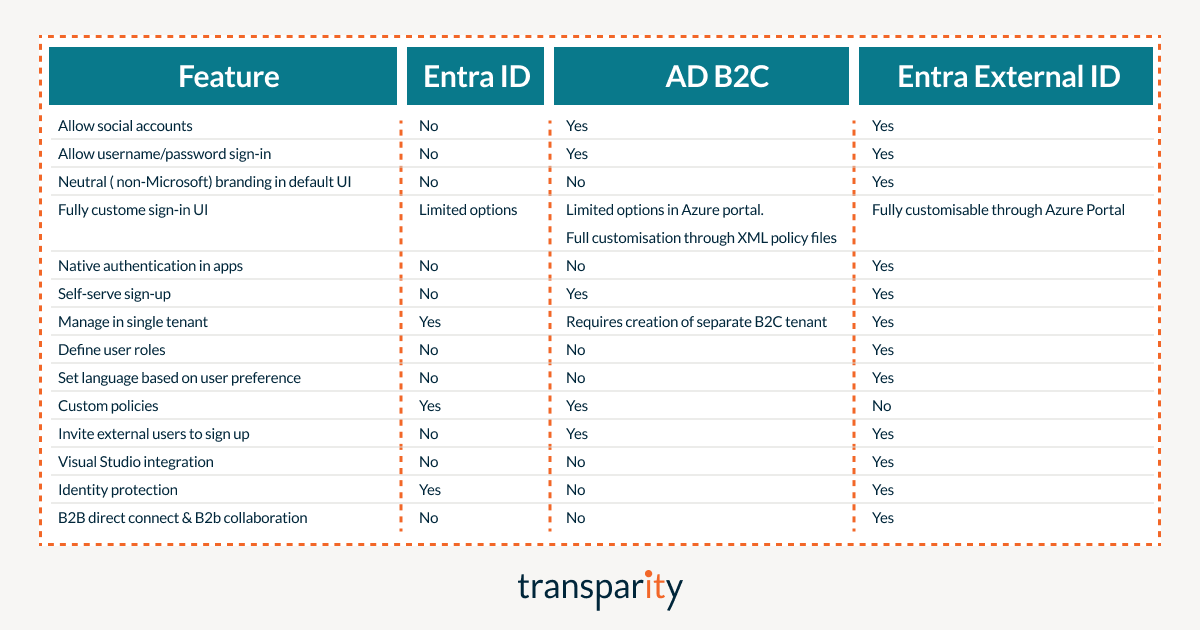
This table shows some of the key differentiating features.
Migration
Whereas migrating legacy systems from Azure AD B2C to Entra External ID would seem like an obvious move, there is currently very little in the way of tools to migrate custom policies. We are led to believe that this is something Microsoft are working on. Currently Entra External ID would seem to be a better candidate for greenfield development and it might be prudent to wait a while before migrating existing systems using AD B2C.
Conclusion
When deciding which Microsoft Identity Management solution to select for a new development, the following simple rules should help.