Device Management Solutions

Microsoft Intune Partner device management with Transparity

Effortless, Unified Endpoint Management with Transparity’s Microsoft Intune Expertise

At Transparity, we specialise in helping customers unlock the full potential of Microsoft Intune and Windows Autopilot deployments with our mobile device management and mobile application management solutions. Our experts tailor Intune deployments to each organisation’s unique requirements, ensuring seamless collaboration and secure access for employees wherever they work. By partnering with Transparity, organisations benefit from robust data protection, simplified IT administration, and the flexibility needed to thrive in today’s dynamic business landscape.

Find Out How Microsoft Programmes Can Fund Your Modern Workplace Journey

Transparity as a Modern Work partner with a direct relationship to Microsoft can leverage funding to aid you in your transformations. 

Device Management Solutions with Transparity

We handle the assessment, implementation, testing, and initial device enrolment process, and can also provide tailored training if you’d like your team to handle ongoing management. Alternatively, Transparity can fully manage the full rollout, giving you complete peace of mind.

Microsoft Autopilot

Windows Autopilot Zero Touch Deployment

At Transparity, we use Windows Autopilot to simplify the entire lifecycle of Windows device management. From initial setup and configuration to resetting and recovering devices, our approach minimises the need for on-premises infrastructure and enables zero-touch deployment across laptops, desktops, and mobile devices.

Microsoft Intune partner

Endpoint Management with Microsoft Intune Consultancy

Transparity delivers end-to-end endpoint management solutions, empowering organisations to seamlessly assess, configure, deploy, and enrol devices using the capabilities of Microsoft Intune. Our specialists streamline every aspect, from app management and detailed policy deployment to ongoing support, ensuring devices are always secure and compliant.

“We engaged with Transparity and Microsoft to give us the expert support we needed to deliver our deployment of Microsoft Autopilot. We worked in partnership throughout the process, gaining fantastic insights from specialists and enabling us to provision the solution in line with our business objectives. The approach was flexible and collaborative, allowing the Hobbycraft team to focus on core business activities with the confidence that the project was progressing to a successful conclusion. I highly recommend Transparity and the Microsoft FastTrack program.”

Andy Elston
IT Infrastructure Manager, Hobbycraft

Contact us today

Reach out to us through our contact form, and we’ll respond to you promptly to ensure you get the support you need. Your success is our priority, and we look forward to becoming your Microsoft Intune partner.

Key Uses of Modern Device Management

Upgrade Operating Systems

It can be a challenge to keep corporate devices current and compliant, especially as technology evolves and security threats increase. Manual upgrades can be time-consuming, disrupt productivity, and leave gaps in protection if devices fall out of sync with Microsoft’s support lifecycle. Modern device management addresses this by automating the upgrade process for all eligible corporate devices, ensuring a seamless transition to Windows 11.

Migrate from Legacy Tools

Managing devices using outdated, manual processes, such as relying on PDQ Inventory and Deploy, or performing manual imaging with tools like Macrium can be labour-intensive, inefficient, and prone to inconsistencies. Intune replaces legacy tools and streamlines device provisioning, configuration, and ongoing management, ensuring a more efficient, reliable, and scalable solution for modern device management needs.  

Maintain Up-to-Date Applications

Struggling with deploying and updating applications consistently across devices leads to wasted time, compliance risks, and frustrated users. Microsoft Autopilot and Intune directly address this challenge by automating application deployment, streamlining updates, and ensuring every device is configured to meet security and compliance requirements from the outset. 

Software Compliance

Maintaining software compliance and keeping applications updated can be challenging when using manual processes, as these methods may lead to compliance gaps and operational inefficiencies. Modern device management automates application updates and enforces compliance policies, helping to keep devices secure and current. This method reduces the workload for IT teams and supports a consistent experience for end users throughout the organisation.

Provision New Devices

Many organisations grapple with the challenge of efficiently provisioning and enrolling large numbers of devices, often relying on manual processes that are labour-intensive and prone to delays. This can slow down onboarding for new hires, complicate hardware refresh cycles, and sap IT resources. Windows Autopilot zero-touch deployment provides consistent device onboarding. Devices can be shipped directly to users and set up automatically upon login.

Endpoint Security

It is a challenge to maintain robust security across all devices, especially as threats evolve and security standards rise. Intune addresses these issues head-on by enabling automated deployment of up-to-date security baselines. Non-compliant devices are quickly identified and remediated, reducing manual workload for IT teams and ensuring your organisation consistently meets the latest security standards.

Our Digital Workplace Experience

Transparity’s Digital Workplace team helps organisations unlock the full potential of Microsoft 365, creating secure, modern, and collaborative environments. From Teams and SharePoint to Viva and Intune, we deliver tailored solutions that boost productivity and engagement.

With built-in security, expert guidance, and user-focused adoption support, we ensure long-term value. As a trusted Microsoft Solutions Partner with 200+ Microsoft-certified experts, we help you build a digital workplace that’s ready for the future.


Supported M365 Users
0 +
Supported Customer Tenants
0 +

Windows 10 End of Life Support - Company Readiness Datasheet

Windows 10 has been instrumental in supporting modern workplaces, powering both personal devices and enterprise-level systems. As Microsoft advances towards more secure, AI-enabled, and cloud-centric computing solutions, organisations need to prepare for the forthcoming transition: upgrading to Windows 11 or considering cloud-native alternatives.

This transition presents both opportunities and a sense of urgency. To assist organisations in navigating this change, we have compiled a comprehensive checklist designed to facilitate the shift from Windows 10.

Microsoft Intune Partner

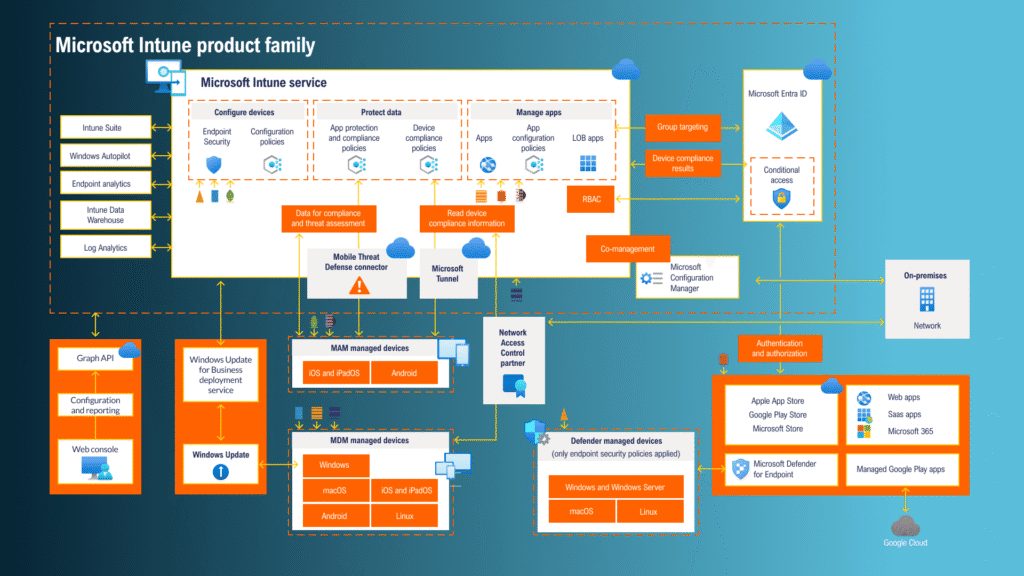
As the modern workplace embraces hybrid and remote models, the need for effective device and application management has never been greater. Microsoft Intune is a cloud-based endpoint management software that empowers organisations to manage user access, safeguard company data, and streamline device and app management across desktops, mobiles, and virtual environments.

Integrated Threat Protection
Web-Based Admin Centre
Self-Service with the Company Portal App
AI-Powered Insights with Microsoft Copilot

Seamless User and Device Management

Effortlessly manage both company-owned and personal devices from a single platform. Microsoft Intune supports a range of operating systems, including Android, iOS/iPadOS, Linux Ubuntu Desktop, macOS, and Windows. This enables secure access to resources wherever and however your team works.

Simplify App Management

Easily deploy, update, and remove applications across your devices. Intune empowers you to connect to private app stores, roll out Microsoft 365 apps (like Teams), deploy Win32 and custom line-of-business apps, protect data within apps, and control access, all with just a few clicks.

Automate Policy Deployment

Take the hassle out of security and compliance. Create and deploy tailored policies for apps, devices, security, and access to specific user or device groups. Devices only need internet access to receive the latest updates, keeping your organisation protected at all times.

Endpoint Security and Management

Unlock advanced features with the Microsoft Intune Suite, including Remote Help, Endpoint Privilege Management, Microsoft Tunnel for MAM, and more, helping your organisation stay ahead in security and efficiency.

Case Studies

How Leaders Romans Group Unified their Team and Drove Engagement with a Modern Intranet (2)
Discover how Leaders Romans Group boosted communications, cut costs and streamlined document access with a modern intranet.
Discover how Concern Worldwide enhanced collaboration with a tailored SharePoint intranet for non-profits, creating a secure, user-friendly hub that connects global teams and streamlines communication.
Transparity delivered a seamless Microsoft 365 tenant migration for MedCity’s integration into London & Partners, unifying email, files, and collaboration tools. The secure, disruption-free process optimized licenses and ensured smooth post-migration support.

FAQs

Yes, modern Windows device management solutions are designed to support a variety of platforms. With services like Microsoft Intune, organisations can manage not only Windows PCs but also macOS, iOS, and Android devices, ensuring consistent security and configuration across all endpoints.

Windows Autopilot is a cloud-based deployment technology that allows organisations to pre-configure and set up new devices, enabling users to get up and running with minimal IT involvement.

With Autopilot, devices can be shipped directly to end users who simply sign in and follow guided steps. The device automatically applies corporate settings, apps, and security policies as configured by IT.

Microsoft Intune is a cloud-based service that provides mobile device management (MDM) and mobile application management (MAM), enabling comprehensive control over both corporate and BYOD environments.

Yes, Intune can be used with tools like Remote Help to assist users remotely and resolve issues efficiently, reducing downtime and support costs.

Endpoint management refers to the practice of monitoring, configuring, securing, and supporting the various devices (endpoints) that connect to an organisation’s network. These endpoints can include laptops, desktops, smartphones, tablets, and even IoT devices. The primary objective is to ensure all devices comply with company policies and are protected against security threats.

Unified Endpoint Management (UEM) is an approach where a single platform is used to manage all types of endpoints, regardless of operating system or ownership (corporate or personal/BYOD). UEM solutions enable organisations to streamline IT operations, apply security policies uniformly, and simplify device onboarding and management.

Yes. Endpoint management solutions aid compliance with data protection regulations (such as GDPR, HIPAA, and others) by enforcing encryption, controlling app installations, managing device access, and providing audit logs for security events.

Microsoft Intune, as your endpoint management software, provides remote lock and wipe capabilities. If a device is reported lost or stolen, IT administrators can remotely erase sensitive data and lock the device to prevent unauthorised access.

[mwai_chatbot id="chatbot-8s20vg"]
Skip to content