In this blog we look at the NoSQL database, Azure Cosmos DB. Covering its benefits and a specific use case. There has been tremendous growth within the NoSQL market. It is now common to see NoSQL databases as a key technology element when moving into a more digital world.
NoSQL has its advantages over classic databases and is a better fit for things like IoT applications, online gaming and complex audit logs where we can build flexible schemas, easily horizontally scaled. Which is hard to do with something like SQL Server sharding. And if modelled correctly sub-second query response time for globally distributed data sets is possible. Azure Cosmos DB is Microsoft’s offering as a managed service in the NoSQL world and is a market leader.
AZURE COSMOS DB OVERVIEW
Azure Cosmos DB is a globally distributed, multi-region and multi-API NoSQL database that provides strong consistency, extremely low latency and high availability built into the product. If you decide to go for a multi-region read-write approach you can get 99.999% read/write availability across the globe.
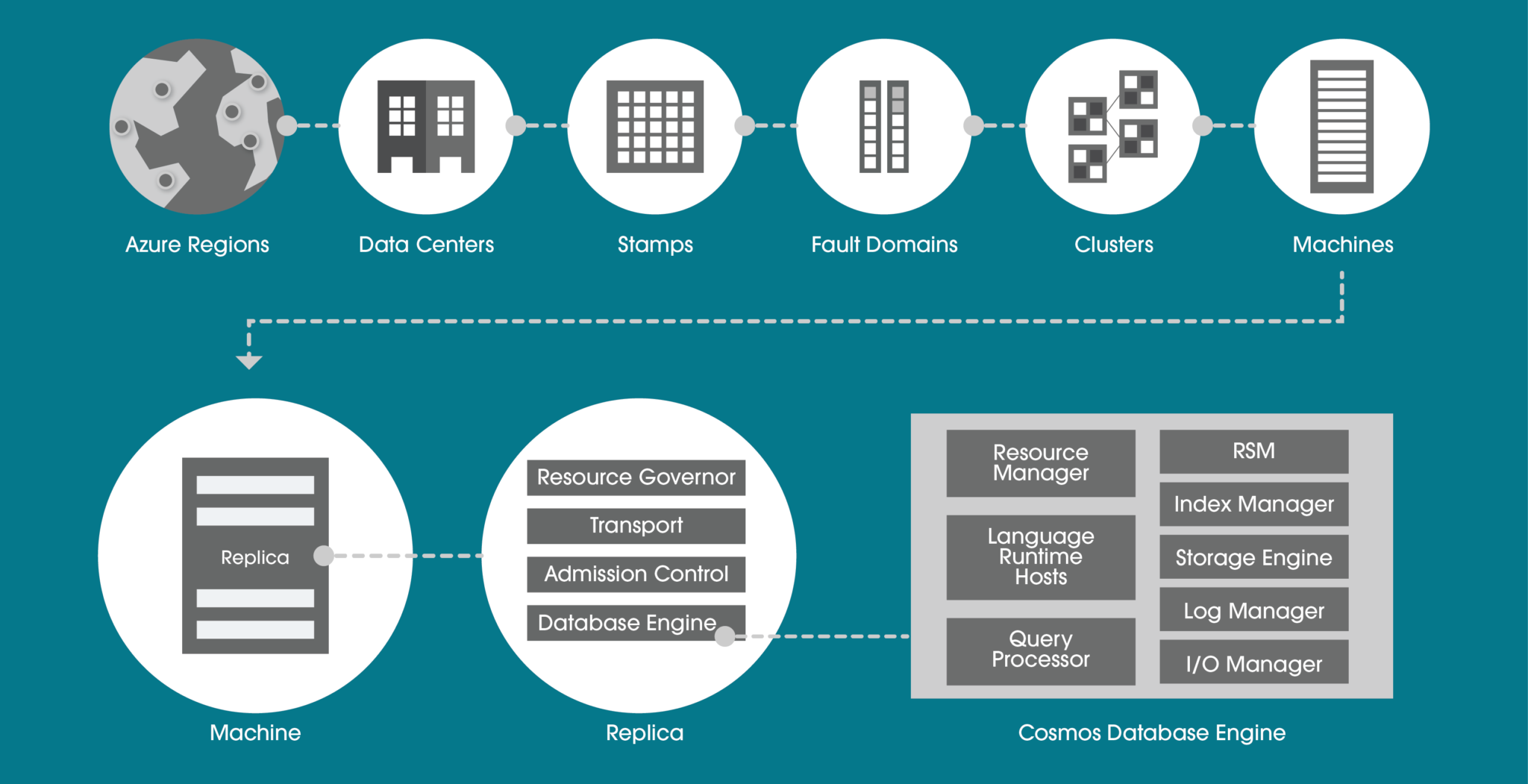
Within a data centre, Azure Cosmos DB is deployed across many clusters, each potentially running multiple generations of hardware. The below diagram shows you the system topology used. The key to a successful Azure Cosmos DB implementation is selecting the right partition key. This will be determined by the query profile (whether it is more read-based or write-based) and query patterns.
AZURE COSMOS DB APIS
There are many APIs available to use within Azure Cosmos DB and each has its own use case that your business may need.
HIGHLY SECURE
For technology decision-makers, security is a very important consideration. You will be asking yourself, does this technology cover all the layers within a security perimeter? Quite simply, Azure Cosmos DB does. This is possible with many different techniques. Let’s look at the more common features.
PRIVATE ENDPOINT
Private Endpoint is usually a must for enterprises. The ability to ultimately use your own private IP address range to connect to services makes using Azure Cosmos DB feel like an extension to your data centre.
You can then limit access to an Azure Cosmos DB account over private IP addresses. When Private Link is combined with restricted NSG (network security group) policies, it helps reduce the risk of data exfiltration.
ENCRYPTION IN FLIGHT
For encryption in flight, Microsoft uses TLS v1.2 or greater and this cannot be disabled. They also provide encryption for data in transit between Azure data centres. Nothing is needed here in terms of extra configuration, it is built into the service.
The same goes for data encryption at rest. Encryption at rest is implemented by using several security technologies, including secure key storage systems, encrypted networks and cryptographic APIs.
MICROSOFT DEFENDER
Microsoft Defender for Azure Cosmos DB provides an extra layer of security intelligence that detects unusual and potentially harmful attempts to access or exploit Cosmos DB accounts.
If you as a business already use Azure SQL and Microsoft Defender, it makes sense to continue with the same approach for the NoSQL environments. You will be alerted for SQL injection attacks, anomalous database access patterns and suspicious activity within the database itself.
MULTI-REGION
Do you need “planet” scale applications? If so, this is the technology for you. With this feature, you can replicate the data to all regions associated with your Azure Cosmos DB account. Typically you pick the regions closest to your customer base for that geographical region. Not only does it cater for this global audience but you also get side benefits such as high availability.
This is because if a region does become unavailable, then another region with automatically handle any incoming request. Thus the 99.999% SLA with the multi-region approach. If this is not enough, you can even enable every region to be writable, and elastically scale reads and writes all around the world.
AZURE COSMOS DB PRICING AND PERFORMANCE
Request Units (RUs) is a metric used by Azure Cosmos DB that abstracts the mix of CPU, IO and memory that is required to perform an operation on the database. The higher the RU, the more resources you have when executing a query. This naturally means a higher cost.
The number of RUs your database needs can be quite tricky to determine. Particularly coupled with the fact you might be using multi regions. These both impact the price.
Microsoft has a capacity calculator (https://cosmos.azure.com/capacitycalculator/) to help guide you through this important exercise. Let’s investigate an example where we will need to understand basic requirements such as data sizes and more complex concepts like item size and read speeds which will tell us the RUs needed, thus total cost.
AZURE COSMOS DB CALCULATOR EXAMPLE
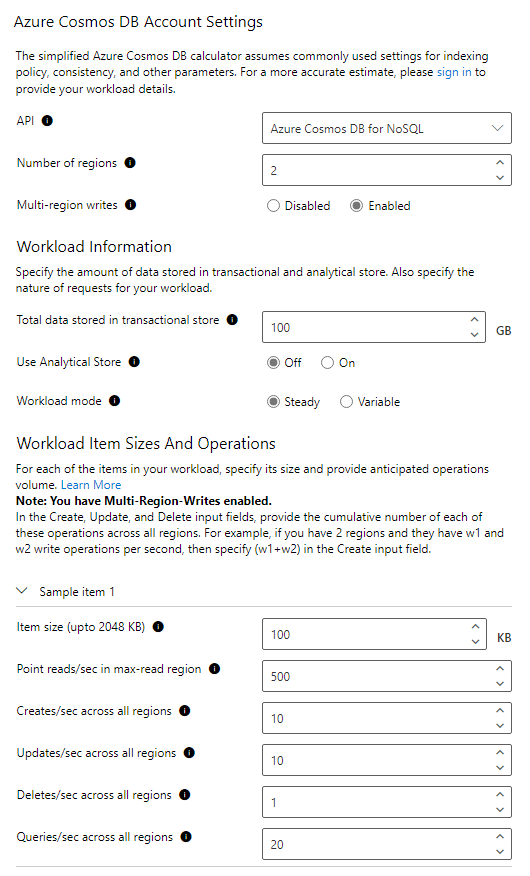
For this example, our workload requirements are:
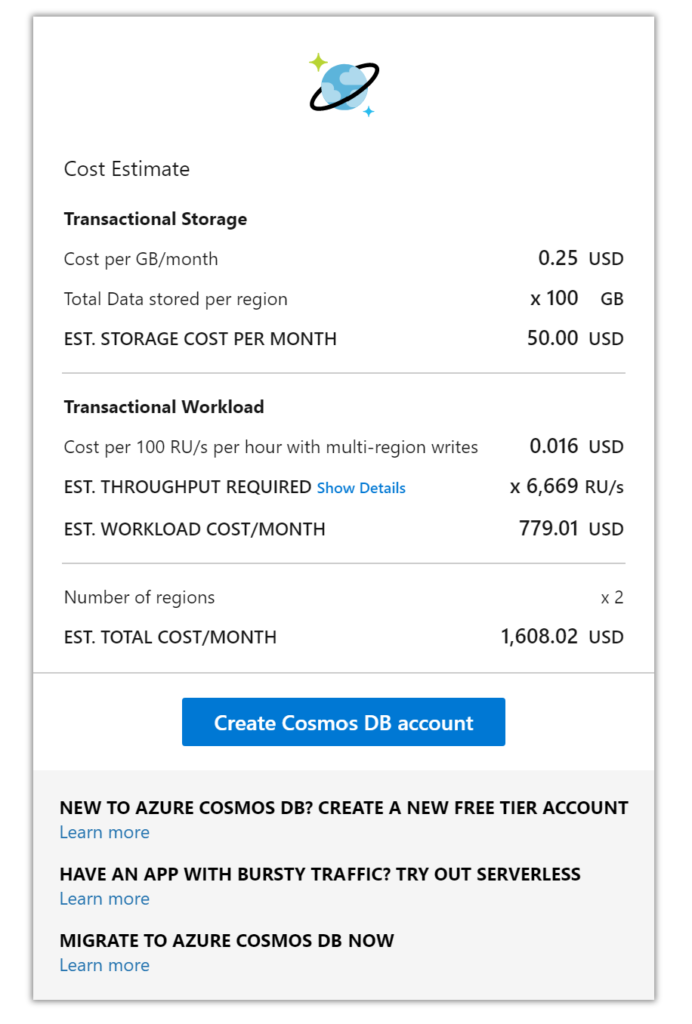
The RU calculation given is approximately 6,699 RUs which has a cost of $779 for the compute. Data storage for 100GB is $50 and adding another region means a total monthly cost of approximately $1608, this is without a reservation policy. If you wanted a 3-year reservation you could save up to 60% of the cost at the time of writing.
This is a very competitive price when you consider not only the performance you are getting from a multi-region write-based database but also the 99.999% SLA, built-in backups and benefits of a cloud-native database. To try and build something equivalent using just virtual machines would cost your business much more.
AZURE COSMOS DB CHANGE FEED
The change feed in Cosmos DB is a persistent record of changes to a container in the order they occur. Change feed support works by listening to a Cosmos DB container for any changes. These changes include inserts and update operations made to items within the container. So, think of the change feed as a persistent record of changes in the order that they occur which we can then use downstream.
EVENT SOURCING PATTERN
Why is this useful? With this feature, you could use an event sourcing pattern for your design which is quite common to see for things like an audit logging system where every state/action must be captured. The idea of event sourcing is that updates to your application domain should not be directly applied to the domain state. Instead, those updates should be stored as events describing the intended changes and written to a store (this being Cosmos NoSQL container). This can easily describe the function of an audit log.
The audit log for software is a critical component today because it ensures security and reliability for the application, especially in regulated markets like finance and insurance. Building this single source of truth where the system is creating an event after every change is very complicated to do with traditional databases like SQL Server or Oracle.
However, with something like Cosmos DB change feed, we can get global scale event sourcing setup quite easily. When you couple this feature with the right partition key and consider that Cosmos DB has financially backed SLAs covering availability, performance and latency, you can see there is great synergy between Cosmos DB and an event-sourcing approach.
Below is a high-level diagram of how this could look if you decide to use replication of the “event store” to another region. Showing you how to reach a global scale.
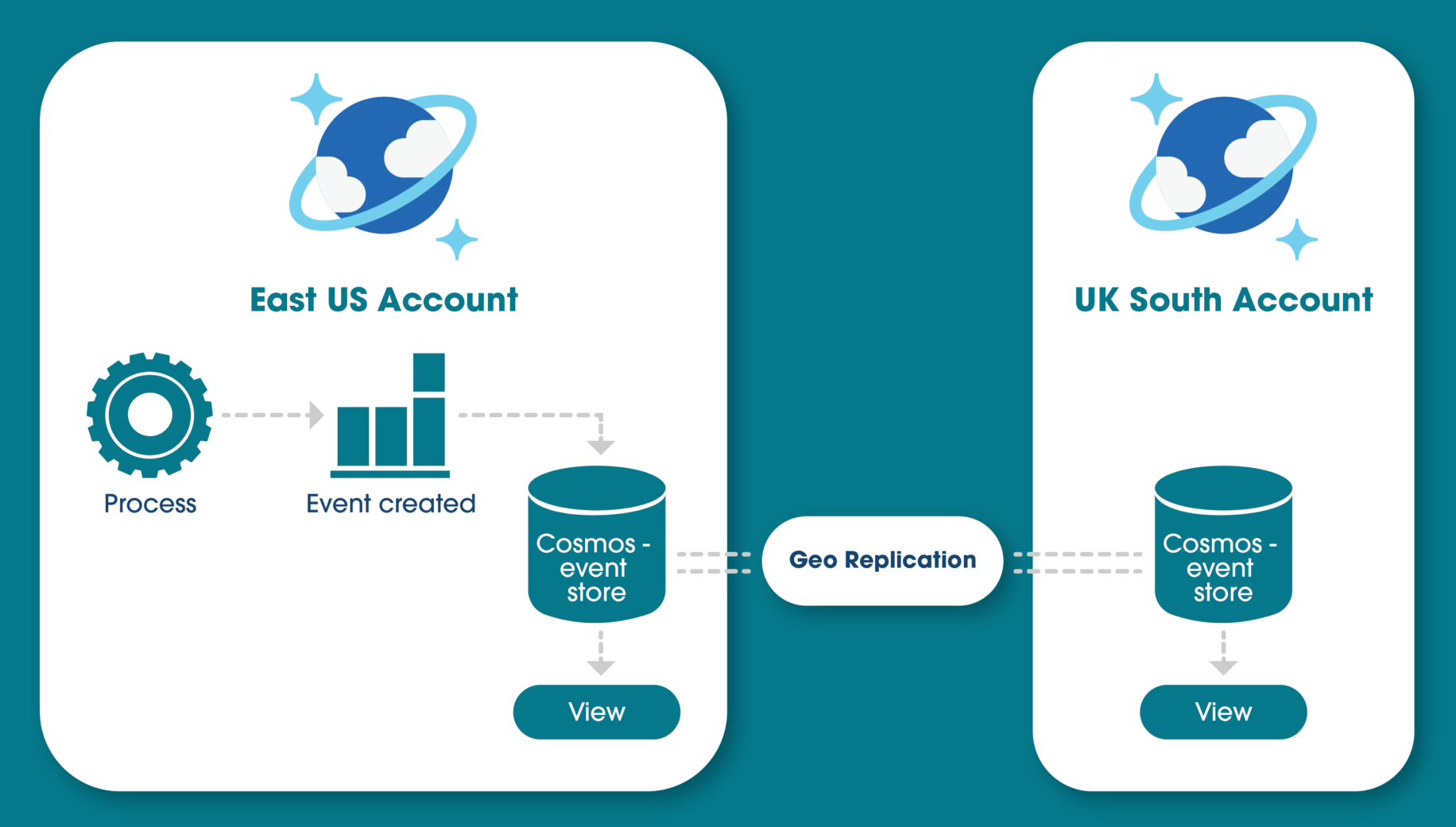
The idea of building a materialised view on top of the event store is common practice if, for example, you want to query the updates that happened, rather than everything, and make it available to multiple regions.
CONCLUSION
After reading this article you should now understand how a NoSQL system could fit within your business and all the core features and benefits that Microsoft’s Azure Cosmos DB can give you. From highly available multi-region SLAs and secure application development to its ability to cater for many markets and needs and the event sourcing approach that is possible.
If you are looking for consulting for your Azure Cosmos DB or are looking at using it in your application development, why not get in touch? We are experts in the full Azure development platform.
REFERENCES