

Digital transformation is a highly discussed topic in today’s business world, and for good reason. Organisations are looking for ways to stay ahead of the competition by leveraging technology to improve their processes, increase efficiency, and better serve their customers. One key aspect of digital transformation is integrating various systems, services, and applications. That’s where Azure Integration Services (AIS) comes into play.
Today, we will dive into why to use Azure Integration Services for application integration. As well as how these services can help businesses achieve their digital transformation goals. Whether you’re looking to automate workflows, integrate data and systems, or simply build more connected and efficient systems, Azure Integration Services can help you to achieve your goals, and take your organisation to the next level.
AZURE INTEGRATION SERVICES RESOURCES
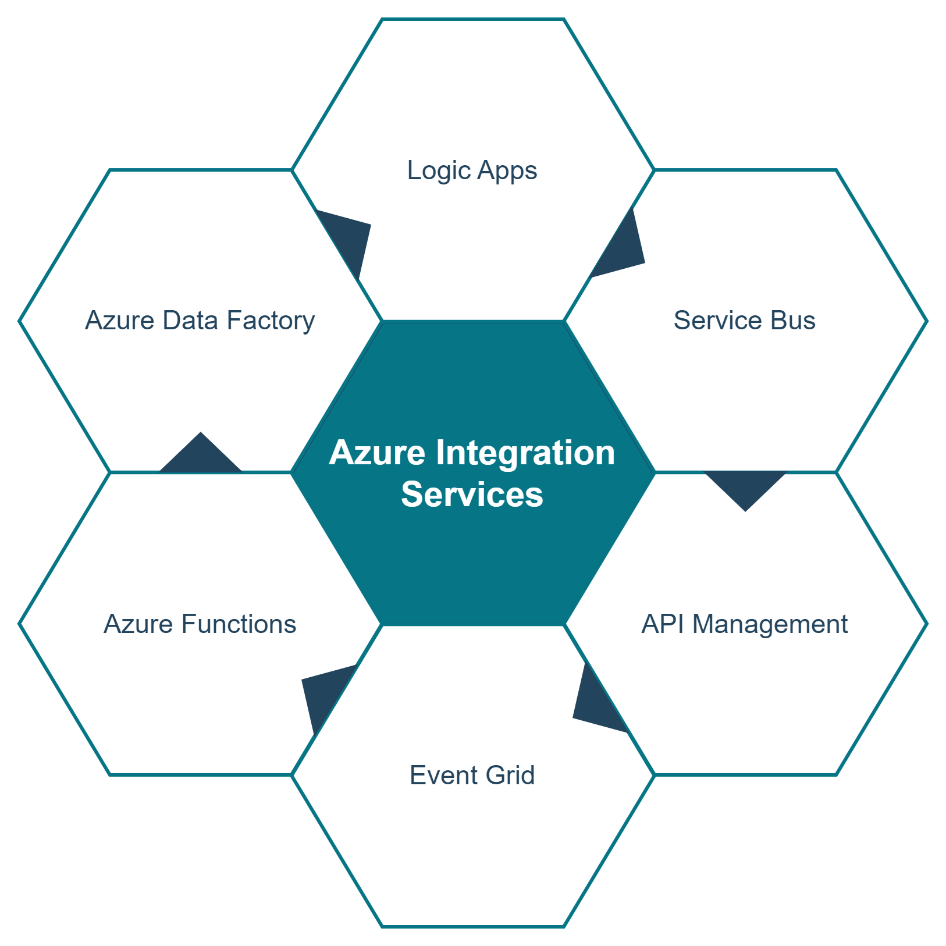
Azure Integration Services is a set of cloud-based services offered by Microsoft that enables organisations to integrate applications and systems in a seamless and efficient manner. These services are designed to enable coherent integration and data flow between different systems, platforms, and environments. The comprehensive suite of services can be utilised independently to overcome specific integration challenges, or together, to form a complete integration solution. In this blog post, we will take a closer look at the most used services, as well as explore the benefits of using Azure Integration Services.
THE BENEFITS OF USING AZURE INTEGRATION SERVICES
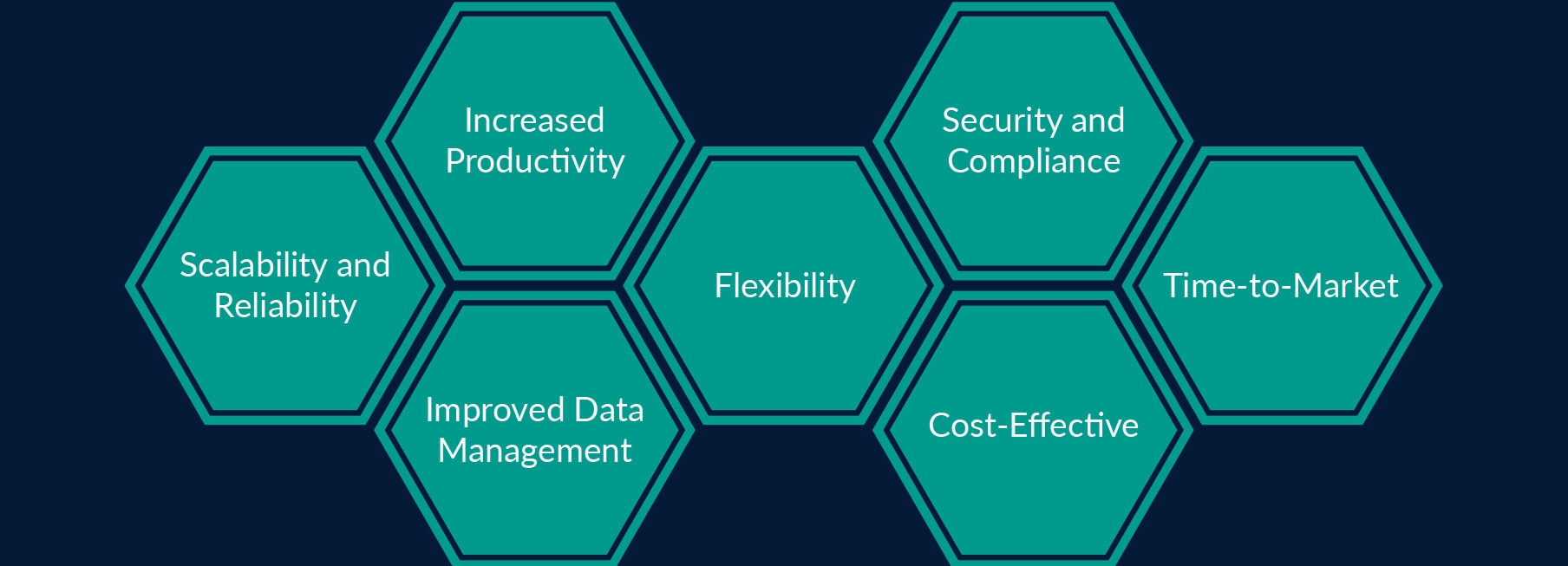
Azure Integration Services offer a number of benefits to organisations looking to integrate their systems and applications. Let’s highlight some of them:
A COMPLETE INTEGRATION SOLUTION
Transparity is a leading technology firm that specializes in implementing Azure Integration Services and migrating existing integrations from BizTalk Server. Our team of experts leverages AIS to provide businesses with a comprehensive and scalable integration solution. Enabling them to achieve their goals efficiently and effectively.
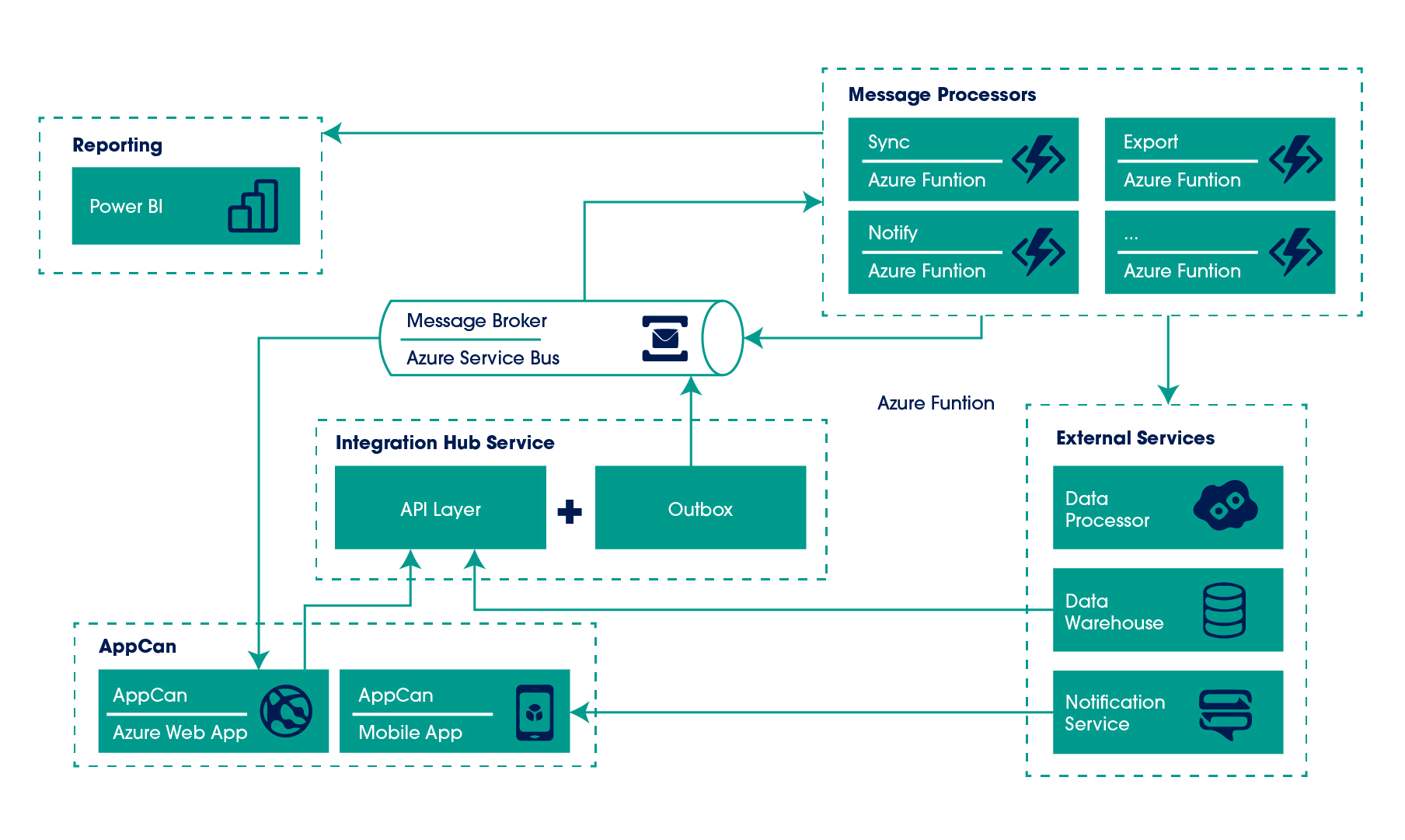
One of our recent projects is the AppCan integration hub. A centralised service that allows the client’s software to integrate with a range of external applications and services. We leveraged Azure Service Bus and Azure Functions to create a highly scalable and secure solution.
One of the key challenges of the project was to ensure that the integration hub could handle large volumes of data in near-real time. As well as provide a robust testing environment for the client’s software integration process. To address these challenges, Transparity used Azure Service Bus to create a queue system that would allow data to be transmitted between systems without losing any information. And Azure Functions to create the custom business processes that could be triggered automatically based on various events.
By utilizing Azure Service Bus as the messaging intermediary and Azure Functions as the message (events) processors, the AppCan integration hub can process a large number of concurrent requests:
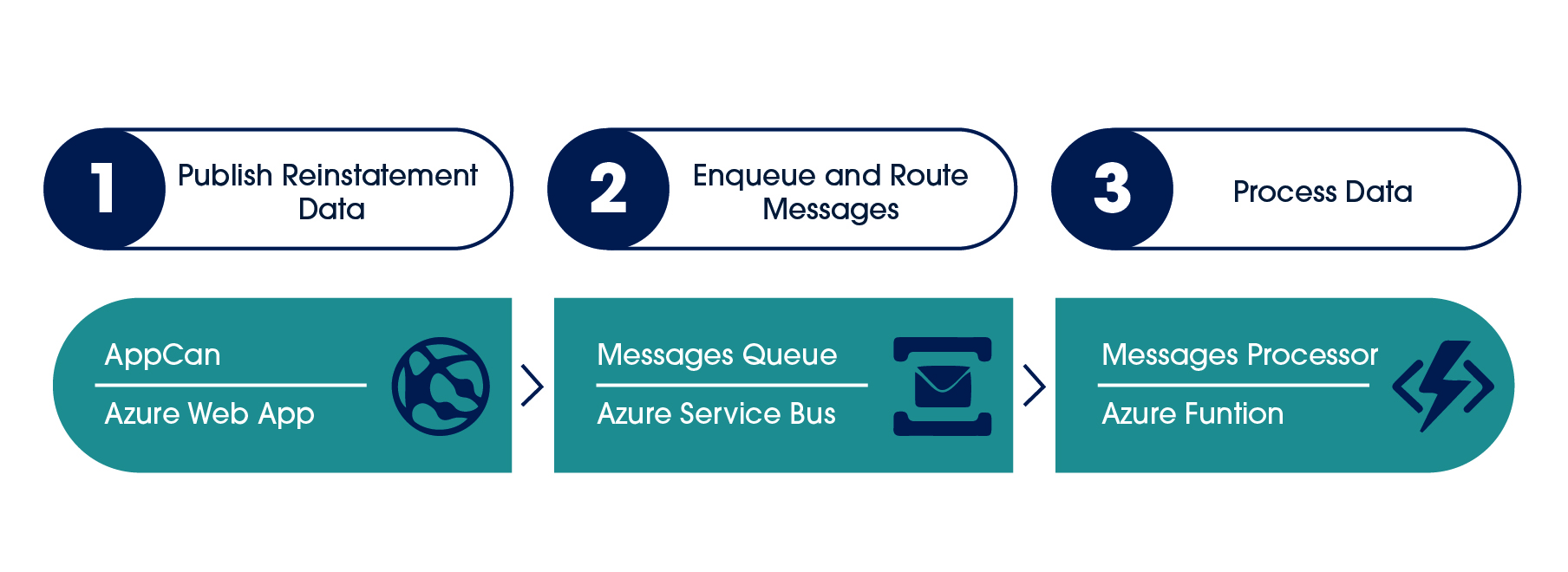 I’d like to emphasise, that this clean yet efficient pattern brings the whole spectrum of benefits into the system, while keeping the overall architecture simple. The following diagram demonstrates the architecture in a simplified form:
 Azure Integration Services are designed to help organizations tackle complex integration challenges. The services provide a balanced combination of core functionality and creative flexibility. Allowing organisations and technical teams to create innovative solutions that meet their specific integration needs.
Transparity helps overcome these challenges and provides the ability to innovate and design a comprehensive solution. The implementation of AppCan’s integration hub resulted in cost-savings, improved data exchange and streamlined processes. Leading to increased efficiency and higher levels of customer satisfaction.
CONCLUSIONS
In conclusion, Azure Integration Services is a powerful suite of services that allow organizations to connect and integrate their systems, applications, and data. Whether you need to create workflows, handle events, manage messaging, or perform data integration and transformation, Azure Integration Services has a solution to meet your needs. It is a valuable tool to have in your technology stack. It can help you to streamline your processes, improve your efficiency and save on costs.
Organizations often struggle with intricate integration problems. As well as finding the right solution involves recognizing both the challenges and the capabilities of various integration tools. Azure Integration Services offers a harmonious mix of essential features and versatile options. Allowing both business and technical teams to develop a comprehensive and cutting-edge integration plan. If you’re unsure if AIS is suitable for your needs, consider speaking with one of our knowledgeable technology integration specialists.
If you need advice or are looking to outsource your application integration solution, get in touch.

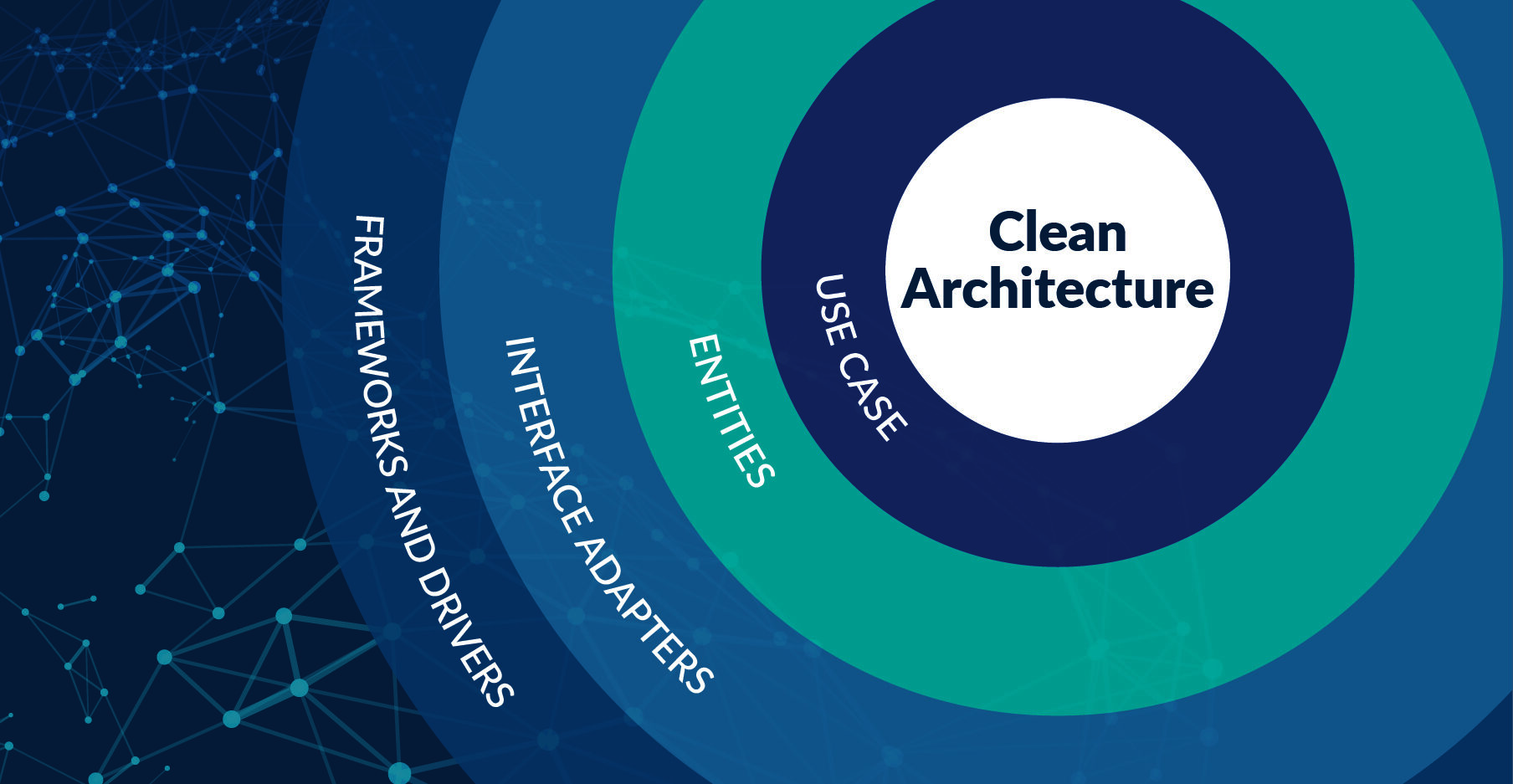
Clean Architecture is an architectural pattern that aims to separate the concerns of a software system into distinct layers, making the code more maintainable, testable, and scalable. The central idea behind Clean Architecture is that the inner layers of a system should not depend on the outer layers. Thus allowing for greater flexibility and ease of modification.
Layers of Clean Architecture
The layers of a Clean Architecture system can be broken down into several distinct components.
The Use Case Layer
The Use Cases layer is the first layer of the Clean Architecture system. It is responsible for handling the business logic of the application. It is where the core functionality of the application is defined and implemented.
The Use Cases layer is typically composed of use case classes, each of which corresponds to a specific business requirement or action that the application needs to perform. The purpose of the Use Cases layer is to encapsulate the business logic of the system and provide a clear and consistent interface for the other layers of the system to interact with.
By keeping the business logic in a separate layer, it becomes much easier to understand and modify the code, as well as to test the system. It should not depend on any of the other layers of the system, and should only interact with them through a set of well-defined interfaces. This ensures that the business logic of the system is decoupled from the details of the infrastructure and user interface. This makes it easier to change or replace these components without affecting the core functionality of the system.
The Use Cases layer should be focused on a specific business requirement or action, and should not contain any infrastructure or presentation logic. They should be designed to be as simple and small as possible, with a single responsibility. This helps to keep the business logic of the system easy to understand and maintain.
The Entities Layer
This layer contains the domain objects that are used by the Use Cases layer to perform its business logic. These objects are typically plain old data objects (PODOs) that hold the data for the system, and may also include methods for manipulating that data.
For example, an entity class might represent a user account and include methods for validating the user’s email address or password.
The Interface Adapters Layer
This layer is responsible for adapting the objects in the Entities layer to the outside world. It contains the code that maps between the internal data structures of the system and the external data structures that are used by the user interface or other external systems.
For example, an interface adapter class might handle the process of converting a user account entity object into a JSON object that can be sent to a web client.
The Frameworks and Drivers Layer
This is the outermost layer of the system, and is responsible for providing the infrastructure and services that the other layers depend on. This layer contains the code for interacting with databases, web services, and other external systems.
For example, a framework or driver class might handle the process of connecting to a MySQL database, or sending a request to a web service.
Advantages of Clean Architecture
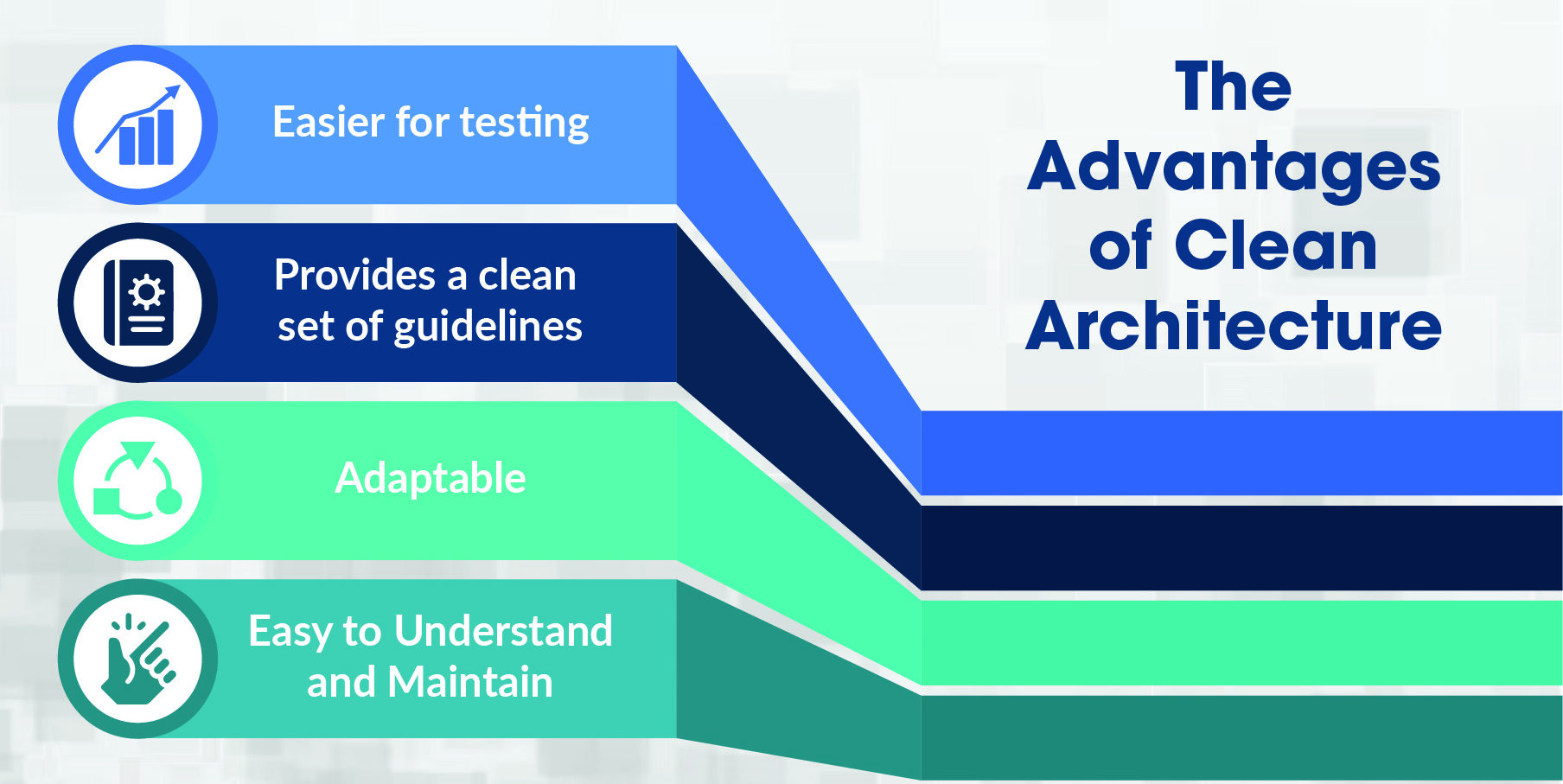
One of the key advantages of Clean Architecture is that it allows for a clear separation of concerns between the different layers of the system. This makes it easier to understand the overall structure of the code. As well as making it easier to modify or extend the system without introducing unintended side effects.
For example, if a developer needs to change the way that user accounts are stored in the database, they can make the necessary changes in the Frameworks and Drivers layer without having to worry about how this will affect the rest of the system.
Easier for Testing
Another advantage of Clean Architecture is that it makes it easier to test the system. Because the different layers of the system are decoupled, it is possible to test each layer independently. Which makes it much easier to ensure that the system is working correctly. This is especially important in large, complex systems, where it can be difficult to test the entire system as a whole.
For example, a developer can write unit tests for the Use Cases layer. Then use these tests to verify that the business logic of the system is working correctly without having to worry about how this logic will be affected by changes in the other layers.
Provides a Clean Set of Guidelines
In addition to the above layers, Clean Architecture also provides a set of guidelines for how the different layers should interact with each other. For example, the Use Cases layer should not depend on any of the other layers, and should only interact with them through a set of well-defined interfaces. This ensures that the business logic of the system is decoupled from the details of the infrastructure and user interface, making it easier to change or replace these components without affecting the core functionality of the system.
Adaptable
Another important aspect of Clean Architecture is that it is adaptable. It can be used in a wide variety of software development contexts, including web applications, mobile apps, and even embedded systems. This is because the core principles of Clean Architecture are focused on separating the concerns of a system into distinct layers. A technique that can be applied in any software development context.
Easy to Understand and Maintain
One of the key features of Clean Architecture is that it is focused on creating systems that are easy to understand and maintain. This is achieved by breaking the system down into smaller, more manageable pieces, and by separating the concerns of the system into distinct layers. This makes it much easier to understand the overall structure of the code, and also makes it much easier to modify or extend the system.
In Conclusion
In conclusion, Clean Architecture is an architectural pattern that aims to separate the concerns of a software system into distinct layers, making the code more maintainable, testable, and scalable. It provides a set of guidelines for how the different layers should interact with each other, and how the business logic of the system should be decoupled from the details of the infrastructure and user interface.
By following the guidelines of clean architecture layers, developers can create a system that is flexible and easy to modify, while still maintaining a high level of quality and maintainability. Clean Architecture is adaptable and can be used in different software development contexts,
Investing in a custom enterprise mobile app is an investment of both time and money. With 91% of UK adults owning a smartphone (Deloitte Consumer Trends 2022), there is no doubt about the relevancy of mobile apps. However, in the current economic climate especially, you want to be sure you are investing your hard-won budget into the right areas of the business.
There are two major types of mobile apps for the enterprise. One will be for use by your customer base and the other is for use by the staff. Both types of mobile apps can be extremely rewarding but lead to different types of benefits. Here we explore the benefits of investing in a mobile app for use by the staff.
INVEST IN A CUSTOM MOBILE ENTERPRISE APP FOR STAFF
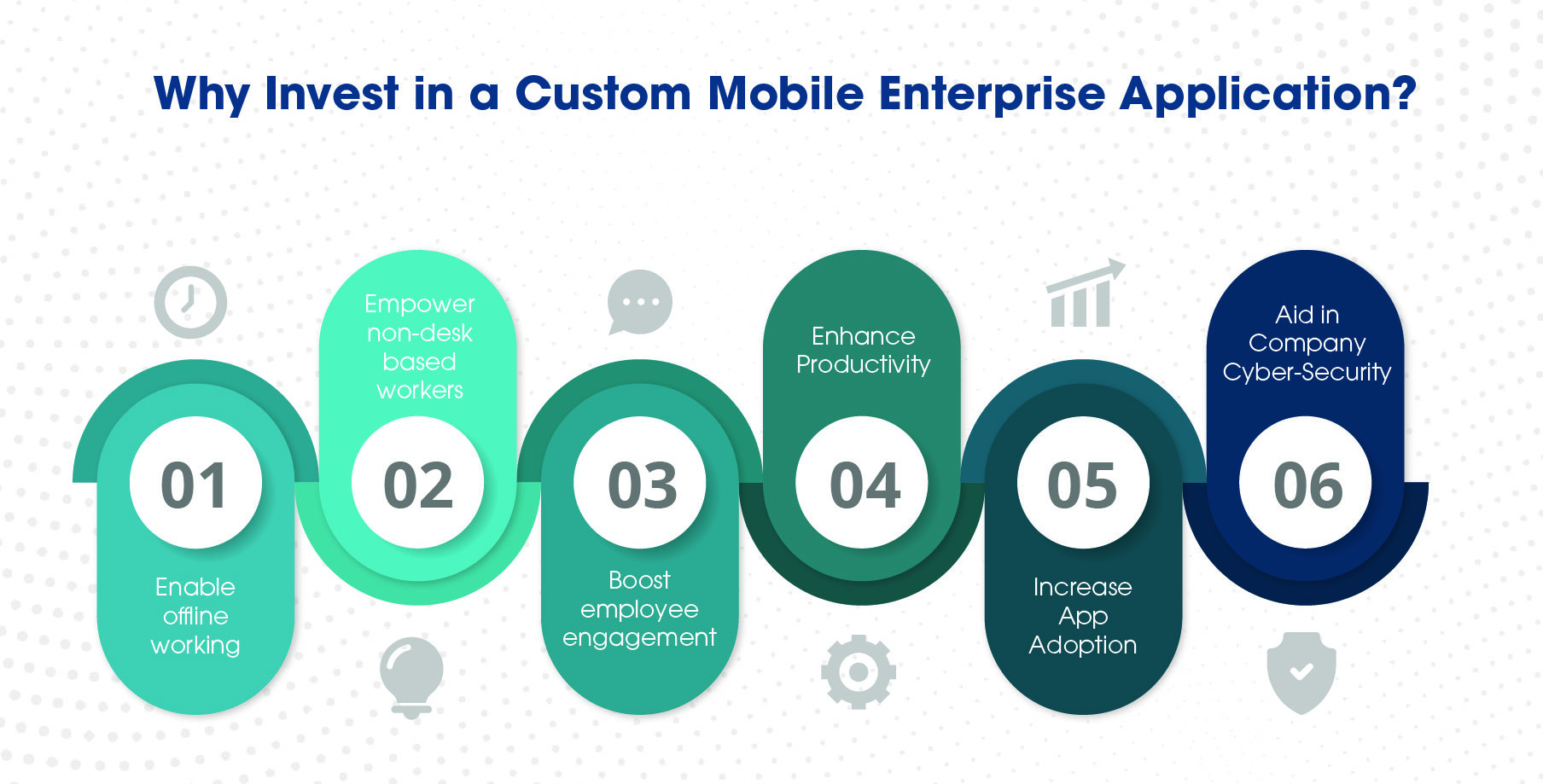
1. ENABLE OFFLINE WORKING
An immediate argument against the idea of creating a specialist mobile app is that accessing apps on the web is of course a possibility. Even if they are not particularly streamlined for mobile use. However, this relies on internet connectivity. If your staff travel a lot, are field workers, operate in remote locations or in regions with connectivity issues, then you cannot rely on a phone connection to be able to use a web app.
Mobile apps can be designed with strong offline working capabilities, empowering your staff no matter where they are or their circumstances to continue their work, carry out their duties and remain connected no matter the circumstances.
2. EMPOWER NON-DESK BASED WORKERS
Similar to the benefits of offline working, there are many types of employees not in remote locations who simply are not desk-based, be it care workers dealing with patients, nurses in wards, staff on factory floors, drivers, hospitality staff and a host of other roles. It is important to remember your internal software needs to be used (or should be to empower productivity and connectivity) by these staff too.
Your average offline worker cannot take a laptop with them to check pipes, but they will have a mobile phone. With a few clicks of a button, lengthy admin at the end of the day turns into efficient actionable steps throughout the normal work day. In addition, isolation, disconnection or loneliness can be minimised through meaningful available connections.
3. BOOST EMPLOYEE ENGAGEMENT
In this age of remote and hybrid work and the push on corporate culture to be more people focussed, being able to provide staff with the ability to be flexible and still productive is a vital tool in employee engagement.
A Teams meeting in your car while kids are at practice, checking your PowerPoint presentations on the train on the way to a meeting are already a normal. But it doesn’t just have to be the giants like Microsoft providing tools for flexible work. If the company already has custom software vital to day to day processes then making them available by mobile strengthens the ability and connectivity of your staff. As well as enhancing employee engagement with your internal apps and processes.
In addition, with the noise often found in many normal channels, a tailor-made company app with useful notifications and alerts can increase the read rate on important company wide documents and news. Ensuring it doesn’t just get lost amongst the emails or alerts on widely used channels.
4. ENHANCE PRODUCTIVITY
The ability to work wherever you are with whatever resource is available, be it phone, tablet or laptop immediately increases production by removing obstacles between times and locations of working on a project. Being able to sync items, pick up where you left off and collaborate with team members increases both efficiency and productivity.
This applies also when looking at only having access to a web app versus the user-friendliness of an app specifically designed for mobile.
5. INCREASE APP ADOPTION
Where many staff still use personal mobile devices to connect to company sites, a disinterest or aversion to downloading a host of different apps can be an issue. Though the Microsoft Modern Work suite is an incredible array of tools, if the average employee needs to download 8 apps to get going you may have low adoption rates. Instead, a custom app can provide one go to location for the staff, one single download with everything built in that the employee may need for the role.
In addition, a branded product like a custom app will be presented as more vital than a third-party solution and can aid in a sense of belonging, added to the before-mentioned employee engagement benefit.
6. AID IN COMPANY CYBER-SECURITY
There are inherent risks when staff are accessing company software and documents in multiple locations and on multiple devices. However, this is now an inherent part of modern work. By putting everything together into an employee app where you are fully in control of the security, overall cyber-security is increased.
In the void a lack of an app can leave, employees may end up deploying their own solutions and apps with the resultant repercussions and security risks. A tight security posture along with innovative mobile software empowers those employees who want to use technology to do so in a secure way.
WHAT TO THINK ABOUT WHEN BUILDING A CUSTOM ENTERPRISE MOBILE APP?
Though the marvellous modern work suite by Microsoft empowers employees and increases connectivity, there is a moment when a company may see it is time to take the next step by investing in a custom mobile app. Perhaps a point reached due to the growing size of a company, the type of work of its staff (many offline field workers for example), or the need for some of the aforementioned benefits.
There are a few key points that can be thought about when considering investing in a custom mobile app:
ENTERPRISE CUSTOM MOBILE APP DEVELOPMENT WITH TRANSPARITY
As custom software development experts we are very experienced in developing whether it’s for the cloud, mobile or desktop. With .NET MAUI providing unprecedented levels of shared code, you can maximise cost and efficiency by planning a mobile app alongside your cloud/desktop apps.
FIELD WORKER APP IN THE UTILITIES SECTOR
You can read a full case study of our mobile app development work for AppCan here, looking at the technology used to achieve it and the outcome: teams of field workers using the app every day.
NETWORK TESTING APP
We recently completed development of a new iOS and Android app to support the launch of a new network cable test device. The app, now available in both the Apple App Store and Google Play Store, uses Bluetooth LE to pair to the handheld test devices and capture test reports that can be viewed in the app and pushed to the existing cloud platform.
The solution was built using Xamarin.Forms 5, uses Xamarin Shell navigation and includes a SQLite database for offline data capture. Synchronising test reports employs a consumer loop pattern and handles intermittent device connectivity. The Microsoft App Center was used to build and distribute the app.
GLOBAL APP FOR THE NON-PROFIT SECTOR
We are currently working on a new Android app for viewing and managing sites across global organisations. Existing sites can be searched for and an edit-then-verify process ensures site information can be changed by remote workers.
The solution is built using the latest .NET MAUI and .NET 7 and includes authentication via the MSAL library. A local SQLite database and a manual sync process for new sites and site edits will ensure the app can be used in regions with poor network connectivity and kept in sync with the backend database. Microsoft App Center is being used to distribute the app and provide test diagnostics.
GET IN TOUCH
If you would like to explore your options, get an idea of budget, understand .NET MAUI or see how else we can help you on your mobile app development journey, don’t hesitate to get in touch.
In the last post we covered the Why and How to Prepare for Migrating your Xamarin App to .Net MAUI. We also gave you some ideas and suggestions for planning the migration and prepping the story and sprint.
In this post we will start with the actual migration story and hopefully help you on your journey, so grab a fresh coffee and lets start.
MANUAL OR AUTOMATED MIGRATION?
Now we have a plan for our Migration, and we have also worked out what will work in the new migrated version and what will need to be replaced, we can start with the actual migration.
We now have two choices to pick from: do you follow the Manual Migration which is detailed here or use the semi-automated .NET Upgrade Assistant Tool which is currently a Windows only CLI tool with a Mac version coming soon.
I had found that until recently the best path was to use the Manual method as the Automated tool caused more issues than it fixed. However, with recent updates the Upgrade Assistant tool is now very good and gets you a large part of the way. Still not 100% as it’s an Assistant Tool – it’s right there in the name.
I’m not going to talk more about the Manual process as this is detailed very well in that GitHub Wiki.
THE MIGRATION
So, you created the new branch, you did right! The whole team know to not carry out any work on the Xamarin project/repo! We will be deleting large sections of the Xamarin project so anything they do will be lost and any branches will not merge after the migration hence me saying you need a PLAN.
GETTING STARTED
Now install/update the .NET Upgrade Assistant dotnet tool with the following command on your CLi:
1dotnet tool update --global upgrade-assistant
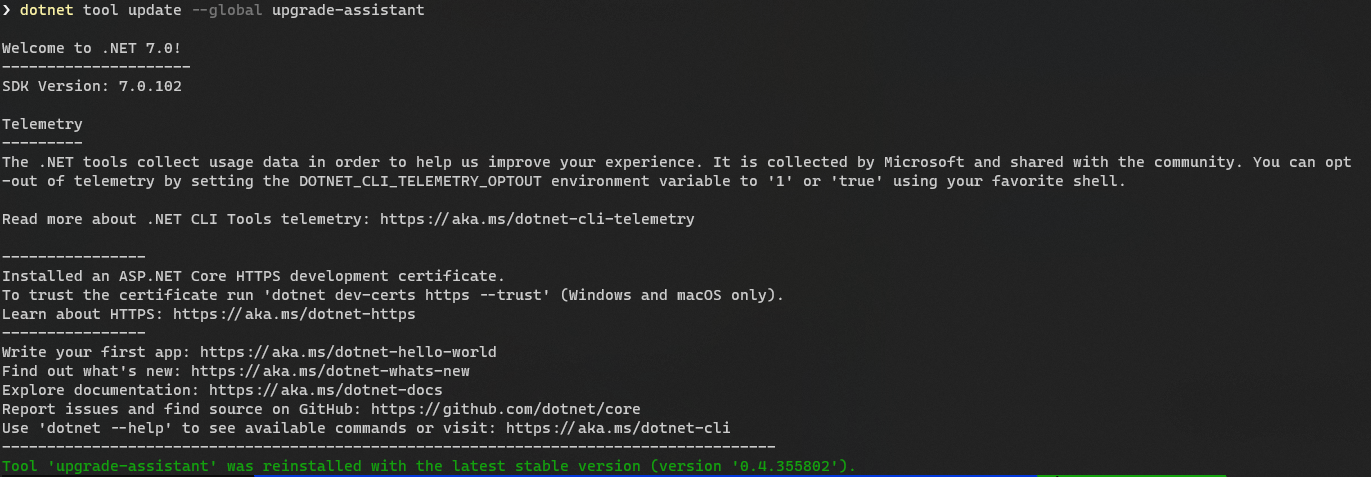 Now you have the tool, make sure you are in the folder for your project. I suggest you start inside your Xamarin Shared Project as it’s this code we really want to migrate. I will explain more on why later, but I have found that the Upgrade Assistant if run against the Solution will affect the other projects in the solution like say the WebAPI making changes you may not want. So it’s best to stick to just the shared project – it’s all we need anyway.
Now you’re inside the shared project folder you can run the following command:
1upgrade-assistant analyze MYPROJECT.csproj
This will run over your project and produce a Sarif report showing what Errors and Warning you can expect from running the actual Upgrade, again this will help with your pre-upgrade planning.
From this report, you can see what major blockers you have and need to resolve before actually committing to a full migration. To view the report there is a Visual Studio extension here that can help.
READY TO MIGRATE?
When you have checked the report and you’re ready to migrate you can run the following command:
1upgrade-assistant upgrade MYPROJECT.csproj --non-interactive --entry-point *
I use the non-interactive as it saves you a few hundred clicks of the enter key for decisions it’s made but wants your approval for, but by all means leave that part out if you want full control and love bashing the enter key. I prefer to go grab a coffee.
The assistant starts by making a backup of your project and its files which adds to the safety of creating a new branch. It will then step through the project carrying out the steps of the Manual process for you like upgrading the .csproj to the new SDK style, updating the NuGets and namespaces. The process can take a while, my small app took 8 minutes to complete on my machine so it’s the perfect time to refresh the coffee and biscuits.
BUT IT’S NOT MAUI OR A SINGLE PROJECT
Now the upgrade-assistant has completed its work, you will try to open and run the project and get a long list of errors and red squiggles. If you’re like me, you’re thinking what the heck that assistant did nothing for me… it’s not even looking like a MAUI app in the Visual Studio solution explorer. It should look like this:
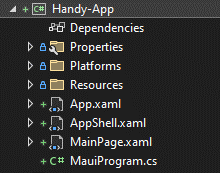
I thought the same and then went back to look at the manual process before I realised that all it’s doing is fixing up the csproj and the namespaces, it’s not converting fully to a MAUI application and I don’t think they highlight this in the doc’s well enough and I guess why you’re here reading this.
LET’S FIX IT UP IN MAUI
We obviously want our app to take full advantage of everything MAUI has to offer, including the cleaner project structures. So, the best next step is to migrate to this within our project. Don’t panic, the work with the upgrade-assistant isn’t wasted. Remember above I said I would come back to why we only upgraded the shared project and not the solution, well it’s here we find out why.
You could be tempted here to fix up all the error’s and attempt to run the project for say Android but this will not work as we only migrated the shared project. If you did migrate the whole solution it’s still not going to work as the Upgrade-Assistant will not make the required changes to the MainActivity.cs. Hence me suggesting not running at the solution level.
MAUI PROJECT STRUCTURE
We want to use the new MAUI project structure, so to do this let’s add a default MAUI project to our solution. This means right click the Solution in the Solution Explorer and then Add a new Project.
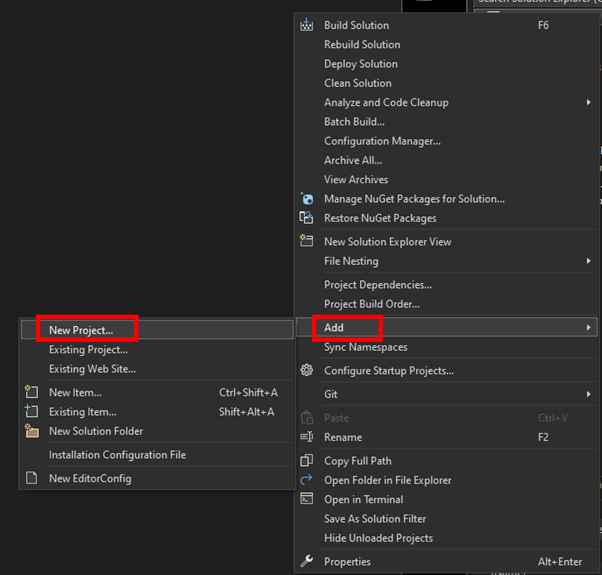
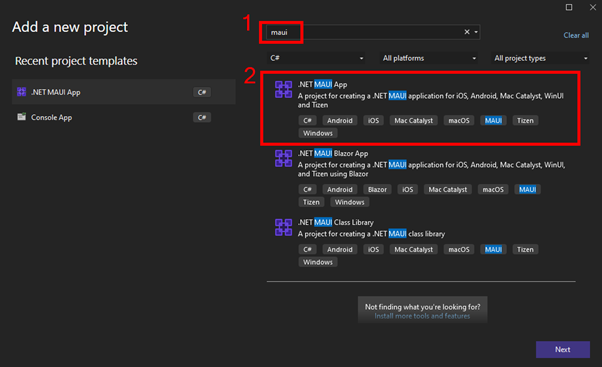
If you type MAUI into the search box you can then filter the long list to the ones you need, select and give it a name as you normally would.
The next step is quite simple. From the Xamarin Shared Project, drag and drop the folders for your Views, ViewModels, Services, Helpers etc into the new MAUI project. As the Assistant has migrated these files and updated the namespaces, they should all be happy in the new location.
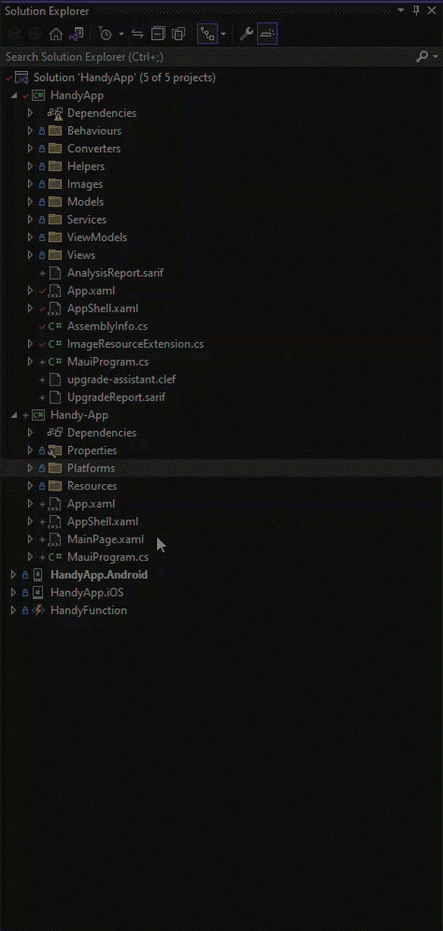
Once you have these copied over, the next step in my case was to delete the MainPage.Xaml from the root of the project as I keep all my Views in the Views folder and copy the contents of the AppShell.xaml from the Old Xamarin project into the MAUI file.
BUILD!
Now the fun part, and that is to do a Build. I warn you now there will be a long list of errors to fix, and this is where most of the work is. You will have the easy missing NuGets as we haven’t added those to the MAUI project yet, but others will be breaking changes between Xamarin and MAUI. For example, MAUI has no Relative Layout. If your app uses that it’s a big change or Color is now Colors so lots of search and replace needed.
This is where all that planning upfront comes into action and for a small app like my HandyApp it’s a solid day of work. However on some client Apps, this step can take a few days to resolve. Especially if there is no MAUI UI Control for what was being done before and your forced to create from new.
I am going to leave this step here, not because I don’t want to help but as I said above, every app is different and your issues/errors/blockers will be unique to your project. If you’re stuck and really need some help, then please reach out, we would be more than happy to help you on your journey.
ANDROID / IOS CHANGES
Now the main shared project items are copied over you need to look in the Xamarin Android and iOS app projects for any bespoke code. Like say a CustomerRender or other custom Platform-Specific code.
If you have any, you need to copy them over into the relevant platform in the new MAUI project. During this step, you may find that some common practices in Xamarin are now resolved as part of the defaults in MAUI, so check the docs before you go too far.
Be sure here that if you have any interface code from your platform specific changes you include a version in the WinUI and MacOS platforms, otherwise you will get lots of build errors later.
You should now be able to build and run your App for the first time. I tend to start with the mobile versions, so Android and iOS first, as that was what Xamarin provided, to check I am back where I started. Once I have these both working, I try Windows which should, all being well, just work.
FONTS AND ICONS
Once you have the errors fixed, you should have the app running but all the fonts and images will be missing. You can now copy these from the Android or iOS resources folders into the MAUI resources folder.
The trick here is to pick the best image. If you still have access to the design files for these images and icons, see if you can get hold of SVG files in place of PNG’s. This will mean the final results will be much better quality across the platforms.
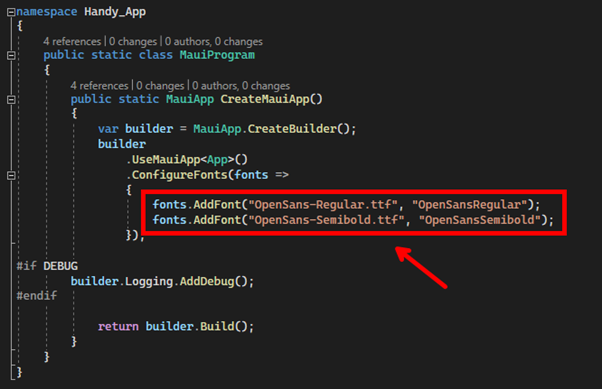
For the fonts this is the same, but you may have the fonts listed in the old Xamarin projects in the AssemblyInfo.cs as an embedded resource. Copy the font files into the new MAUI project resources folder, and in the MauiProgram.cs you will see a ConfigureFonts section to add/update your fonts.
FINAL PARTS
Now you can clean up the code and switch out things like MVVMHelpers for CommunityToolkit and Source Generators, if you don’t know what these are check them out here.
Now that you have all the code and the app runs, you can delete the old Xamarin projects from the solution. Yep, you read that right, just delete the projects, the Shared project and the Android and iOS heads as you don’t need them anymore. Hopefully, nobody made any commits to these while you were migrating, and you can commit the changes to repo and start the testing to be sure it’s all still fully functioning.
CONCLUSION
There is a lot to the migration, and you will see and hear different arguments about the best way to achieve it. But I have found this to be the simplest and easiest way so far.
The process should be fairly pain free for most apps. The pain only comes from where your app has special renderers or 3rd party library’s. It is scary with the 100’s of error messages when you first try and run the app, but use the power of your IDE to find and repair them, most should be simple and quick edits.
Lastly reach out and let us know how you get on or to share your hints and tips. If you hit a real stumbling block, maybe we can help.
I hope it’s a good migration for you.
WHY DO I NEED TO MIGRATE FROM XAMARIN TO MAUI?
The biggest question I have been fielding recently is should I upgrade a Xamarin app to DotNet MAUI (Multi-platform App UI). My answer until recently was there isn’t much in it or there are still a few issues so hold off for now.
UPCOMING XAMARIN END OF SUPPORT
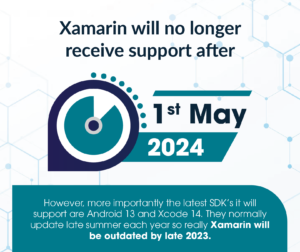
However now that .NET 7 is released, and MAUI is fully released and fully featured it makes sense to at least start looking and planning an upgrade for Apps. The main reason behind this is that Xamarin will no longer receive support after 1st May 2024. However, more importantly, the latest SDK’s it will support is Android 13 and Xcode 14 which are the current latest versions from Apple and Google – but for how long?
SUMMER 2023 – LATEST DEVICE VERSIONS NO LONGER SUPPORTED IN XAMARIN
Android and Xcode normally update in late summer each year so really Xamarin will be outdated by late 2023 as it will no longer be able to support the latest versions and devices. This means that if you have an active App you need to take the time NOW to start the migration process as it’s not a quick and easy process.
In this post I hope to give you a helping hand in starting the process, sadly however I can’t do this in too much of a deep dive as every project will be different. I will show where to start and useful resources that will help you along the way.
GAIN NEW TARGETING WITH MAUI
Also by migrating to MAUI from Xamarin you gain the ability to target desktops with WinUI for Windows and MacOS on the Mac side. All with very little in the way of changes for most apps which is very cool. Additionally, depending on your app you can also target Tizen which gives you access to all Samsung smart devices. Another advantage is that with MAUI you can use Blazor in your App which allows your Web Team to bring their skills into the Mobile world or just use that section from the company website instead of re-inventing it in a mobile App.
WHERE TO START YOUR XAMARIN TO MAUI MIGRATION?
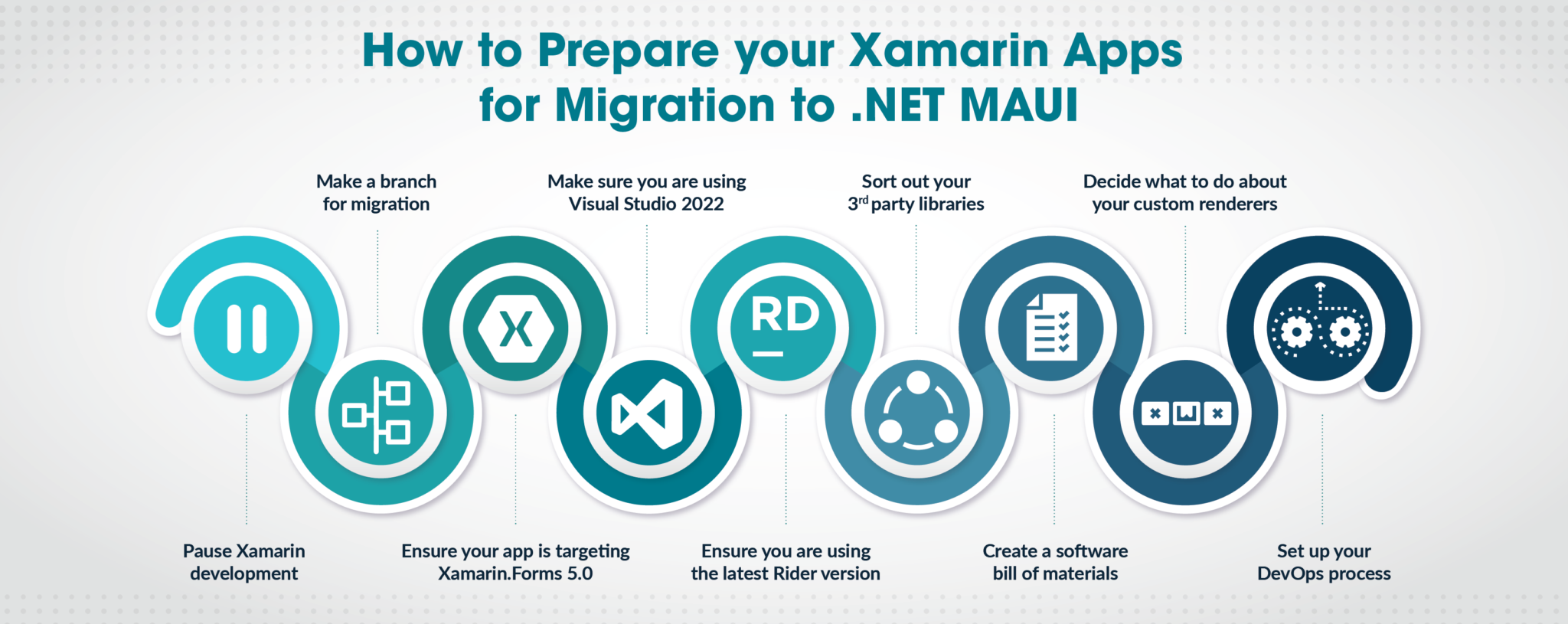
PAUSE XAMARIN DEVELOPMENT
The best place to start is to plan a pause in any active development of your application, as any work you do on the old Xamarin app could (read probably will!) cause issues in the migration. So, schedule a stop so that you are planning for success, you can then build a Story for the migration.
MAKE A BRANCH FOR MIGRATION
Now make a branch for the migration work in your source control. Sounds obvious I know but it’s painful if you don’t, but as you will see later there will be some huge changes to the project’s Solution so you will want to be sure you can step back if things don’t go quite as well as you wish.
XAMARIN.FORMS 5.0
The next step is to make sure your current App is targeting Xamarin.Forms 5.0 as this is the best starting point and where the team has created helpful tools. This hopefully will just be an update of the NuGet packages. However, depending on your App’s age as well as its need, it could be a little more work.
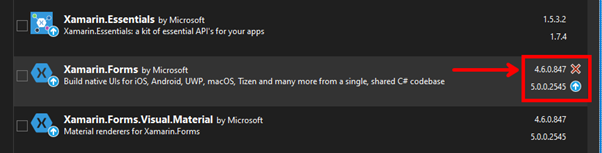
A great starting point is the official documentation here which at the time of writing takes you to the MAUI Github repo as these steps are yet to be added to the Docs.
VISUAL STUDIO
This part is really important, but MAUI development and the SDK/tools all live in Visual Studio 2022 on both Windows and Mac, so you need to be on this SKU. Yes, you can view the code files on VS19 but you will not be able to build/debug/deploy. So if internally your company is not yet on VS22 you can use this as the case to management for the upgrade.
The good news is that VS19 and VS22 can be installed side by side, so you have the confidence of being able to switch back to VS19 if needed. It’s what I have on my dev machines but I must admit I haven’t opened VS19 for a while now.
If you are installing VS22 make sure you install the MAUI and Xamarin tooling as you will need both for this to work and the Xamarin tools are not checked by default which catches a lot of people out.
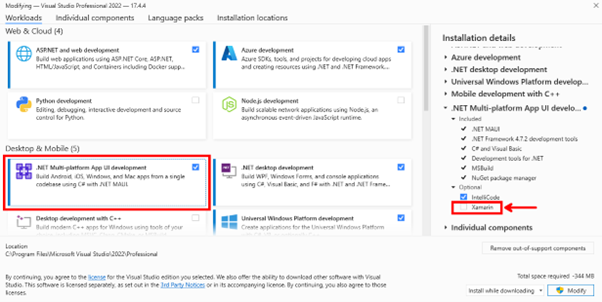
You can save space by removing the Xamarin tooling after the migration,
RIDER
If you’re a Rider user you need the latest version, however, as I am not a Rider user I can’t comment on which is the minimum version you need but there are a few blogs here from the JetBrains team that can help you.
3RD PARTY LIBRARIES
Most, if not all, Xamarin Apps make use of 3rd party libraries from NuGet. Why wouldn’t you when there are so many great tools to be used from the rich ecosystem and community? The problem is that some of these have not been updated for use with NET6+ yet and may never be.
However, the most popular packages have or soon will be as you can see from this slide published by the Xamarin/MAUI team back in November 22:
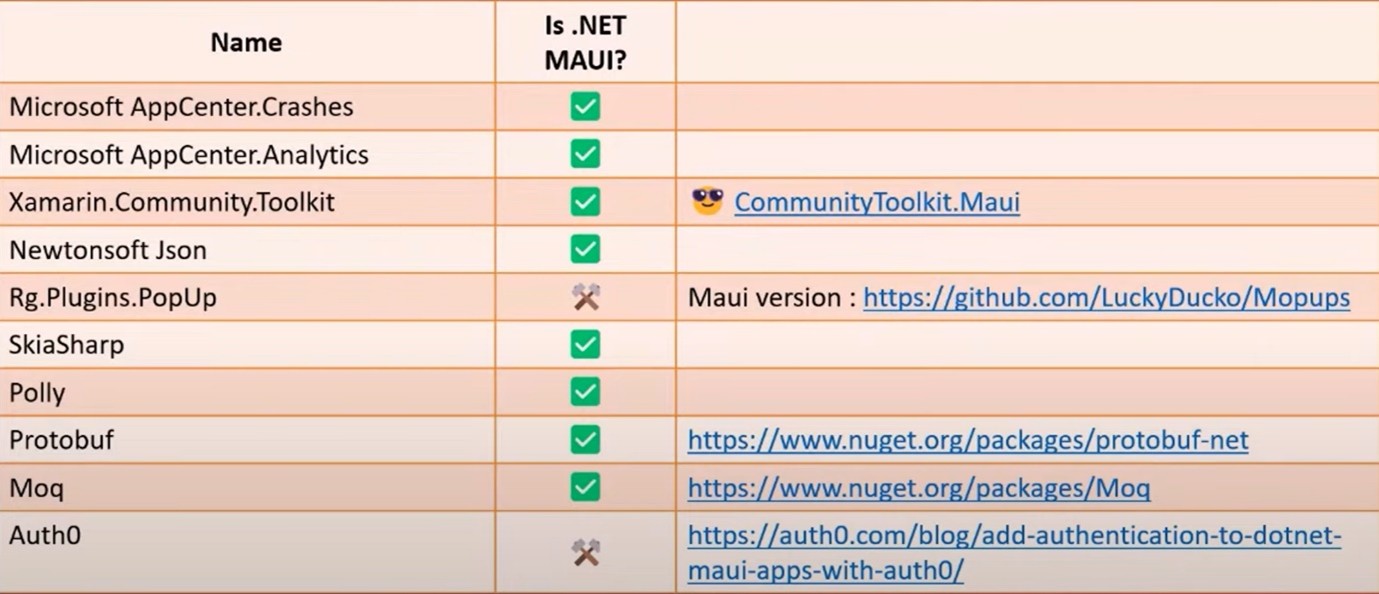
The best approach though is to break down the list of NuGet’s used and if the package is a Non-UI tool/package that targets .NET Standard it should just work. If it’s a UI component then you can check if there is a MAUI version or if you can create a replacement in MAUI.Graphics thus removing that dependency.
CREATE A SOFTWARE BILL OF MATERIALS
My best advice here and what I have done on client projects is to make an SBOM (Software Bill Of Materials). This is just a simple list of all the libraries and NuGet’s used in your project. This is not only great to build and keep updated for processes like this but it’s also a great resource to have in your Repo so that if any security alerts come out for some Library you can quickly and simply check if it affects your application.
Now you have your SBOM you can check these to see what just needs updating for the MAUI migration and what will leave holes in your App. Like, say a missing whizzy tool that makes an animation work, etc. You can then add into your planning how you will replace this or change the App design so that it’s not needed anymore. I have found that with my apps this has been a great time to look at the design with the client and with the advances in MAUI Graphics and other libraries I have been able to remove some dependencies and improve the app, so double bonus.
CUSTOM RENDERERS
What about all the hard work you have put into that custom renderer to please the business and to show the graphic designer how good you are, or just to get around some quirk of the OS…
Well, it’s not a blocker to migration but potentially a lot of work if you have a lot of them. Thankfully there are great resources that can help you.
DEVOPS
Then there is the DevOps process to think about, this will need some major changes as well. Though not mentioned above (as it depends on your internal systems) GitHub Actions or Azure DevOps would require just as big changes as the migration of the app.
This again needs planning and in my client cases, I have set up a separate DevOps process from scratch before migrating the App so that I know that stage is complete and tested working. You can do this with a simple File New MAUI app to prove the process and release gates etc.
CONCLUSION
There is a lot to the Xamarin to MAUI migration, but if you take the time to plan and prepare the actual migration should go smoothly. I’ve migrated a few apps now and just like any decorating, it’s all in the preparations.
Part of the planning should include making that SBOM I mentioned which will help not just with the migration but also in maintaining the App going forward. I have also found that as an Excel sheet, it’s easy to share with the business to build the story around the migration.
Lastly, reach out and let us know how you get on or share your hints and tips. If you hit a real stumbling block maybe we can help.
Watch out for part two where we cover the actual migration story.
Happy coding.
Application Integration can often feel like a difficult subject to grasp. You can interact with a website, and you can see the data stored in a database, but how do you get the measure of an integration solution?
This article will demystify the subject by presenting the problems a business encounters when it doesn’t have an adequate application integration solution. We will then explore how an integration solution can solve these problems and afford a range of additional benefits along the way.
Finally, we will see how a business that fully commits to a managed application integration solution can unlock the full potential of existing systems, and achieve the high efficiency and adaptability required to stay at the cutting edge of changing market conditions.
WHAT HAPPENS WITHOUT ANY MANAGED APPLICATION INTEGRATION?
At first, application integration can seem like a waste of time and money. After all, your corporate systems are where the work gets done. They are what your customers interact with, and if there’s any spare resource, surely it should be allocated there.
The problem is that because corporate systems are specialised, no single system is a perfect fit for meeting all of a customer’s needs. Sooner or later, it will need to share the functionality of another system. Let’s explore what happens when this occurs:
The resulting architecture looks like this:
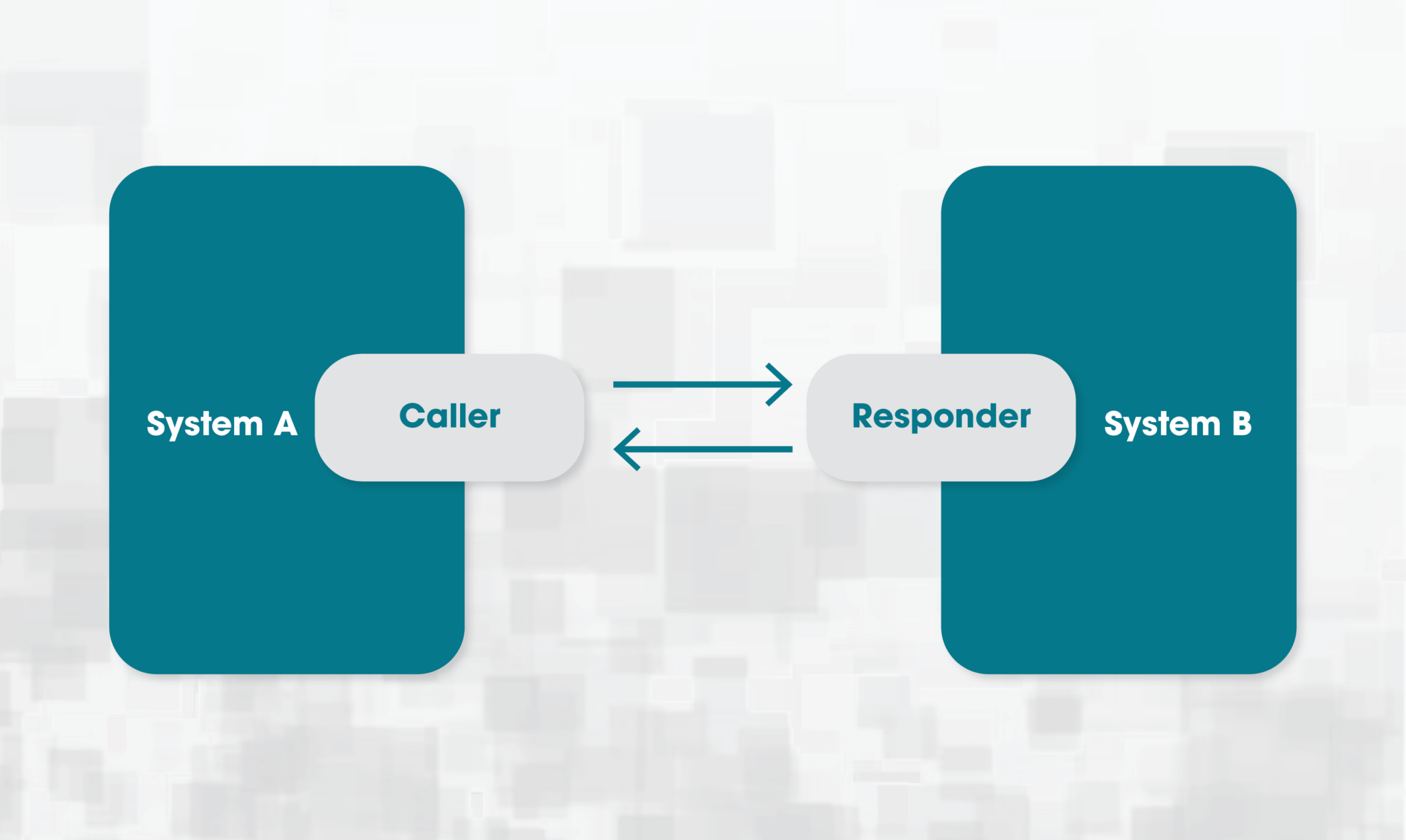
So far so good, but over time this process repeats again and again, with different developers, different requirements, and between different systems. Developers come and go, and gradually knowledge of what’s connected to what disappears. Eventually, the dependencies between systems build up until they start to look something like this:
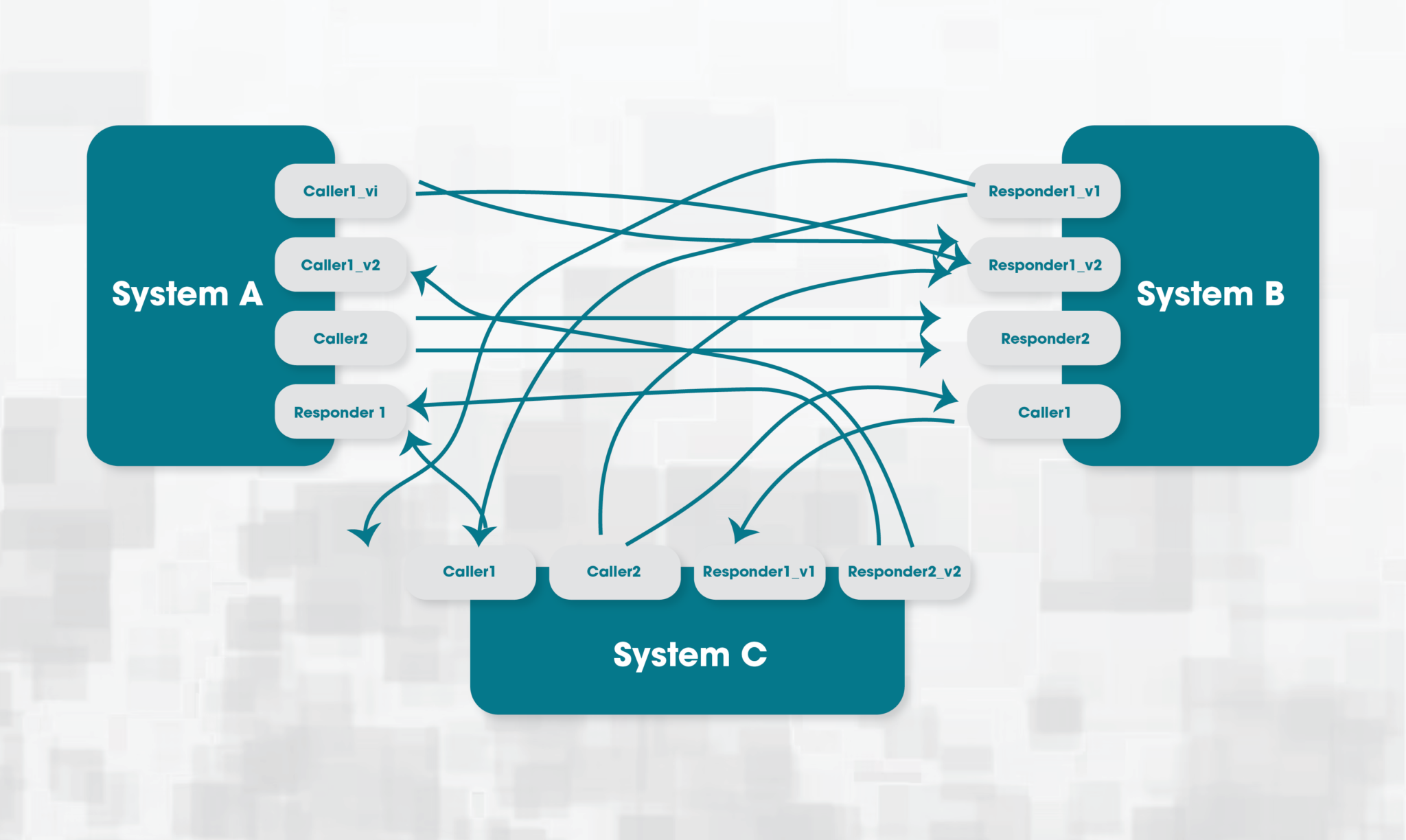
In this situation, all systems have become tightly coupled to one another. If a system goes down, any system it’s connected to will also be affected. If an upgrade causes a significant change to a system, links may also need to be updated, requiring not just development on the upgraded system, but those which link to it as well.
What’s more, when things do go wrong, it’s not always clear which system is responsible, and issues can be batted back and forth between teams for some time before the root cause is identified. Lacking visibility of the whole system can also lead to developers replicating existing functionality simply because they have no idea it already exists.
Slowly but surely, we have waded into a quagmire of difficulties, simply by following the principle that systems should manage their own integration solutions with each other.
WHAT IS THE INTEGRATION SOLUTION?
What has been described above is called the point-to-point model in integration architecture. Each system must maintain many connections to various other systems. It’s extremely costly to maintain and difficult to wrap your head around the complexity. An alternative is to use the hub-and-spoke model:
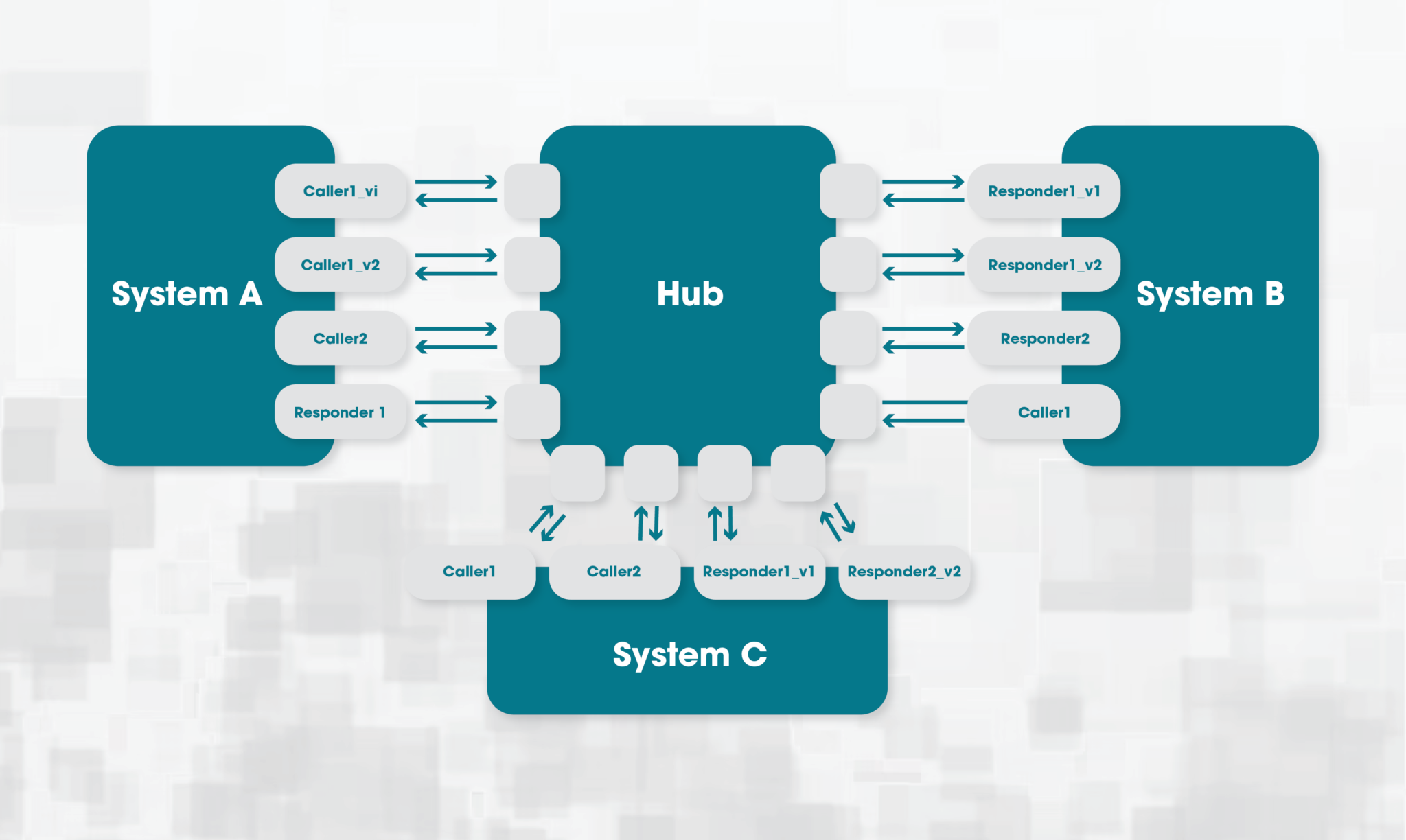
In the hub-and-spoke model, instead of systems connecting directly, they each connect via a mediating hub which handles passing the traffic from the sending system to the receiving system.
Say an endpoint in system B returns how many items are in stock for a given item ID, and this functionality is accessed by all other systems. The hub is now responsible for passing the relevant item ID to the endpoint and returning the result to the correct calling system. Now if system B is updated, instead of all systems having to make changes, only the connection to the hub needs to change, greatly reducing the impact of upgrades.
Additionally, if there is a failure or a system is unavailable, the hub will be able to determine exactly where the problem lies, and its logs can be used to trace complex messaging routes involving many different systems. When receiving systems require data in different formats, instead of having to surface multiple endpoints, the hub can transform data sourced from a single endpoint in the source system, saving developers time.
But that’s not all. Once you have this architecture in place, you may find people in your company coming to the hub to learn about what functionality is available across the business’s systems. Developers who work on the hub may become integral to implementing new complex business processes, by providing greater visibility and facilitating communication between disparate teams.
TAKING APPLICATION INTEGRATION TO THE NEXT LEVEL
We could stop here, but these are hints of what is possible if we take investment in application integration to the next level. Let’s explore how we can do that and what it would mean:
These improvements lead us to the Enterprise Service Bus architecture. At this point, the lines between individual systems start to blur, and applications begin to exist as high-level message flows which involve calls to a range of systems. As requirements change, applications can adapt quickly and easily without being dependent on costly low-level changes.
Where traditionally it would have been expensive to divide a task up between many separate systems, the Service Bus makes it possible to build processes which make use of the full range of functionality provided across the business. This encourages more specialised systems that are easier to optimise, and less duplicated functionality frees up developer time to focus on tasks which are a better match for their skillset.
The result is a level of efficiency and adaptability which can truly unlock the full potential of all your corporate systems, and it all depends on committing to a long-term, fully-managed application integration solution.
CONCLUSION
Application integration can seem mysterious, but all businesses are familiar with the problems that emerge when it isn’t properly managed. This article shows how full commitment to a managed application integration solution has benefits far beyond just mitigating these problems. It allows the business to unlock the full capability of its existing systems.
Examples of tools on the market which enable building such a solution include Microsoft Biztalk and more recently Azure Integration Services, both of which provide the capability to expose system functionality through APIs and then leverage a powerful messaging engine to perform high-level business logic.
As the software ecosystem continues to move towards cloud-based microservices, the costs of integrating corporate systems will continue to drop and a fully managed application integration system will become an indispensable asset to stay at the cutting edge of what your business can achieve.
