
Considering recent research bringing to light a security risk within Azure Functions storage accounts with key-based access, in this blog post, we will explore how to configure Azure Functions with managed identity for storage access, before disabling key-based access entirely.
Azure Functions is a serverless compute service that allows you to run code on-demand without worrying about infrastructure management. It provides a flexible way to build and deploy event-driven applications and microservices. One of the key features of Azure Functions is its integration with other Azure services, such as Azure Storage.
When creating an Azure Functions App, a dedicated storage account is also created, the Functions App relies on the storage for various operations such as trigger management and logging. By default, this account is created with “Allow storage account key access” enabled. An access key derived connection string is added to the Function App configuration, in the AppWebJobStorage application setting. A common practice is to move the connection string to Azure Key Vault and configure the Function App to fetch the connection string secret on startup.
SECURITY RISK FOUND IN AZURE FUNCTION STORAGE ACCOUNTS KEY-BASED ACCESS
Recent research by Orca Security, a cloud security company, discovered that attackers who have obtained the access key could gain full access to the storage account and business assets. Moreover, the attackers could move laterally within the environment and even execute remote code.
Although Microsoft has already recognised the risks associated with shared key access and recommends disabling it, the default setting for storage accounts still enables this authorisation method. Microsoft recommends that, where possible, key-based access to storage accounts should be disabled and advises using Azure Active Directory authentication for enhanced security and reduced operational overhead.
AZURE FUNCTIONS WITH MANAGED IDENTITY FOR STORAGE ACCESS
Based on a real example encountered in a recent project, here we are going to explore an HTTP triggered Function as an initial example, looking at how to secure the Functions access to its own storage account. Next, we look at a Function triggered by a queue in a different storage account and how to secure the interactions between those two resources.
CONSIDER A SIMPLE FUNCTION APP WITH AN HTTP TRIGGER
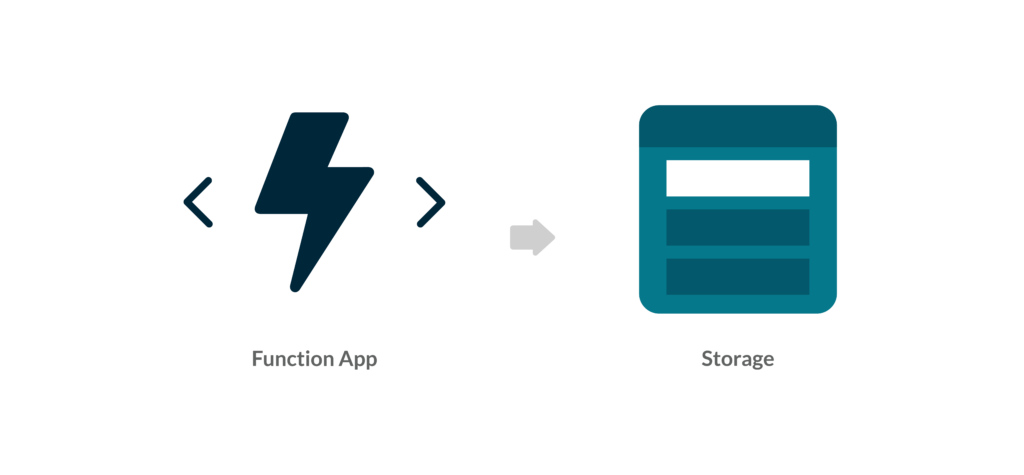
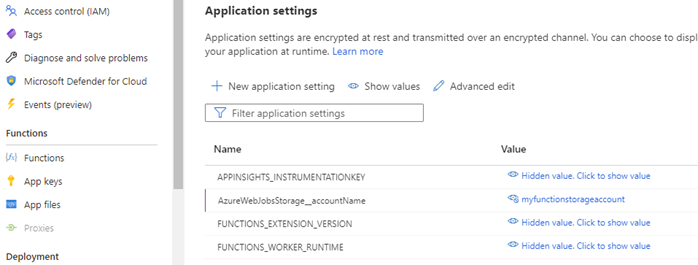
The Function App is backed by an Azure storage account. If we visit the Azure Portal and take a look at the Configuration screen, we can see an application setting called AzureWebJobStorage which stores the connection string for the Function App Storage.
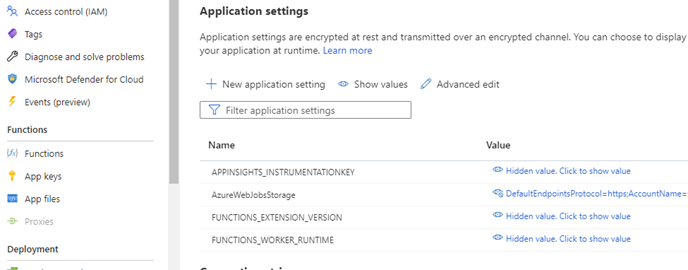
Rather than using a connection string, we can switch to an identity-based connection by performing the following steps:
STEP 1: ENABLE MANAGED IDENTITY FOR AZURE FUNCTION APP
Navigate to the Function App Identity screen in the Azure portal and select “System assigned” for the managed identity option. Click save. This will create a managed identity for the Function App in Azure Active Directory.
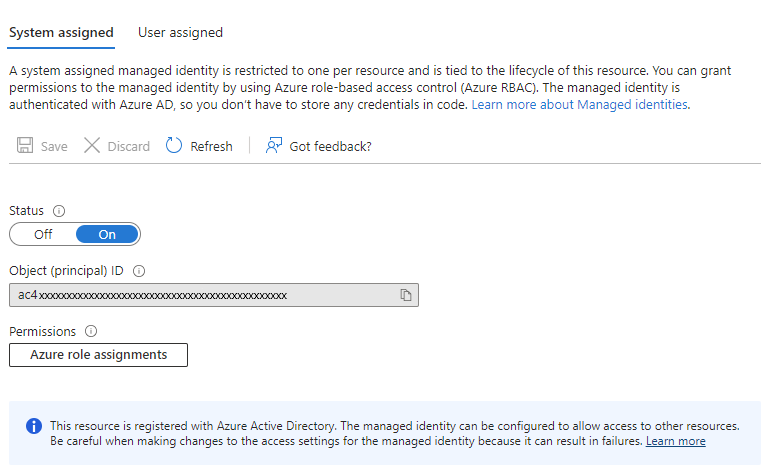
STEP 2: GRANT ACCESS TO AZURE STORAGE
The next step is to grant access to Azure Storage for the managed identity created in the previous step. To do this, go to the storage account’s Access Control (IAM) screen in the Azure portal, and add a role assignment for the Function App’s managed identity with the role of “Storage Blob Data Owner”.
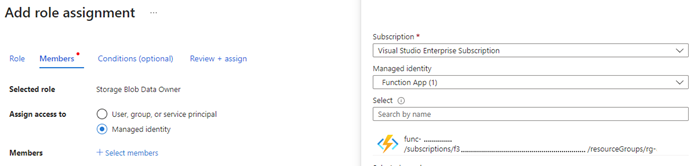
STEP 3: CONFIGURE THE FUNCTION APP SETTINGS
The Function App now needs to have its setting modified to instruct it to use managed identity when accessing its storage account. Open the Function App Configuration screen in the Azure Portal. Rename the AzureWebJobsStorage variable name to AzureWebJobsStorage__accountName (with 2 underscores). This convention ensures the function uses managed identity to access the storage account. Next, we change the value of this variable to the name of the storage account that was created with the function. Save changes.
STEP 4: DISABLE ACCOUNT KEY ACCESS TO STORAGE
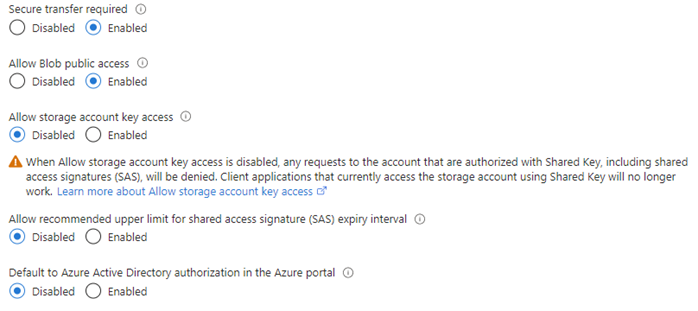
At this point the Function App will use its managed identity to access its storage, so we can safely disable account key access*. In the Azure Portal open the Configuration screen for the Function App storage account. Toggle the “Allow storage account key access” setting to disabled and save changes.
CONSIDER A FUNCTION APP WITH A STORAGE TRIGGER
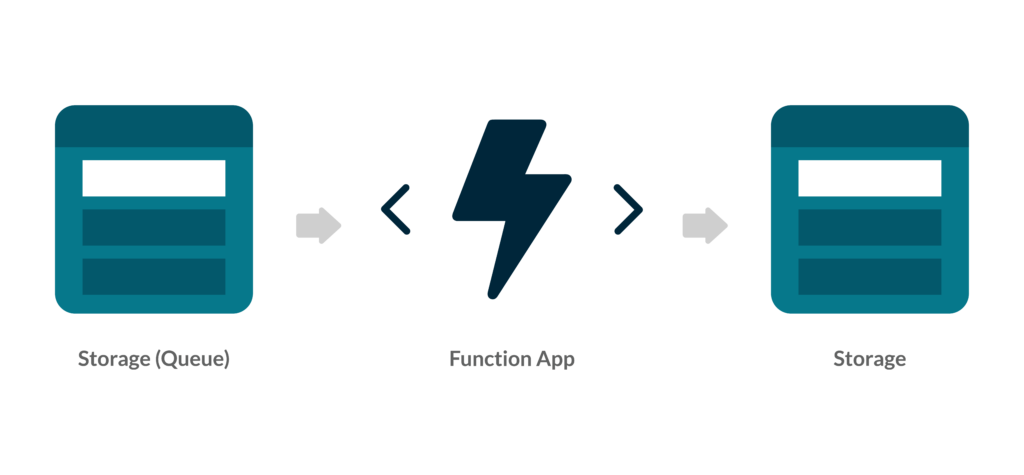 Beyond HTTP Functions can be triggered in many ways. In this example, we have a Function that is triggered by a new message on an Azure Storage Queue. The Function App needs to be configured to have access to the Storage Queue. The following steps will describe how to achieve this with managed identity.
Important: Requires Microsoft.Azure.Functions.Worker.Extensions.Storage V5 or later
STEP 1: ENABLE MANAGED IDENTITY FOR AZURE FUNCTION APP
If not already complete we need to enable managed identity for the Function App as described above.
STEP 2: GRANT PERMISSION TO THE FUNCTION APP IDENTITY IN THE STORAGE ACCOUNT
The Function App identity must be granted permission to perform its queue actions. In this example, the Function reads a message from a queue, processes it, and removes it from the queue. For this, we’ll give it the “Storage Queue Data Message Processor” and “Storage Queue Data Reader” roles.
Navigate to the queue storage account’s Access control (IAM) screen in the Azure portal and add role assignments for the Function App’s identity with the roles of “Storage Queue Data Message Processor” and “Storage Queue Data Reader”. The role requirements will vary by scenario, so we need to ensure we have assigned the correct role(s) for our needs.
STEP 3: CONFIGURE APPLICATION SETTINGS
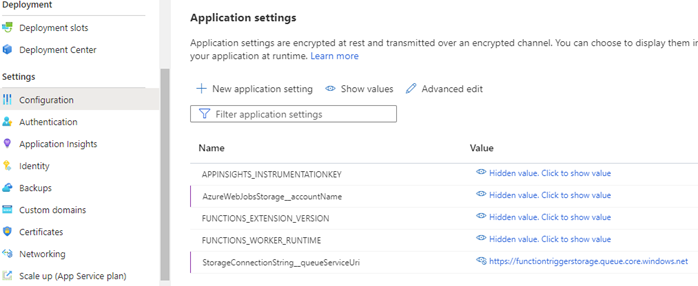
If this is an existing Function App with a queue trigger, it will already have queue connection settings. For example, it might have a connection string application setting with the name StorageConnectionString and a value that contains the connection string or a reference to the Azure Key Vault secret containing the connection string. In the below example, we have an environment variable that contains the connection string to a storage queue.

In the Configuration screen for the Function App, the application settings need to be configured with the following convention: The setting name should be in for the format {connectionName}__queueServiceUri (2 underscores). The value should be the Uri of the queue service.
STEP 4: DISABLE ACCOUNT KEY ACCESS TO STORAGE
Now that the Function App uses its managed identity to access the queue storage which will trigger it, we can safely disable account key access*. In the Azure Portal open the Configuration screen for the queue storage account. Toggle the “Allow storage account key access” setting to disabled and save changes.
CONCLUSION
Configuring Azure Functions with managed identity for storage access is a simple and secure way to access Azure Storage resources without storing credentials or secrets in code or configuration files. By using managed identity, we can avoid the complexities of managing and rotating credentials and improve our application’s security. With the above steps, we can easily configure our Azure Functions to use managed identity for accessing Azure Storage.
Note: If any other services have been setup to use this storage account via a key-based mechanism, they will also need to be configured to use managed identity before disabling the account key access.
If you are looking for Azure experts or or help with your app development, be it consultancy or outsourcing, do get in touch and find out how we can be of help.
REFERENCES
A cloud-native application is a software program that has been developed to be hosted in the cloud. The software program will typically be broken down into multiple services, each running independently, taking advantage of cloud technologies/techniques to ensure these services are resilient, and scale with customer demand. A cloud-native application should also be agile, flexible, and secure.
Traditionally, applications would be monolithic, meaning all the components for the application are integrated together in one solution (tightly coupled) and deployed as one unit. Updating monolithic architecture can be restrictive and time-consuming, harder to scale (it is not possible to scale a small proportion of your application, which can be costly), and can be less flexible and harder to deploy.
The modern approach is often to break down the service into multiple smaller services, each called a microservice. These microservices are independent of each other (loosely coupled) and can be scaled independently, as well as deployed separately. A microservice is an independent service, with its own data store, with the aim of successfully completing one business requirement/task. It’s then possible to orchestrate these independent microservices, to deliver powerful applications.
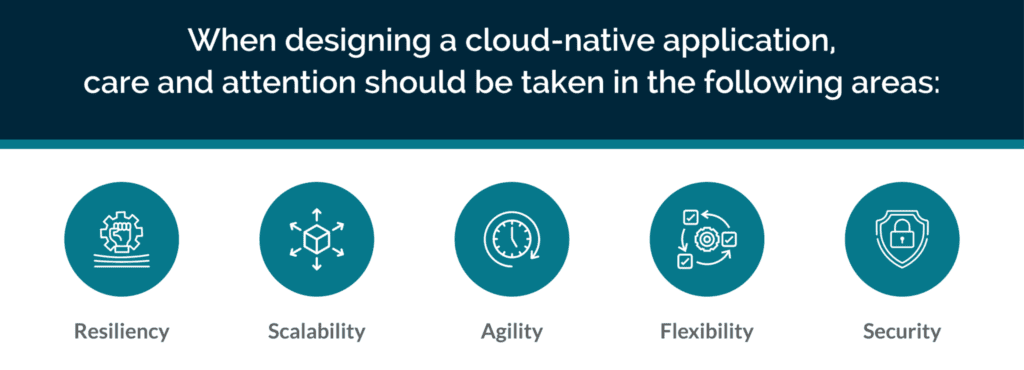
RESILIENCY
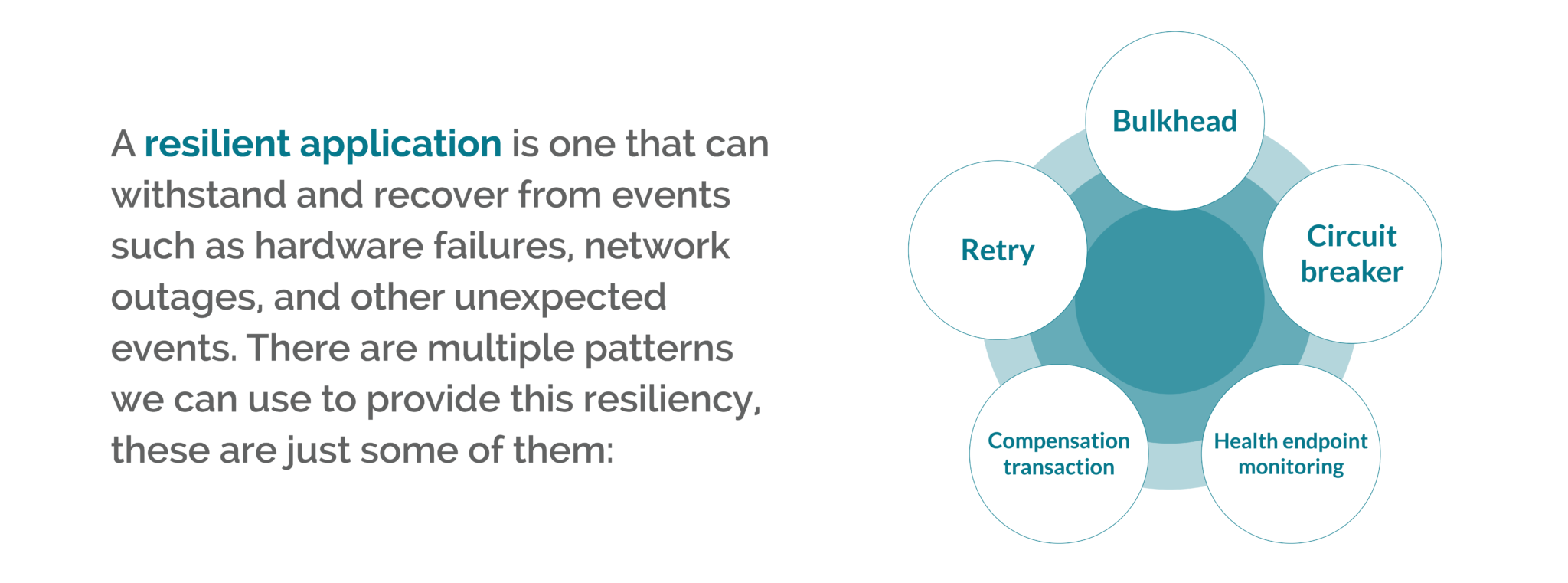
A resilient application is one that can withstand and recover from events such as hardware failures, network outages, and other unexpected events. There are multiple patterns we can use to provide this resiliency. Depending on the project, you may adopt one or multiple approaches. What follows is a list of some of these patterns (this is not an exhaustive list):
SCALE
When dealing with requests, a service should be able to scale to meet the demand – scaling out/up when demand is high, and scaling in/down when demand is low. This can be easily achieved when using cloud resources, by making configuration changes to the application or cloud resource:
AGILITY
When a team is working on a project, the team should be able to quickly pivot to the project’s demands, following the path to success. Choosing the right platform to plan, track and discuss work, that integrates to your cloud provider seamlessly, providing continuous delivery with observability is required to facilitate a successful project.
FLEXIBILITY
Cloud-native applications need to quickly adapt to changes in requirements and in the environment where they are hosted. Taking advantage of new technologies when they become available, and not being locked into any service/technology that slows them down – either in execution, development, or planning.
SECURITY
When designing cloud-native applications, having these isolated independent services can help by reducing the scope of attack. It’s very important to keep security and secure thinking high on the agenda at every stage of a project lifecycle. The following processes and tools can be used to protect your project:
For now, Microsoft BizTalk Server remains a viable option for on-premises application integration at the enterprise level. It facilitates numerous functions that allow organisations to build, deploy, and manage their application and system connectivity. But at this point, can we still say that BizTalk can, more or less, do everything on-premises that Azure Integration Services (AIS) does in the cloud?
To be fair, the answer isn’t a straightforward yes or no. Cloud environments are fundamentally different from on-premises infrastructure, which inherently complicates any attempt at a one-to-one comparison between BizTalk and AIS. But at the same time, it must be said that AIS offers certain capabilities that are simply beyond the capacity of BizTalk.
IS BIZTALK OUTDATED?
Released in 2000, BizTalk is one of the few older integration technologies that is still utilised fairly widely to this day. It’s capable of streamlining on-premises operations by connecting systems and applications such as SAP S/4HANA, Sage CRM and Salesforce.
However, despite notable updates and enhancements in its latest (2020) edition, BizTalk can’t support the most up-to-date Microsoft services and capabilities. (Simply think of how much has changed in tech overall, especially in the cloud, between 2020 and 2023 alone.) As such, BizTalk might not be the best option for today’s businesses when taking other modern digital architectures into consideration.
The cloud-based services of AIS enable application, data and system integration for businesses’ most critical resources. Also, if using the appropriate data gateway and connectors, some AIS tools can connect to on-premises data sources, partially bridging the gap between the two infrastructure worlds. Almost due to this fact alone, AIS solutions are much more flexible and scalable than those within BizTalk Server.
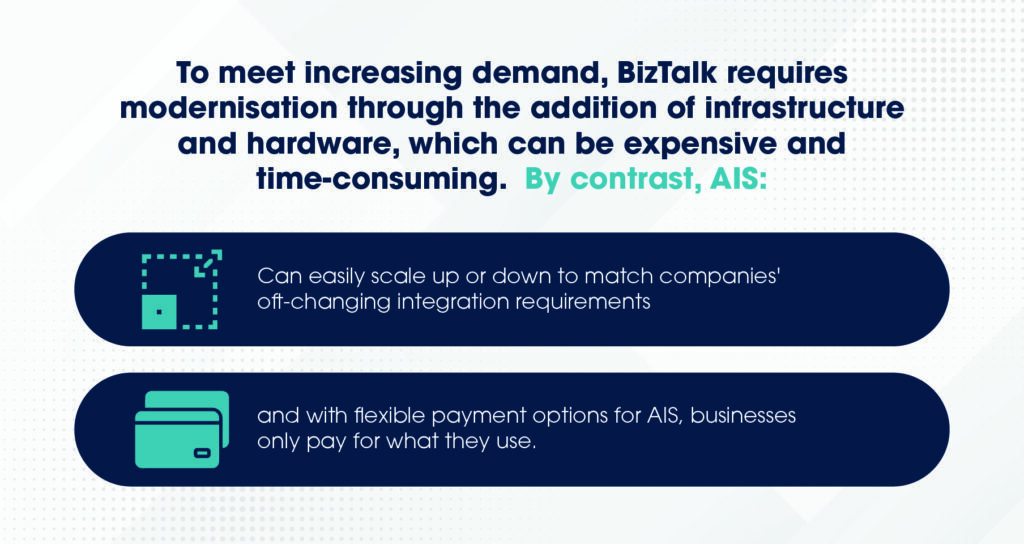
To meet increasing demand, BizTalk requires modernisation through the addition of infrastructure and hardware, which can be expensive and time-consuming. By contrast, AIS can easily scale up or down to match companies’ oft-changing integration requirements, and with flexible payment options for AIS, businesses only pay for what they use.
BIZTALK VS. AZURE INTEGRATION SERVICES
If looking to directly compare BizTalk to AIS, the best way to do so is by examining certain essential business technology needs and addressing how they are met by both the former and the latter. Below are five factors to assess:
1. APPLICATION MANAGEMENT
BizTalk: The platform for application administration is called The BizTalk Administration Console, a Microsoft Management Console (MMC) application. This contains a console tree, which facilitates access to folders and subfolders that represent different types of artefacts.
AIS: Application interfaces are managed and monitored through the Azure portal, allowing users to remain ever cognizant of app health or performance issues. With features such as run history transaction traces available in the portal interface for Azure Logic Apps, this allows you to have more efficient — and granular — insight into apps and Azure resources than BizTalk allows for its resources.
2. BUSINESS PROCESSES
BizTalk: Orchestrations are executable business processes that use publish-subscribe messaging through the MessageBox databox. Using a subscription and routing infrastructure, they can construct new messages and receive messages. BizTalk offers direct ports in orchestrations which put messages directly in the message box to be processed elsewhere.
AIS: Using a building-block approach, businesses can form executable processes with pre-built operations from a vast array of connectors, simplifying integration with ready-made solutions. Easy-to-understand design tools mean minimal code is required for the implementation of patterns and workflows. Also, AIS’ serverless capabilities make it even more scalable and adaptable.
3. APPLICATION CONNECTIVITY
BizTalk: Adapters run locally on BizTalk Server with dozens of out-of-the-box adapters and a small collection of available ISV adapters. Adapters use a message-oriented messaging pattern where systems exchange complete messages. These systems are responsible for parsing data before loading it into the final data store.
AIS: Tools such as Azure Service Bus and Event Grid facilitate app connectivity in terms of messaging-based data transfer and event-driven integration, respectively. Meanwhile, Azure API Management provides a unified view — and comprehensive oversight — of on-premises and cloud APIs, including those hosted on non-Microsoft clouds in an enterprise multi-cloud architecture. This facilitates a better flow of app traffic across all API deployments.
4. BLOCK ADAPTER USAGE
BizTalk: The concept of blocking certain adapters from specific applications doesn’t exist in BizTalk Server. Instead, users must manually remove adapters from the environment. It’s also possible to define receive and send handlers for individual adapters, assigning computer authorisation to execute or process those handlers.
AIS: Azure Logic Apps enables users to block connections in your logic app workflows if this is necessary for security or other reasons. Use Azure Policy to define and enforce guidelines that prevent unauthorised connections to systems and services you wish to block.
5. SECURITY AND GOVERNANCE
BizTalk: Encrypted information is stored in the Enterprise Single Sign-On (SSO) database, where it can be stored, mapped and transmitted by adapters. BizTalk has two main administrative groups, the administrators group and the operators group — and both experience issues with system accessibility due to Microsoft’s predetermined roles. To overcome limitations, custom profiles have to be created to access the appropriate systems.
AIS: Azure has several security methods in place to protect sensitive data. The first is Azure Key Vault, which stores API keys, credentials, secrets and certificates — and is only accessible through the Azure Key Vault Connector. The second is the managed identity option, which is available across numerous AIS resources and allows users to prevent access to anyone who doesn’t have an authorised managed ID store within Azure Active Directory.
GENERAL AIS ADVANTAGES
AIS is ideal for integration due to the plethora of cutting-edge solutions it puts at your fingertips to improve workflows and facilitate better app and system connectivity. Having compared these modern services to BizTalk, let’s evaluate the key takeaway benefits of AIS:
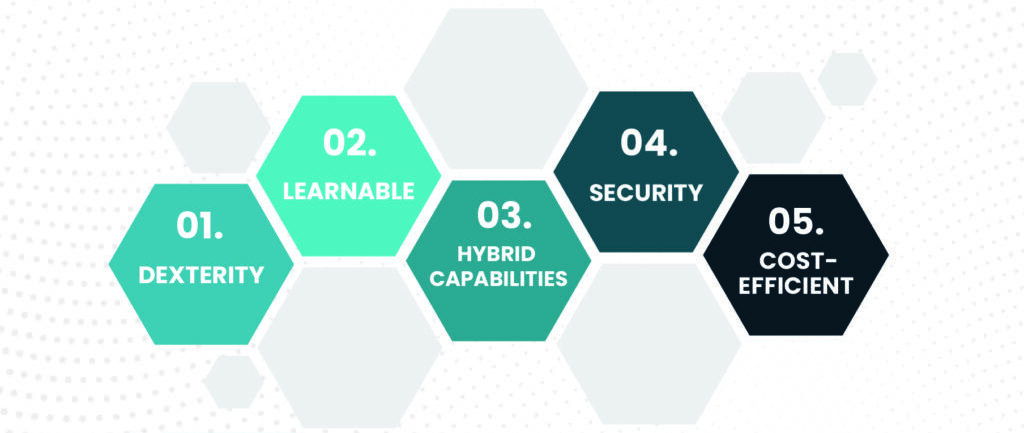
DEXTERITY
Providing a wide selection of APIs, templates and pre-built connectors, AIS allows organisations to integrate their applications and systems efficiently. This saves time and money by averting the need to build infrastructures from scratch.
LEARNABLE
With the payment models available, businesses can slowly build and expand their resources, facilitating a learning environment that makes these systems digestible for newly acquainted developers. Meanwhile, more experienced developers can utilise familiar tools such as Visual Studio or ASP.NET, as well as common programming languages (e.g., C# and Python).
HYBRID CAPABILITIES
The hybrid capabilities of AIS allow for seamless mobility and consistent cloud deployment. Additionally, they give users access to a diverse range of hybrid cloud connections, such as caches, VPNs (virtual private networks) and CDNs (content delivery networks).
SECURITY
When Microsoft designed Azure, it made sure to focus and base this on the industry-leading security development lifestyle (SDL) process, ensuring a secure system for integration. Also, with 50+ compliance offerings, Microsoft Azure has proven itself as one of the best cloud platforms for compliance coverage.
COST-EFFICIENT
The previously mentioned pay-for-what-you-use flexibility of AIS makes its services incredibly cost-efficient when set up correctly. Businesses can scale areas in bite-size chunks as needs dictate, instead of having to completely reinvest in new infrastructure. With Azure’s cloud capabilities and presence in 42 regions, businesses can easily tap into new markets without additional costs.
STEP INTO MIGRATION
If you’re a loyal BizTalk customer, take the time to consider the best solution for your business by weighing out the benefits of each infrastructure. Whether you’re looking to experiment with AIS integration or update your on-premises BizTalk system, the experts at Transparity are on-hand to help.
Get in touch with us today to discuss your infrastructure’s potential and find a solution that works for you.
This article will look at producing a long-term BizTalk migration strategy, and then explore three key features of an individual BizTalk migration project (migrating from one version to another) which are essential to maximise efficiency and ensure the work is completed before support ends.
Many companies use Microsoft BizTalk as their application integration solution. However, BizTalk is now considered legacy software and many of its earlier versions are now out of support (2013 and back), with end-of-support dates approaching for the remaining versions.
PLANNING A LONG-TERM STRATEGY
Due to the complexity of migration and time pressure as support windows close, it is often not practical to immediately migrate to a more future-proof integration solution such as Azure Integration Services. It is instead often necessary to migrate in stages, which can involve using other BizTalk versions as stepping stones toward the final goal.
The closer Biztalk versions are to each other, the easier the migration will generally be due to greater overlap in features for adjacent versions. Therefore the project can be completed faster than a migration to a later version or different integration solution altogether. This time could make all the difference between whether a production system goes out of support or not.
Therefore, the first key to a successful migration is to plan this long-term strategy and decide which BizTalk versions to use as stepping stones to reach your desired integration solution. Many factors will influence these decisions, such as which BizTalk versions you currently have in use, and the estimated complexity of each part of the migration process.
There is a range of potential technical challenges, for example, you may need to set up new BizTalk environments or upgrade servers on which an existing environment runs. Understanding the long-term strategy in advance will allow you to make huge time and financial savings over the course of a migration project.
THE KEY PILLARS TO A SUCCESSFUL BIZTALK MIGRATION
With a long-term strategy in place, the next step is to complete the migrations themselves. There are three key areas to focus on at this stage to ensure each migration goes as quickly and smoothly as possible. These are to understand your codebase, enlist expert assistance, and have a strong testing strategy.
The following sections show how focussing on these areas can help you avoid common pitfalls and complete your migration as quickly as possible, avoiding the risk of running applications on out-of-support systems.
1. EXPERT ASSISTANCE
As a legacy system, Biztalk has many features and dependencies which are no longer in common use. Additionally, when older applications were first written they may have taken advantage of libraries that are now deprecated or not widely used. Migration requires identifying and redeploying these resources. This is a complex technical task, especially as the original developers are often long gone and documentation can be scarce.
The longer ago the applications were written, the more challenging this can become, and the added complexity can cause a project to go off track. To mitigate this, it’s worth enlisting experts who have many years of experience working across all versions of Biztalk.
Another key area where expert assistance is vital is in modifying existing BizTalk configurations to support a migration project. We recently worked with a client running multiple versions of BizTalk simultaneously, and their migration plan involved moving code from earlier versions onto an existing BizTalk 2013 setup. This required vertical scaling of the existing BizTalk 2013 servers to handle the load of the migrated applications. In these situations, expert help can be invaluable for planning, configuring, and tuning the performance of these legacy systems to ensure a smooth migration.
2. UNDERSTANDING THE CODEBASE
Over the years it is often the case that source code on older BizTalk systems can be lost or become out of sync with the production environment. Understanding the state of the codebase is essential for planning a successful migration.
There are three general scenarios, each requiring a slightly different approach:
There may also be additional challenges specific to each migration project. In a recent BizTalk migration project, we encountered a system where multiple versions of the same assembly files were installed together on the production system. We needed to design a custom deployment solution that could deploy the different versions in the correct order to replicate the production setup.
3. TESTING
Critical to all the approaches above is a strong testing regimen. This will catch any errors or omissions in the migration process as well as flag up any unexpected code changes which were missed during comparisons. The most effective strategy to test for a BizTalk migration is to design a suite of tests that cover all use cases of an application.
These tests can then be run against the pre-migration applications to establish a benchmark and then against the migrated applications to check for any differences introduced during the migration. These tests can be designed and built in parallel with the work to migrate the codebase, and this is strongly recommended as testing early will surface any issues with old environments or any missing dependencies. These can then be resolved without holding up the main migration effort.
Due to the high complexity of BizTalk migration projects, and the requirement to orchestrate many different processes at the moment that a migrated application goes live, it is very useful to arrange to run tests on the production environment after the migrated code is deployed to ensure everything is working as expected. This will catch any issues which were difficult to capture in a test environment, such as account permissions or IP restrictions, and gives confidence that the migrated code is working as expected before putting a high load on the system.
CONCLUSION
A BizTalk migration can be a complex and time-consuming task but is essential to avoid the risk of running systems on out-of-support technology. This article covered what to consider when planning a long-term migration strategy, and then examined three key areas to focus on to ensure a successful migration: enlisting expert assistance, understanding your codebase, and developing a strong testing strategy. Focussing on these areas can help avoid many of the common pitfalls in migration projects, and greatly reduce the time it takes for these time-critical projects to be completed.
Transparity has extensive experience in completing BizTalk migrations and a team of BizTalk specialists with many decades of experience. Contact us today to find out how we can assist with your BizTalk migration.
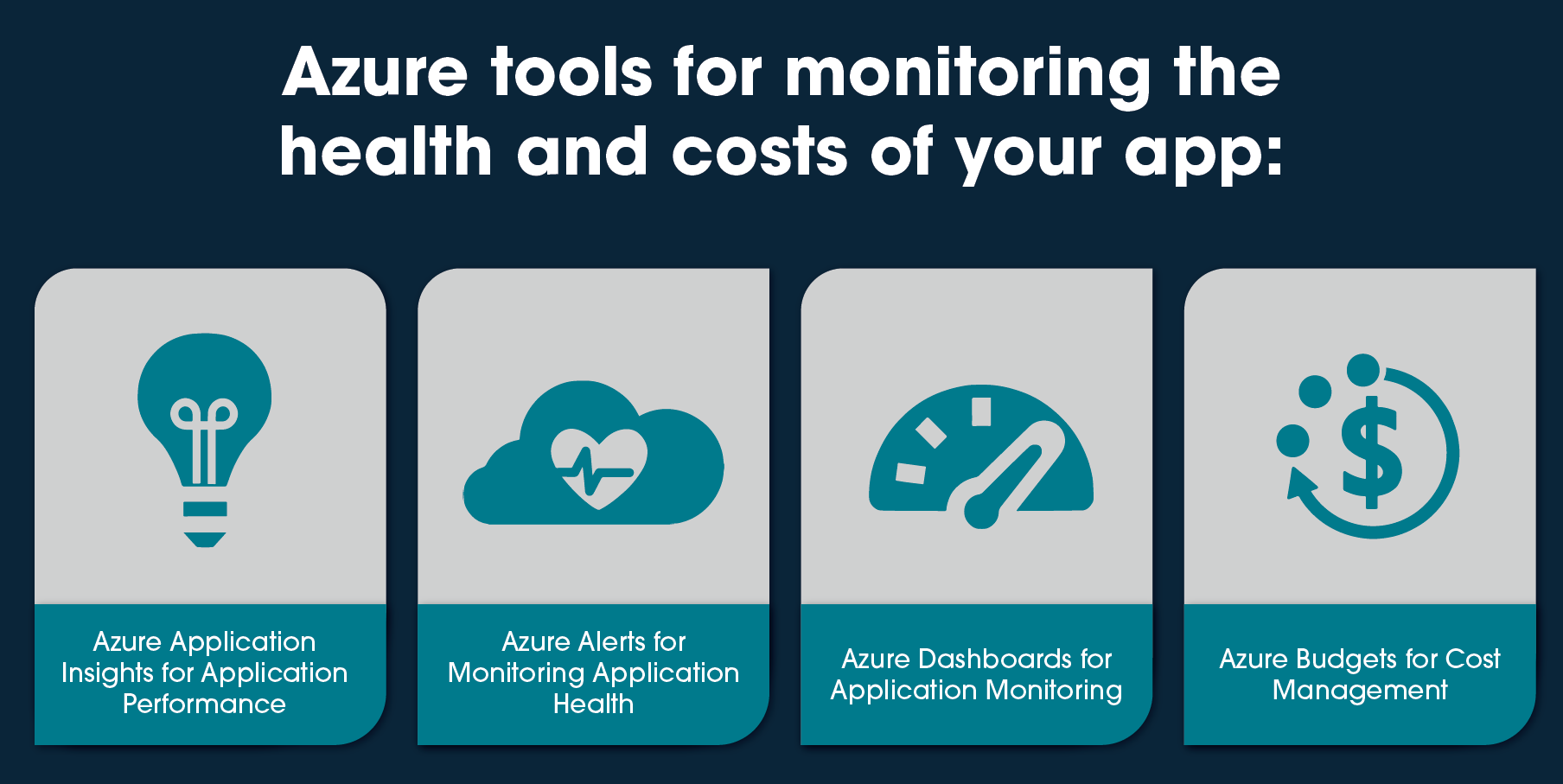
As more organisations are moving their workloads to the cloud, it is essential to monitor the performance and availability of their applications and control the budget. Microsoft Azure provides a range of tools to help developers and IT professionals monitor their applications’ health and costs, including Azure Alerts, Azure Application Insights, Azure Dashboards and Azure Budgets. In this article, we will discuss how to use Azure to monitor your applications and receive customized alerts.
AZURE APPLICATION INSIGHTS FOR APPLICATION PERFORMANCE
Azure Application Insights is a service that helps you monitor the performance and usage of your applications. It does this by collecting telemetry data, including metrics, logs and traces. You can use Application Insights to gain insights into how your application is performing and identify issues that may be impacting your users’ experience, creating Azure Alerts based on the collected data.
Application Insights provides other features including, but not limited to:
AZURE ALERTS FOR MONITORING APPLICATION HEALTH
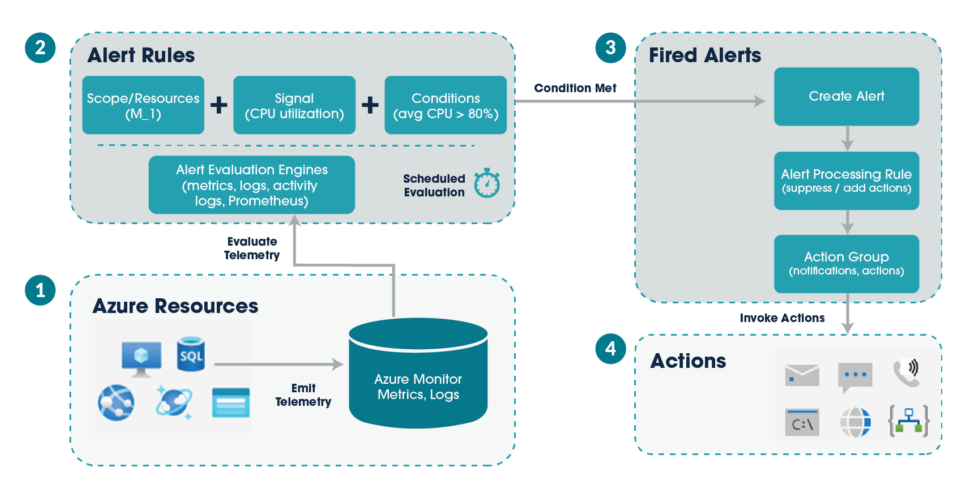
Azure Alerts is a service that helps you monitor the health of your Azure resources by automatically sending email and/or SMS notifications when a specified condition is met. You can set up alerts for various metrics, including CPU usage, memory usage and network traffic. Plus, you can create further customised alerts like application errors and volume of requests.
The following diagram shows how alerts work.
AZURE DASHBOARDS FOR APPLICATION MONITORING
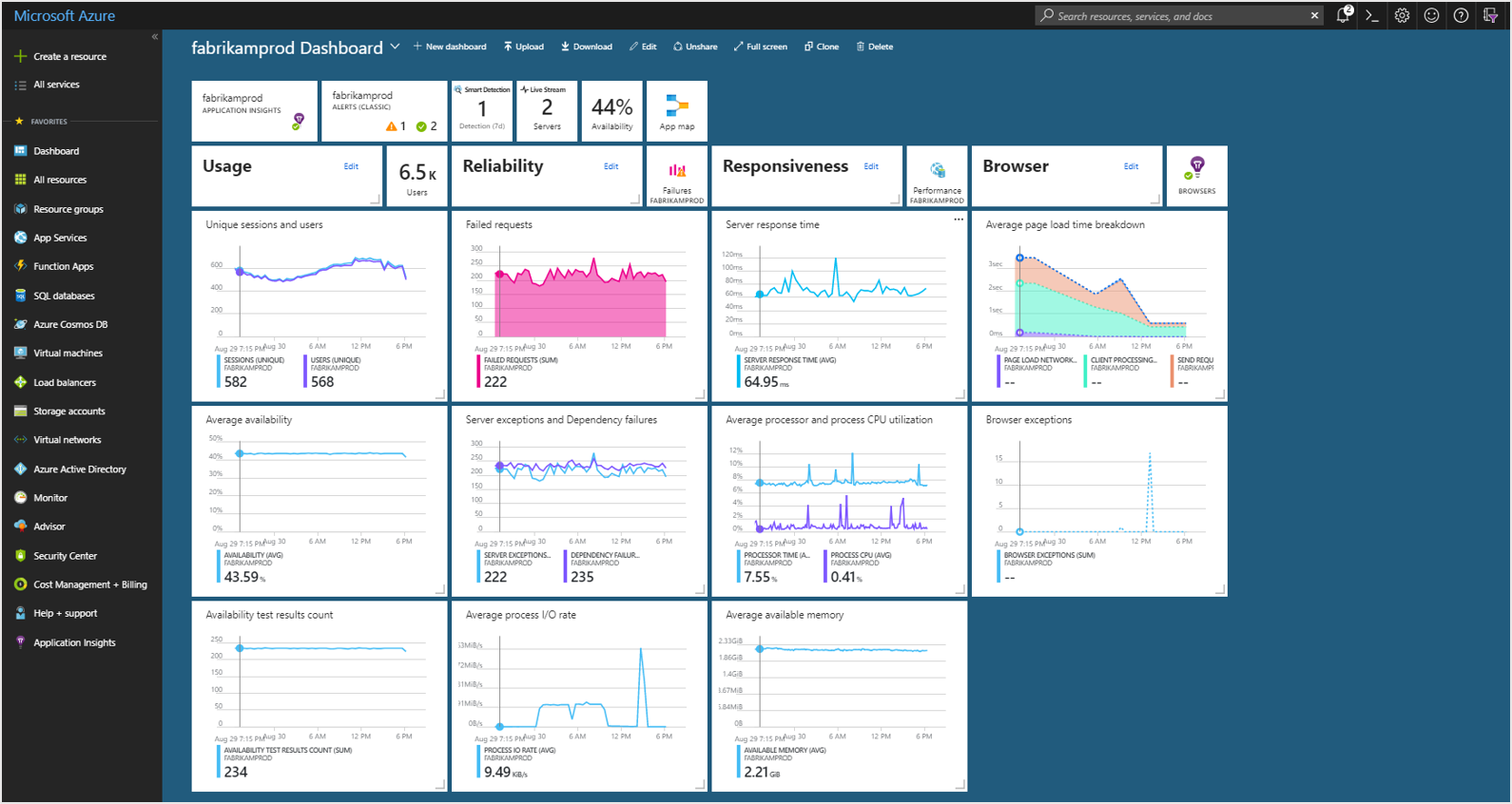
Azure Dashboard is a web-based tool that allows you to create interactive and customisable dashboards to monitor and analyse your Azure resources. With Azure Dashboards, you can collect data from various sources, including Azure Application Insights, Azure Monitor, Azure Resource Graph, and Azure Log Analytics. As well as create charts, tables, and visualizations. Together you gain insight into the performance of your resources and troubleshooting errors.
The image below shows a Dashboard set up to monitor an application’s resources.
AZURE BUDGETS FOR COST MANAGEMENT
Budgets within Cost Management help you plan for and drive organisational accountability. They help you proactively inform others about their spending in order to manage costs and monitor how spending progresses over time.
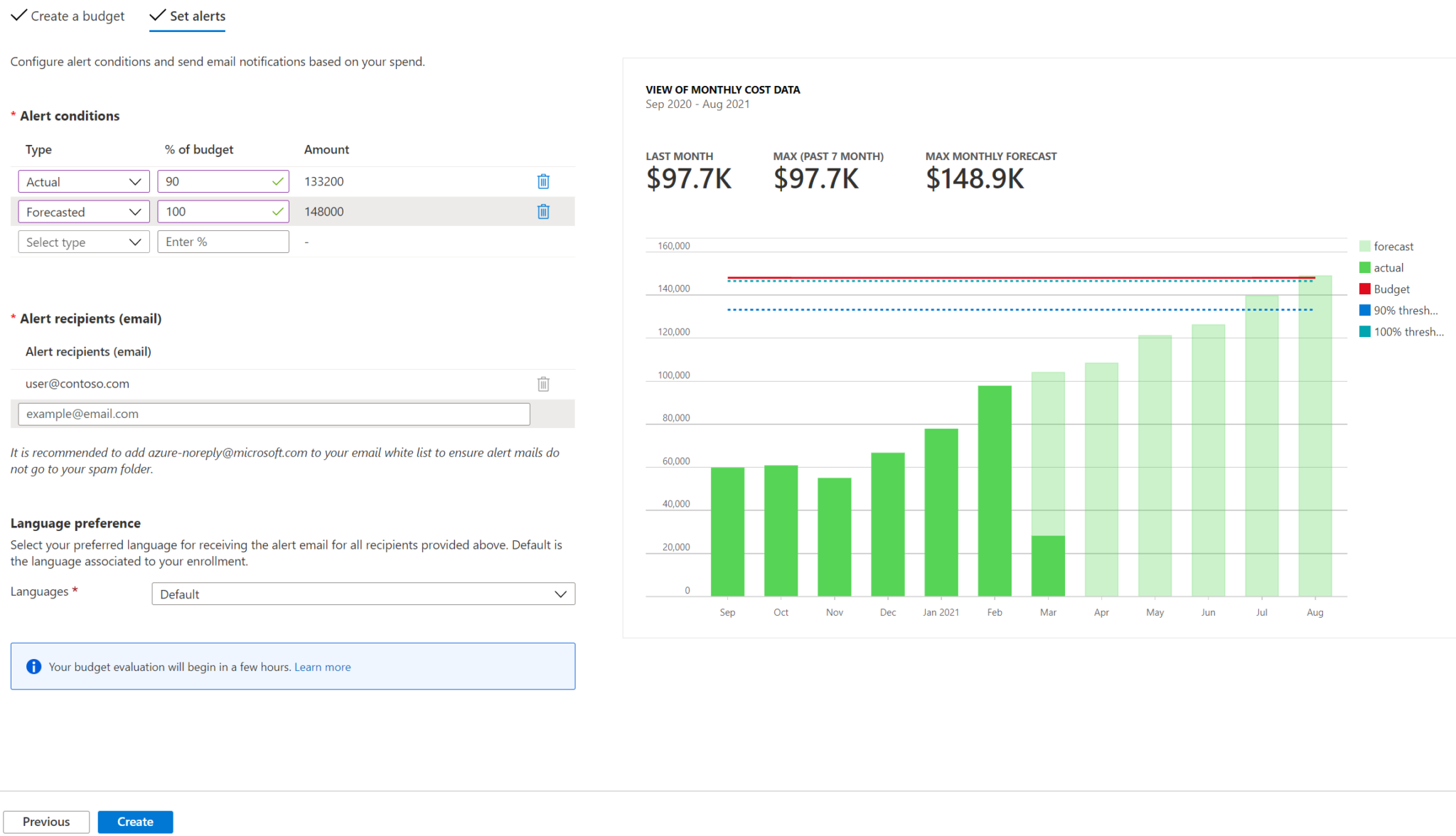
You can configure alerts based on your actual cost or forecasted cost to ensure that your spending is within your organisational spending limit. Notifications are triggered when the budget thresholds you’ve created are exceeded. None of your resources are affected, and your consumption isn’t stopped. You can use budgets to compare and track spending as you analyse costs.
In the following example, an email alert gets generated when 90% of the budget is reached.
CONCLUSION
By setting up Azure Alerts, using Azure Application Insights with Azure Dashboards and creating budgets, you can monitor the health of your applications, gain insights into how they are performing and manage your costs. This can help you identify issues and take action to resolve them before they impact your users’ experience and your expenditure. If you are new to Azure, we recommend exploring these tools and learning more about how they can help you manage your cloud-based workloads.
In this blog we look at the NoSQL database, Azure Cosmos DB. Covering its benefits and a specific use case. There has been tremendous growth within the NoSQL market. It is now common to see NoSQL databases as a key technology element when moving into a more digital world.
NoSQL has its advantages over classic databases and is a better fit for things like IoT applications, online gaming and complex audit logs where we can build flexible schemas, easily horizontally scaled. Which is hard to do with something like SQL Server sharding. And if modelled correctly sub-second query response time for globally distributed data sets is possible. Azure Cosmos DB is Microsoft’s offering as a managed service in the NoSQL world and is a market leader.
AZURE COSMOS DB OVERVIEW
Azure Cosmos DB is a globally distributed, multi-region and multi-API NoSQL database that provides strong consistency, extremely low latency and high availability built into the product. If you decide to go for a multi-region read-write approach you can get 99.999% read/write availability across the globe.
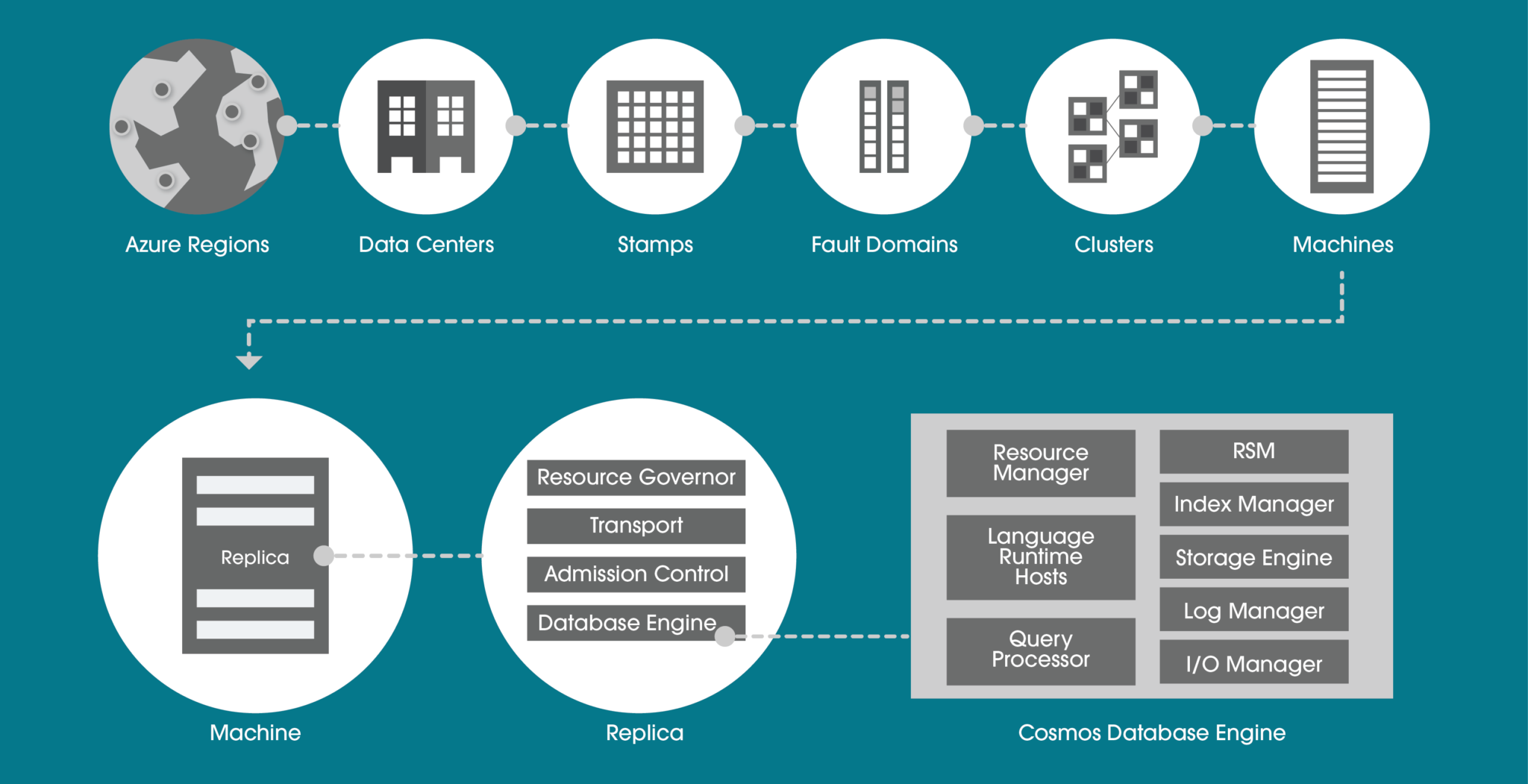
Within a data centre, Azure Cosmos DB is deployed across many clusters, each potentially running multiple generations of hardware. The below diagram shows you the system topology used. The key to a successful Azure Cosmos DB implementation is selecting the right partition key. This will be determined by the query profile (whether it is more read-based or write-based) and query patterns.
AZURE COSMOS DB APIS
There are many APIs available to use within Azure Cosmos DB and each has its own use case that your business may need.
HIGHLY SECURE
For technology decision-makers, security is a very important consideration. You will be asking yourself, does this technology cover all the layers within a security perimeter? Quite simply, Azure Cosmos DB does. This is possible with many different techniques. Let’s look at the more common features.
PRIVATE ENDPOINT
Private Endpoint is usually a must for enterprises. The ability to ultimately use your own private IP address range to connect to services makes using Azure Cosmos DB feel like an extension to your data centre.
You can then limit access to an Azure Cosmos DB account over private IP addresses. When Private Link is combined with restricted NSG (network security group) policies, it helps reduce the risk of data exfiltration.
ENCRYPTION IN FLIGHT
For encryption in flight, Microsoft uses TLS v1.2 or greater and this cannot be disabled. They also provide encryption for data in transit between Azure data centres. Nothing is needed here in terms of extra configuration, it is built into the service.
The same goes for data encryption at rest. Encryption at rest is implemented by using several security technologies, including secure key storage systems, encrypted networks and cryptographic APIs.
MICROSOFT DEFENDER
Microsoft Defender for Azure Cosmos DB provides an extra layer of security intelligence that detects unusual and potentially harmful attempts to access or exploit Cosmos DB accounts.
If you as a business already use Azure SQL and Microsoft Defender, it makes sense to continue with the same approach for the NoSQL environments. You will be alerted for SQL injection attacks, anomalous database access patterns and suspicious activity within the database itself.
MULTI-REGION
Do you need “planet” scale applications? If so, this is the technology for you. With this feature, you can replicate the data to all regions associated with your Azure Cosmos DB account. Typically you pick the regions closest to your customer base for that geographical region. Not only does it cater for this global audience but you also get side benefits such as high availability.
This is because if a region does become unavailable, then another region with automatically handle any incoming request. Thus the 99.999% SLA with the multi-region approach. If this is not enough, you can even enable every region to be writable, and elastically scale reads and writes all around the world.
AZURE COSMOS DB PRICING AND PERFORMANCE
Request Units (RUs) is a metric used by Azure Cosmos DB that abstracts the mix of CPU, IO and memory that is required to perform an operation on the database. The higher the RU, the more resources you have when executing a query. This naturally means a higher cost.
The number of RUs your database needs can be quite tricky to determine. Particularly coupled with the fact you might be using multi regions. These both impact the price.
Microsoft has a capacity calculator (https://cosmos.azure.com/capacitycalculator/) to help guide you through this important exercise. Let’s investigate an example where we will need to understand basic requirements such as data sizes and more complex concepts like item size and read speeds which will tell us the RUs needed, thus total cost.
AZURE COSMOS DB CALCULATOR EXAMPLE
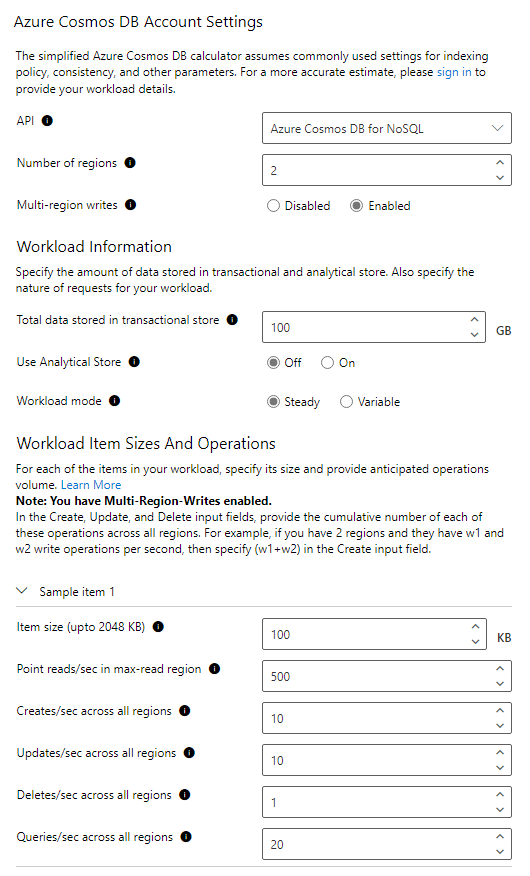
For this example, our workload requirements are:
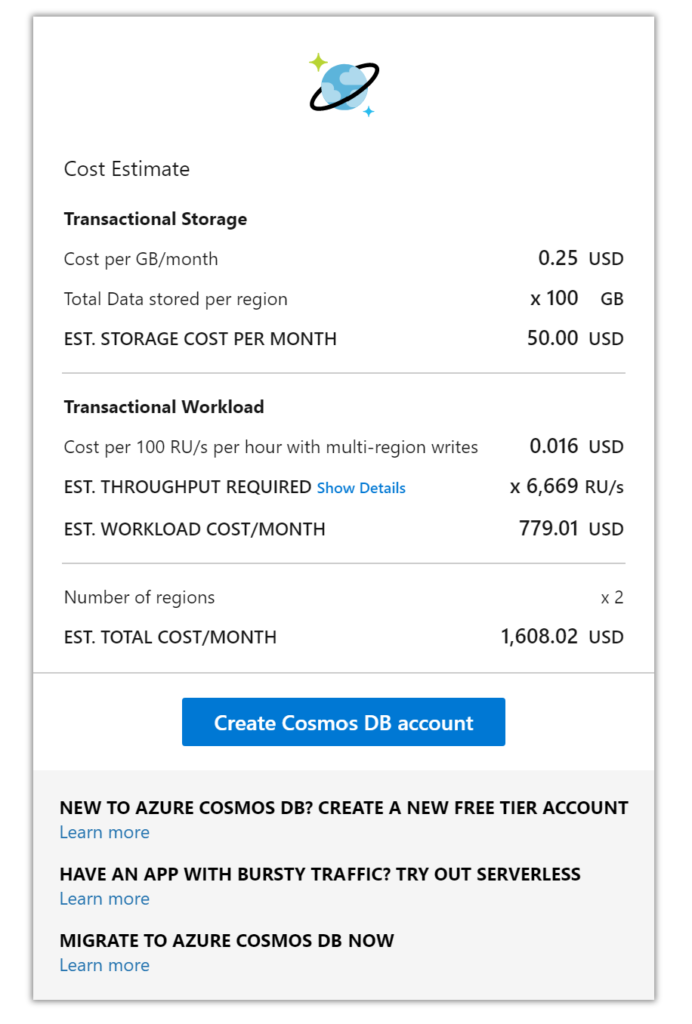
The RU calculation given is approximately 6,699 RUs which has a cost of $779 for the compute. Data storage for 100GB is $50 and adding another region means a total monthly cost of approximately $1608, this is without a reservation policy. If you wanted a 3-year reservation you could save up to 60% of the cost at the time of writing.
This is a very competitive price when you consider not only the performance you are getting from a multi-region write-based database but also the 99.999% SLA, built-in backups and benefits of a cloud-native database. To try and build something equivalent using just virtual machines would cost your business much more.
AZURE COSMOS DB CHANGE FEED
The change feed in Cosmos DB is a persistent record of changes to a container in the order they occur. Change feed support works by listening to a Cosmos DB container for any changes. These changes include inserts and update operations made to items within the container. So, think of the change feed as a persistent record of changes in the order that they occur which we can then use downstream.
EVENT SOURCING PATTERN
Why is this useful? With this feature, you could use an event sourcing pattern for your design which is quite common to see for things like an audit logging system where every state/action must be captured. The idea of event sourcing is that updates to your application domain should not be directly applied to the domain state. Instead, those updates should be stored as events describing the intended changes and written to a store (this being Cosmos NoSQL container). This can easily describe the function of an audit log.
The audit log for software is a critical component today because it ensures security and reliability for the application, especially in regulated markets like finance and insurance. Building this single source of truth where the system is creating an event after every change is very complicated to do with traditional databases like SQL Server or Oracle.
However, with something like Cosmos DB change feed, we can get global scale event sourcing setup quite easily. When you couple this feature with the right partition key and consider that Cosmos DB has financially backed SLAs covering availability, performance and latency, you can see there is great synergy between Cosmos DB and an event-sourcing approach.
Below is a high-level diagram of how this could look if you decide to use replication of the “event store” to another region. Showing you how to reach a global scale.
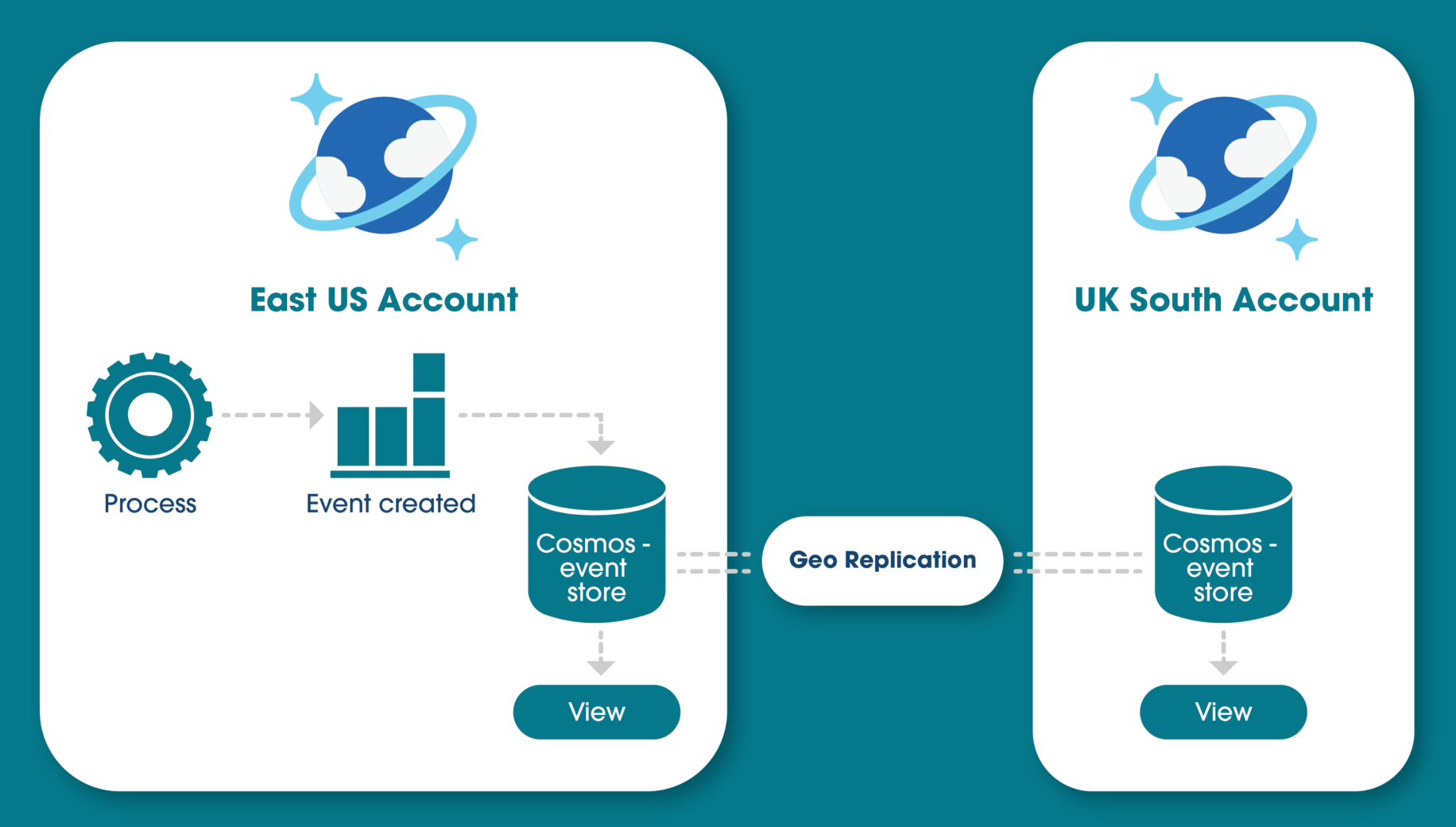
The idea of building a materialised view on top of the event store is common practice if, for example, you want to query the updates that happened, rather than everything, and make it available to multiple regions.
CONCLUSION
After reading this article you should now understand how a NoSQL system could fit within your business and all the core features and benefits that Microsoft’s Azure Cosmos DB can give you. From highly available multi-region SLAs and secure application development to its ability to cater for many markets and needs and the event sourcing approach that is possible.
If you are looking for consulting for your Azure Cosmos DB or are looking at using it in your application development, why not get in touch? We are experts in the full Azure development platform.
REFERENCES
