In October 2025, Microsoft will officially end support for Windows 10, marking a major shift for millions of users and organisations worldwide. Since its launch in 2015, Windows 10 has been the backbone of modern workplaces, powering everything from personal devices to enterprise-grade systems. As Microsoft pivots towards more secure, AI-enabled, and cloud-centric computing, organisations must prepare for the next phase: upgrading to Windows 11 or exploring cloud-native solutions like Azure Virtual Desktop (AVD).

This transition brings both opportunity and urgency. In this post, we’ll explore the key implications of Windows 10 end of support, the options available, and how organisations can navigate the shift without disruption.

What Does Windows 10 End of Support or End of Life Mean?

Windows 10 was released in July 2015 and was covered under mainstream support until October 2020. Since then, it has been covered by extended support. This extended support finishes in October 2025. As the end of extended support means no further security updates, patches, features or bug fixes, this is considered the official end of life for Windows 10.

While the operating system will continue to function, the lack of security updates alone poses a serious risk, particularly for organisations in regulated industries or those handling sensitive data. Unsupported systems quickly become low-hanging fruit for cybercriminals, and compliance auditors won’t be forgiving.

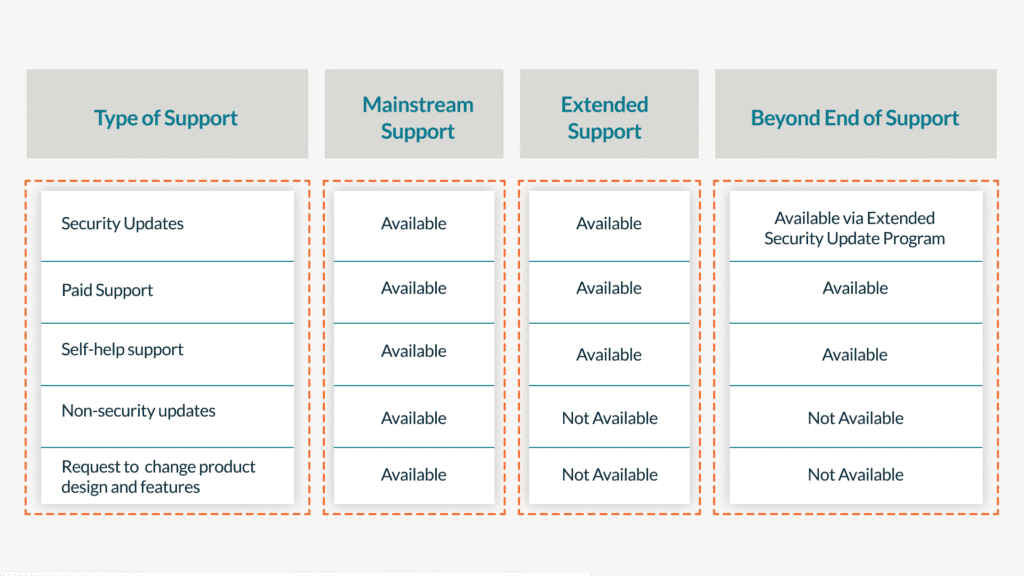
Understanding the Types of Support Coverage

Microsoft Support Coverage

For more details on Microsoft’s fixed lifecycle, read the policy here: Fixed Lifecycle Policy | Microsoft Docs.

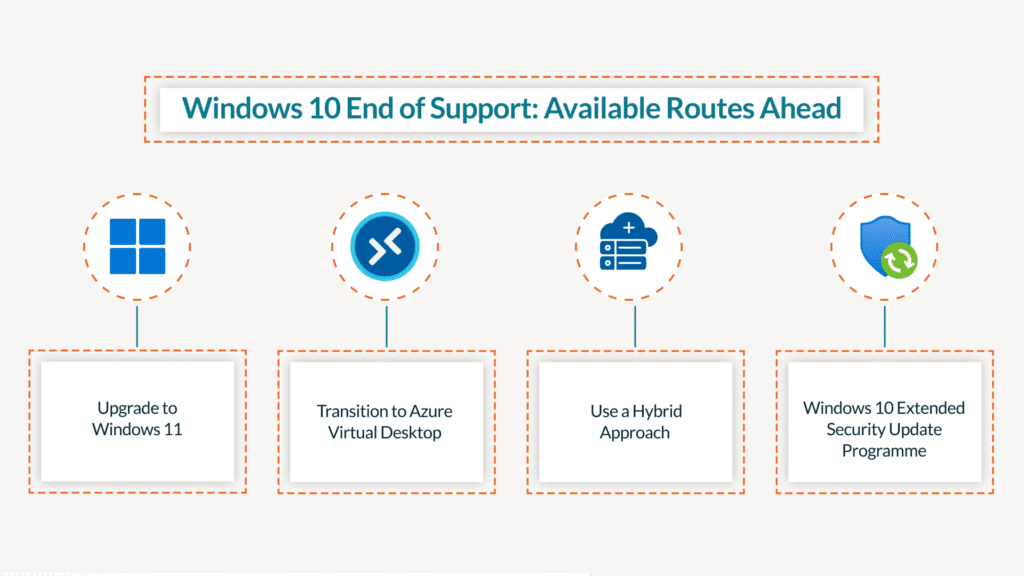
Windows 10 End of Support: Available Routes Ahead

Windows 10 End of Support: Available Routes Ahead

1. Upgrade to Windows 11

Windows 11 is Microsoft’s newest operating system, aimed at enhancing hybrid work, security, and productivity. It features an updated user interface, improved virtual desktop support, and enhanced integration with Microsoft 365 and AI tools such as Copilot.

Key Benefits:

  • Enhanced security: TPM 2.0 and Secure Boot are baseline requirements.
  • Improved performance: Optimised for newer hardware and more energy efficient.
  • Modern features: Integration with Microsoft Copilot, snap layouts, and better multitasking.

Considerations:

  • Hardware compatibility: Many existing devices may not meet Windows 11’s minimum system requirements. This can lead to a significant hardware refresh cycle.
  • Change management: New features and interface changes may require user training and updated IT policies.
  • Cost: Licensing is straightforward, but combined hardware and training investments must be planned.

If you have modern, compliant hardware and operate primarily in a traditional desktop environment, upgrading to Windows 11 is the most straightforward option.

2. Transition to Azure Virtual Desktop (AVD)

Azure Virtual Desktop is Microsoft’s cloud-based desktop and application virtualisation platform. It enables users to securely access a Windows desktop from any device, anywhere, with centralised management and built-in scalability.

Key Benefits:

  • No hardware dependency: Run Windows 11 in the cloud even on legacy or non-Windows devices.
  • Scalability and flexibility: Ideal for remote, hybrid, or global teams.
  • Centralised control: Easier to manage security, updates, and application access across the organisation.
  • Cost efficiency: The pay-as-you-go model can reduce the total cost of ownership, especially for short-term or seasonal users.

Considerations:

  • Cloud readiness: AVD relies on solid networking and identity infrastructure (like Azure AD and Intune).
  • User experience: Performance depends on internet bandwidth and latency—this means it won’t always be the ideal solution.
  • Licensing complexity: Requires Microsoft 365 licenses with virtualisation rights, plus Azure consumption fees.

3. Hybrid Approach

Many organisations may find a hybrid approach of the above two options more practical—upgrading frontline and core devices to Windows 11 while migrating part of the workforce (such as contractors, remote staff, or offshore teams) to AVD.

This allows you to:

  • Extend the life of older hardware via AVD
  • Test and scale cloud-based models gradually
  • Align IT strategy with business growth and evolving work patterns

4. Windows 10 Extended Security Update Programme

Organisations that require continued use of Windows 10 beyond October 2025 have one final temporary option: the Extended Security Update (ESU) program. This program provides critical security updates for up to three additional years after the conclusion of the extended support date.

This programme is available for purchase for Windows 10 for those who don’t manage to migrate off in time. You can find more information on the Windows extended security update programme here.

Key Benefits:

  • Access to security updates, even if you have not migrated off Windows 10
  • No additional cost for Windows 10 virtual machines
  • No minimum purchase requirement

Considerations:

  • Devices must be running Windows 10, version 22H2
  • It is an expensive route at $61 per device in the first year, and double the price for each consecutive year

What are the Ramifications of Not Migrating off Windows 10?

As Windows 10end of support looms, organisations face a critical decision: to migrate to a newer operating system or to deal with the complex challenges of maintaining outdated software. While the Extended Security Update (ESU) program offers temporary relief, it is neither a long-term solution nor a cost-effective one for most. Delaying the transition can have far-reaching effects, impacting security, compliance, and operational efficiency.

Delaying the transition from Windows 10 introduces multiple risks:

  • Cybersecurity vulnerabilities: Unpatched systems are a magnet for ransomware and zero-day attacks.
  • Regulatory non-compliance: ISO27001, Cyber Essentials, HIPAA, and other standards often mandate up-to-date systems.
  • Operational disruptions: Compatibility issues with modern software and tools will grow.
  • Support challenges: As vendors drop support for Windows 10, your IT team will face more maintenance headaches and reduced productivity.

Planning Your Migration off Windows 10

A smooth transition begins with strategic planning. As organisations prepare to migrate off Windows 10, a well-structured approach is essential to navigate the potential challenges and make the most of the opportunities that come with modernising IT infrastructure.

Here’s a basic roadmap:

  1. Assess your environment: Inventory all Windows 10 devices and evaluate hardware compatibility with Windows 11.
  1. Evaluate Organisational IT Strategy: Determine the route that most effectively aligns with your current IT context and objectives.

  2. Select Your Vendor: Decide whether to handle this internally, collaborate with an existing partner, or engage a specialised IT service provider.

  3. Conditional: Define user personas: Determine which user groups are best suited for local upgrades versus cloud desktops.

  4. Review licensing: Ensure you understand the Microsoft 365, Windows 11, and AVD licensing implications.

  5. Conduct pilot programs: Test upgrades and AVD deployments with selected user groups.

  6. Communicate and train: Roll out user guidance, FAQs, and support plans.

  7. Optimise and scale: Refine your deployment process, automate where possible, and scale in phases.

Final Thoughts

Windows 10 end of support is an important moment for businesses to enhance their user experience by transitioning to secure and modern solutions. Whether you’re planning a Windows 11 upgrade or exploring options like Azure Virtual Desktop, now is the right time to begin.

Start planning early, involve the right stakeholders, and use this opportunity to align your device strategy with the future of work.

If you’re unsure where to begin, get in touch to receive guidance on your assessment and deployment strategy. Whether it’s licensing advice, infrastructure optimisation, or full-scale migration support, expert help can save time and avoid costly missteps.

Transparity Awarded 15th Microsoft Specialisation: Low Code Application Development

We’re happy to share that Transparity has been granted our 15th Microsoft Specialisation: Low Code Application Development. This accomplishment solidifies our place as the UK’s most accredited Microsoft Partner, with specialisations across all 6 solution partner designations.

This accreditation validates our low-code expertise and gives us access to exclusive funding for workshops to help customers with their low code vision and business plan.

Microsoft Specialisations are the highest level of certification that Microsoft awards to its partners. They recognise partners who have proven their deep technical expertise and success in a specific area. To earn this specialisation, we passed a rigorous audit process that verified our knowledge, experience, and customer satisfaction in our low-code development projects.

“We are thrilled to have obtained the Microsoft Specialisation in Low Code Application Development. This success underscores our dedication to delivering innovative Power Platform solutions that allow our customers to quickly implement applications with substantial business impact. This accomplishment would not have been possible without our technical experts and the customers we have collaborated with on low code solutions.”

Tim Hannibal, Chief Partner Officer at Transparity

Cross-platform app development has been a major focal point in the world of software development. In a constantly evolving digital environment, the ability to seamlessly deploy applications across different platforms (Android, iOS, Windows, etc.) without recoding from scratch has become an essential factor for a timely and cost-effective development process.

Microsoft’s .NET Multi-platform App UI (MAUI) is an innovative framework that allows developers to design applications for different platforms using a shared codebase.

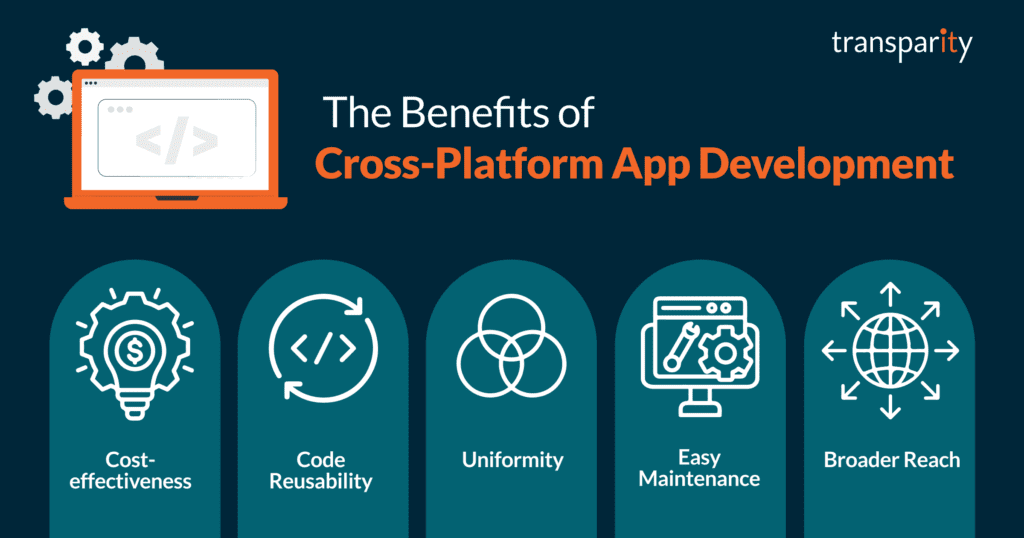
The Benefits of Cross-Platform App Development

The Benefits of Cross-Platform App Development

  1. Cost-effectiveness: Cross-platform app development significantly reduces cost as you don’t need to develop separate applications for different platforms. The same application can be developed once and run across multiple platforms, thereby saving time, resources, and development costs.
  1. Code Reusability: Instead of writing unique code for each platform, developers can reuse the same code for different platforms. This significantly decreases the development time.
  1. Uniformity: It ensures that the application looks identical on all platforms. This results in a better user experience as uniformity in design and functionality is maintained across all devices.
  1. Easy Maintenance: Since there’s only one codebase to manage and update, application maintenance becomes significantly easier and more efficient.
  1. Broader Reach: Cross-platform apps can run on multiple platforms, which directly increases your audience reach. A wider audience can significantly boost the business potential for an application.

.NET MAUI and Shared Code

MAUI, an evolution of Xamarin.Forms, is an open-source framework that allows developers to create applications for Android, iOS, macOS, and Windows from a single shared codebase. Let’s explore how MAUI enables the benefits of cross-platform app development.

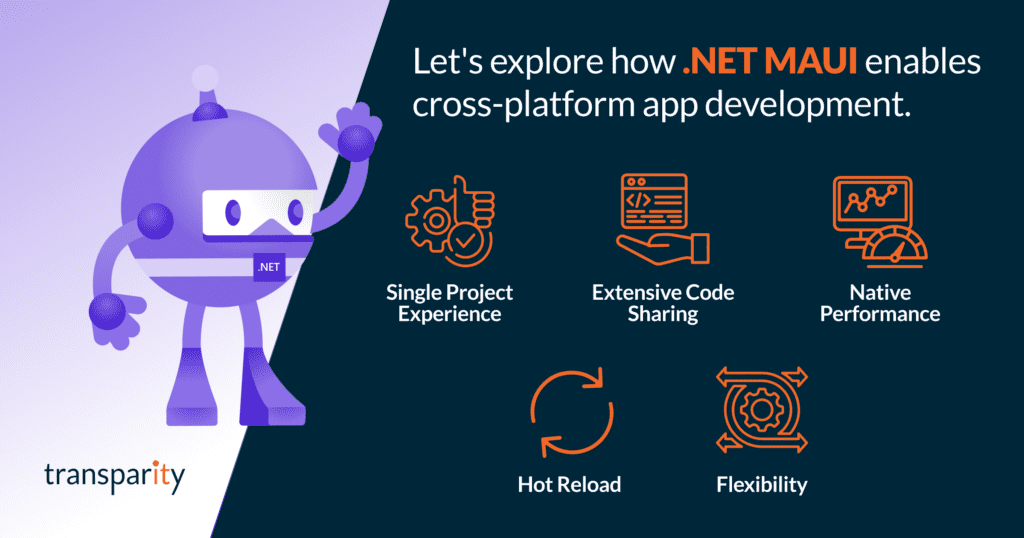
Lets explore how .NET MAUI enables cross-platform app development

  1. Single Project Experience: MAUI provides a simplified and unified project structure, which means you only need to manage a single project for all platforms. This significantly eases the process of building and testing the application.
  1. Extensive Code Sharing: With MAUI, up to 90% of the codebase can be shared across different platforms, reducing the amount of platform-specific code. This allows developers to build complex applications faster and with less effort.
  1. Native Performance: MAUI does not compromise on performance. The applications created with MAUI run natively on each platform, giving users a smooth and high-performance experience on every device.
  1. Hot Reload: It supports hot reload functionality that allows developers to make changes to their code and see the results in real time without restarting the application. This greatly speeds up the development process.
  1. Flexibility: Despite being a cross-platform tool, MAUI offers the flexibility to write platform-specific code when needed. This enables developers to leverage platform-specific APIs and services to customize their app’s behaviour on certain platforms.

Conclusion

The development landscape is becoming increasingly geared towards efficient and rapid application development. Using cross-platform app development and frameworks like .NET MAUI offers a strategic approach for developers, allowing them to create high-performing applications with broad reach, uniform design, and reduced costs.

Leveraging shared code reduces both development time and resource requirements, fostering faster time to market and easier maintenance. As technology evolves, the adoption of such versatile frameworks will undoubtedly rise, and businesses will continue to enjoy the manifold benefits of this development paradigm.

Explore our software development services

Since Broadcom’s acquisition, VMware SKUs have undergone significant changes. Our interactive table provides a comprehensive overview of the modifications made to the SKUs you were familiar with. If you are unsure about the abbreviations or current SKUs, refer to the descriptions provided below the table.

Previous standalone productsCurrent availability
VMware vSphere Enterprise PlusAvailable in VCF, VVF
VMware vSphere+No longer available
VMware vSphere EnterpriseNo longer available
VMware vSphere Standard (excluding subscription)Replaced with new vSphere Standard 
VMware vSphere ROBONo longer available
VMware vSphere Scale OutNo longer available
VMware vSphere DesktopNo longer available
VMware vSphere Acceleration KitsNo longer available
VMware vSphere Essentials KitNo longer available
VMware vSphere Essentials Plus (excluding new subscription offering)Replaced with vSphere Essentials Plus Kit
VMware vSphere Starter/FoundationNo longer available
VMware vSphere with Operations ManagementNo longer available
VMware vSphere BasicNo longer available
VMware vSphere AdvancedNo longer available
VMware vSphere Storage ApplianceNo longer available
VMware vSphere Hypervisor (free edition)No longer available
VMware Cloud Foundation/VCF+/VCF-S (excluding new VCF subscription offering)Replaced with VMware Cloud Foundation (new)
VMware Cloud Foundation for VDINo longer available
VMware Cloud Foundation for ROBONo longer available
VMware SDDC ManagerAvailable in VCF 
VMware vCenter StandardAvailable in VCF, VVF and vSphere STD 
VMware vCenter FoundationNo longer available
VMware vSANAvailable in VCF, VVF, vSAN add-on 
VMware vSAN ROBONo longer available
VMware vSAN DesktopNo longer available
VMware vSAN+No longer available
VMware HCI KitNo longer available
VMware Site Recovery ManagerAvailable in SRM Add-On Service
VMware Cloud Editions/Cloud PacksReplaced with VCF, VVF
VMware vCloud SuiteReplaced with VCF, VVF
VMware Aria Suite (formerly vRealize Suite)Available in VCF, VVF
VMware Aria Universal Suite (formerly vRealize Cloud Universal)No longer available
VMware Aria Suite TermAvailable in VCF, VVF
VMware Aria Operations for Networks (formerly vRealize Network Insight)Available in VCF 
VMWare Aria Operations for Networks Universal (formerly vRealize Network Insight Universal)No longer available
VMware vRealize Network Insight ROBONo longer available
VMWare Aria Operations for Logs (formerly vRealize Log Insight)Available in VVF, VCF 
VMware vRealize Operations 8 Application Monitoring Add-OnNo longer available
VMware Aria OperationsAvailable in VVF, VCF 
VMware Aria AutomationAvailable in VCF 
VMware Aria Suite Cloud for US Public SectorNo longer available
VMware Aria Automation for Secure Hosts add-on (formerly SaltStack SecOps)Available in Tanzu Guardrails Add-On 
VMware vRealize Automation SaltStack SecOps add-onAvailable in Tanzu Guardrails Add-On 
VMware Aria Operations for Integrations (formerly vRealize True Visibility Suite)Available in VCF, VVF
VMware Cloud DirectorAvailable in VCF (CSP only)
VMware Cloud Director ServiceNo longer available
VMware NSXAvailable in VCF and VMware Firewall (with ATP)
VMware NSX for DesktopAvailable in VCF and VMware Firewall (with ATP) 
VMware NSX ROBOAvailable in VCF and VMware Firewall (with ATP) 
VMware NSX Distributed FirewallAvailable in VCF and VMware Firewall
VMware NSX Gateway FirewallAvailable in VCF and VMware Firewall
VMware NSX Threat Prevention to Distributed FirewallAvailable in VCF and VMware Firewall (with ATP)
VMware NSX Threat Prevention to Gateway FirewallAvailable in VCF and VMware Firewall (with ATP) 
VMware NSX Advanced Threat Prevention to Distributed FirewallAvailable in VCF and VMware Firewall (with ATP) 
VMware NSX Advanced Threat Prevention to Gateway FirewallAvailable in VCF and VMware Firewall (with ATP)
VMware Advanced Load BalancerAvailable in VMware Avi Load Balancer Add-On (also standalone)
VMware Container Networking Enterprise with AntreaAvailable in VCF and VMware Firewall 
VMware HCXAvailable in VCF 
VMware HCX+No longer available
Tanzu Kubernetes Grid (vSphere with Tanzu) **Available in VVF and VCF

VMware Primary Offerings

VMware by Broadcom now has two primary offerings: VCF and VVF. Comparison documentation is available here: feature-comparison-and-upgrade-paths-vcf-and-vvf (vmware.com)

  • VCF (VMware Cloud Foundation):

VMware Cloud Foundation is a comprehensive platform that integrates compute, storage, networking, and management into a single stack at the enterprise level.

  • VVF (VMware vSphere Foundation):

VMware vSphere Foundation is a simplified platform designed for mid-sized to smaller customers. It integrates vSphere with intelligent operations management to provide performance, availability, and efficiency.

vSphere Subscription Variations

Beneath vSphere Foundation, there are two subscription variations which provide fewer features. Comparison available here: vSphere Product Line Comparison (vmware.com)

  • vSphere Standard (also known as vSphere STD):

vSphere Standard provides basic server consolidation to reduce hardware costs and accelerate application deployment.

  • vSphere Essentials Plus Kit:

This kit is designed for small businesses starting with virtualization. It provides virtualization and centralized management for up to three server hosts.

Available Add-Ons

With the large reduction of SKUs a lot of optional add-ons are now incorporated into the above SKUs, however there are still a few available separately:

  • Vmware Avi Load Balancer:

This product delivers scalable application services including load balancing, application analytics, and security for both on-premise and cloud environments.

  • vSAN Add-on:

The vSAN Add-on integrates hyper-converged infrastructure capabilities directly into the VMware vSphere hypervisor.

  • SRM Add-on Service:

The Site Recovery Manager (SRM) Add-on Service facilitates disaster recovery planning and automation.

  • Tanzu Guardrails Add-On:

Tanzu Guardrails provides governance and compliance controls for Kubernetes environments.

  • Vmware Firewall:

This firewall provides robust security controls to protect your virtualized environment.

  • ATP (Advanced Threat Protection):

Vmware’s Advanced Threat Protection (ATP) offers comprehensive threat detection and response capabilities.

Free VMware Rapid Migration Assessment

We promise to find you the best migration route for your workloads. If you end up with AVS, we can offer you:

  • 5-year fixed pricing
  • A rapid migration
  • Technology your team understand
  • 3-year free security updates

Enquire today

Advisory: Microsoft Outage

 We are currently monitoring reports of the network infrastructure outages that are affecting Microsoft 365 and Azure services. We are aware of the impact, and are monitoring the situation closely.  

Azure is currently experiencing a widespread outage that is affecting many of its services and regions. This includes UK West and UK South. The outage started at around 12:00 UTC and is ongoing. Azure engineers have identified multiple workstreams and are performing failover operations to mitigate impact. You can view live updates for the issue here: Azure status. 

How does it affect you? 

This outage can affect your Microsoft 365 resources, access to data, applications, and resources hosted on Azure, as well as access to the Azure portal itself. You may be unable to access these services for the duration of the outage. Some of the affected services include Azure Active Directory, Azure Storage, Azure SQL Database, Azure Virtual Machines, Azure App Service, Azure Functions, Azure Logic Apps, Azure Service Bus, and Azure Event Hubs. 

What should you do? 

If you are a customer and are experiencing issues in your environment caused by this outage, please report these to the Service Desk (support@transparity.bumblebeeitsolutions.com or 01202 800001). We will assist you with triage and escalation as needed. 

If you are not a customer and you need support, please reach out via our contact page or call 01202 139262 and we will be happy to help. 

Need help?

As a customer you have direct access to the support team on support@transparity.bumblebeeitsolutions.com or 01202 800001

Transparity Successfully Retains the Prestigious Microsoft Accreditation – Azure Expert MSP

We are proud to announce we have been recognised as a Microsoft Azure Expert Managed Service Provider (Azure Expert MSP) for the second consecutive year. This is the highest Microsoft accreditation available within Azure and is a true recognition of Transparity’s expertise, knowledge, and the quality of service we deliver in Azure.  

Since its inception in 2018, the Microsoft Azure Expert MSP programme has highlighted elite Microsoft Partners with proven expertise in end-to-end cloud management. We are one of only a handful of UK partners to  have been granted the Azure Expert MSP badge to date.   

This thorough audit takes a full look at our work within Azure and is an acknowledgement of the high-quality work we deliver in our Azure managed service, Azure consultancy team, and our Azure App Innovation practice.

“We are extremely pleased to retain our position among Microsoft’s top-tier cloud partners. The successful renewal of our Azure Expert MSP status is a testament to the dedication of our cloud architects, engineers and technical consultants, who ensure that customers receive exceptional service as they adopt and embrace Azure solutions.”

Kelvin Papp, Chief Technology Officer at Transparity

The achievement of this status along with our advanced specialisations is not just an acknowledgment, but also opens the door to Microsoft programmes that are of direct benefit to our clients. Such as the Azure Migration and Modernisation program – where our clients can get funding and access to Microsoft expertise, training and exams. 

The successful renewal of this status along with our incredible 12 specialisations places us as the most accredited Microsoft Partner within the UK – a status we are incredibly proud of. 

“Our people are our greatest assets. We have an extraordinary group of Microsoft Certified Professionals in our business, and all our staff members pursue training and certification to the highest level. But more than that, our teams are known for their focus, their quality of work and their determination to help customers derive maximum value from every Microsoft cloud resource.”

Tim Hannibal, Chief Partner Officer at Transparity

Transparity Awarded 12th Specialisation: Modernisation of Web Applications with Microsoft Azure

We’re delighted to announce that Transparity has earned yet another specialisation – Modernisation of Web Applications with Microsoft Azure. This specialisation is our 12th in total over the full 6 solution partner designations. Coming right off the back of achieving our 6th and final solution partner designation and officially becoming the most accredited partner in the UK!

Since the acquisition of Ballard Chalmers in 2021 as the Digital & App Innovation arm of Transparity and Application Modernisation specialists for over a decade, this was the fitting next step in demonstrating this expertise now on offer within Transparity.

Specialisations were designed by Microsoft to acknowledge partners with a deep technical knowledge in a given area. Only elite partners earn specialisations, being the highest level of certification provided by Microsoft.

This specialisation involved a comprehensive audit to validate our deep knowledge, extensive experience, and demonstrated success in migrating and deploying production web application workloads, applying DevOps, and managing app services in Microsoft Azure.

”We are delighted to have successfully achieved this specialisation which reflects the incredible depth of technical talent  and experience in the team and the excellent results being achieved for our clients.”

Andrew Chalmers, General Manager App Innovation at Transparity

There are multiple modernisation and migration routes available to organisations. Here we will explore the 5 R’s of migration: rehost, refactor, rearchitect, rebuild and replace. And a bonus of two non-migration routes: retain and retire.
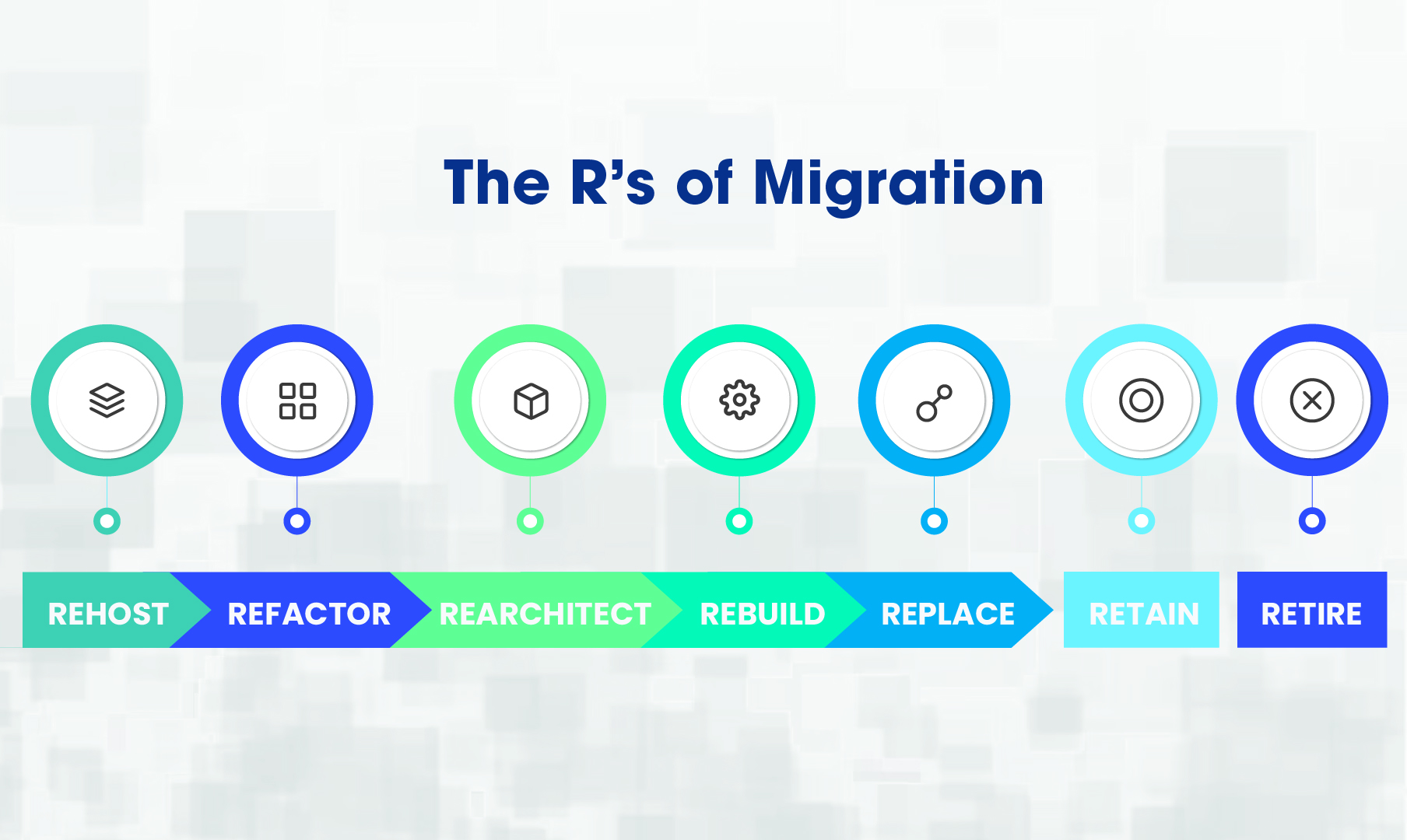
There is no one answer for the best approach as it depends on the individual workload and business situation. Your budget, complexity of workload, current environment, timescales and objectives will determine the most suitable route.

No matter what stage of the migration journey you are on, an organisation will benefit from a long-term cloud strategy focusing on migrating, optimising and modernising. That way the cloud platform becomes a part of the strategy truly aiding in innovation, growth and profit.

Let’s explore the options available.

MIGRATION ROUTES

1  REHOST

The most basic migration approach is simply rehosting your app in the cloud. This is also known as lift it and shift. It is done by moving the workloads to virtual machines in the cloud with no or minimal change to the architecture.

If your organisation wants to migrate away from the constraints of traditionally hosted services in a data centre and leverage the benefits of the cloud such as reducing costs, increasing resilience and auto-scaling then this is a good first step.

However, things to consider are the VM size, and what level of CPU, memory, and storage are required.

An Azure infrastructure team can help you here as no developers are required.

2  REFACTOR

Next up in the scale is refactoring, the step in between rehosting and rearchitecting. It involves implementing some changes to optimize for the cloud environment but no wholesale change to the code itself.

You get the same benefits as rehosting, but you will get better cloud efficiency in cost, speed and resources. If you are looking for code portability and/or faster updates, this is a particularly good migration route.

Again, an Azure infrastructure team can help you here as they are the experts in optimizing cloud environments.

3  REARCHITECT

At this point, your application is rearchitected to take advantage of cloud-native features. The process of app modernisation identifies and redesigns the architecture to adopt these features which may result in software changes.

The resulting rearchitected application will be optimised to reduce costs, scale, have high availability and grow as your business grows.

If you are already invested in your app but looking to the future and use of cloud capabilities, this migration route may be the most suitable.

For this level, you need an Azure development team with expert knowledge of infrastructure and software engineering best practices. As architecture and code changes are being made, your app needs to be in the hands of knowledgeable engineers.

4  REBUILD

Here an app is totally rebuilt from scratch using cloud-native technologies. At first, this can seem like an expensive move to the cloud, however as you dive straight into cloud-native technology, your application is able to utilise cloud features from the start and adopt best practices. Indeed, many apps which migrate to the cloud are later rebuilt anyway.

To truly have a business case for something this wholesale, you will usually find this migration route used when an app has declining end-user satisfaction and/or business processes are limited by functionality.

However, the other compelling business case for rebuilding is when the cost or complexity of using one of the previous three R’s actually outweighs the cost to rebuild. A situation one of our clients found themselves in: the legacy software was so convoluted and complex to unravel that in fact, the easier and more cost-effective option was to rebuild the app from scratch in the cloud – a project we are now undertaking.

If a company is strongly investing in digital transformation, then the potential cost, experience and revenue gains are also strong drivers.

Again, for this migration approach, you need an Azure development team who are strong in cloud-native technologies and who will rebuild your app to make the most of all relevant cloud functionalities available.

5  REPLACE

The final migration route is a little different. With the growth of SaaS products, you may find you no longer need a custom product and instead of migrating your app to the cloud, can leverage an existing service that provides all necessary functionality.

If your app is providing something standardly needed within an industry it is quite possible it exits as a SaaS solution. That means rather than focussing on modernising this app, your investment can go into other apps that give you a competitive advantage.

Here the SaaS company would most likely have a team or process in place to help migrate your data over to their product and you are unlikely to need to hire an Azure team for any work.

OTHER R’S OF MIGRATION – NON-MIGRATION ROUTES

When looking at the 5 migration approaches or R’s of migration, there are two more that can be included. These are retain and retire. These are not approaches to migration but in fact, choices to not migrate.

1  RETAIN

Retain is unlikely to be a cost or business-effective strategy with the huge shift to the cloud, but at times, when looking at budget or functionality it may be the case that temporarily retaining an app in its current state is the best option available.

Occasions such as when an organisation can treat a legacy system as read-only. Possibly due to the fact data migration to a new system doesn’t warrant the cost involved. Or the system can be retained with a view to retiring it when the system data is obsolete

2  RETIRE

Retiring is worth considering if in fact an app no longer provides enough use and there is no need to replace or rebuild it as it could simply be decommissioned. As times change and business processes shift, what was once vital perhaps no longer has the business case it used to. If that is the case, both budget and effort can be redirected onto more necessary migration and modernisation targets.

MODERNISATION AND MIGRATION WITH TRANSPARITY

As development experts, we are on hand for rearchitecting and rebuilding. As development and modernisation experts, and users of the Microsoft platform for decades, our Azure developers are ideally suited to helping you rearchitect or rebuild your app to make the most of cloud-native features.

However, if that is not the right migration route for you at this point, there is also the Transparity Azure infrastructure team, perfectly placed to help you rehost or refactor your workloads in the Azure cloud.

For replacement, our experts will point you in the direction of an off-the-shelf product, if familiar with one, that would be more cost-effective than a custom build. We always want to be doing the best for you, your goals and your budget.

FAQs

What are the R's of cloud migration?

The R’s of cloud migration are: Rehost, Refactor, Rearchitect, Rebuild, Replace, Retain & Retire. These strategies support organisations to plan, successfully deliver and optimise migration projects.

The best migration strategy for legacy applications depends on the outcome an organisation wishes to achieve. The simplest strategy is to rehost, as this causes minimal disruption. However, other strategies such as refactoring can unlock benefits such as increased efficiency in cost, speed and resources.

The time required for each cloud migration strategy depends on factors like application complexity, data volume and expertise. Rehosting is the fastest method and can be executed in a matter of weeks for smaller applications. However, refactoring and rearchitecting may take months or even years.

You should choose rehosting if you want lower upfront costs and fast migration. However, refactoring is the better choice for organisations who are willing to take extra time to receive long-term benefits such as maximising cloud benefits and enjoying high level of scalability.

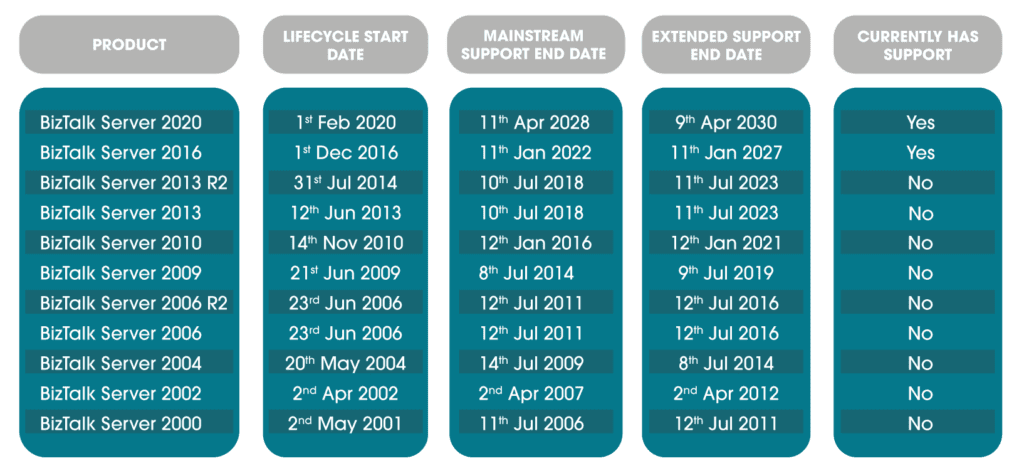
In this blog, we look at the different BizTalk Server versions along with the corresponding end of support and the overall BizTalk lifecycle. The first BizTalk Server was released in the year 2000 and since then we have seen regular releases until the latest release – BizTalk Server 2020.

Organisations who have been using BizTalk Server for a while may have lost track of which version they are using, when support has run out, if and until when extended support is available and so on. So we are going to catch all these end-of-support dates here.

The BizTalk Lifecycle – BizTalk Server Versions

This is a complete summary of each BizTalk Server version, its release date, end of mainstream support and end of extended support, also known as end of life. You can also note rapidly which versions are currently being supported.

BizTalk Server and Windows Server

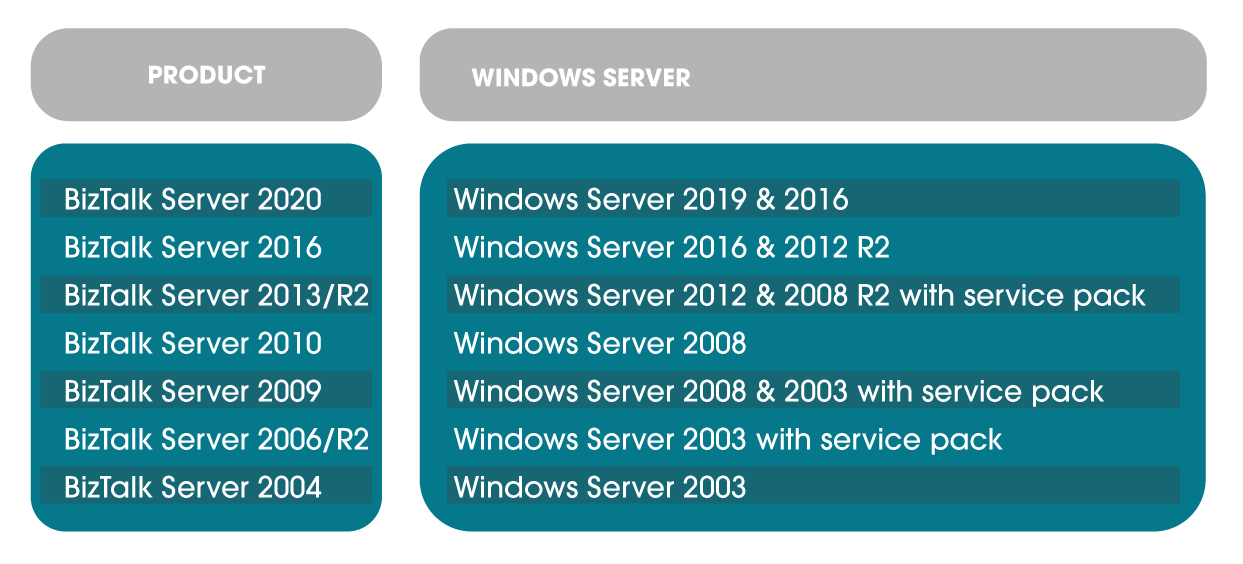
Being on old unsupported BizTalk servers is one issue, but BizTalk is stable and often the bigger issue is that old BizTalk servers run on even older Windows Server versions and this is a greater support problem. Below is a convenient guide on which Windows Server each BizTalk Server version supports.

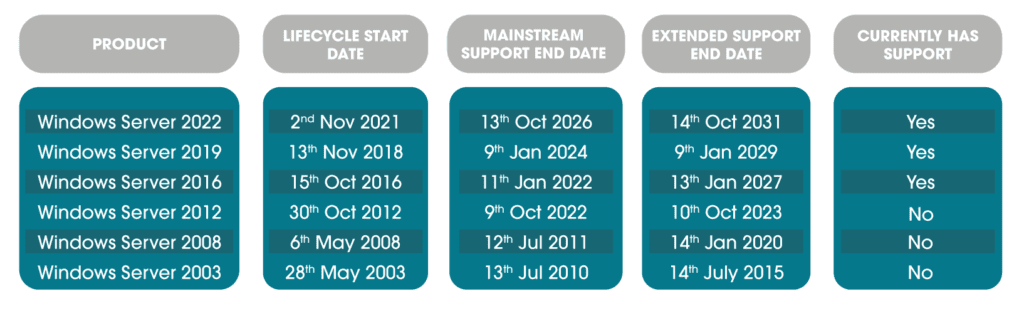
Here is a roundup of each Windows Server version, its release date, end of mainstream support and end of extended support, also known as end of life. You can also note rapidly which versions are currently being supported.

Your BizTalk Server Roadmap – When and How to Modernise

Using the information above and following the instructions in this document as required (What Version of BizTalk Server Do I Have? | Microsoft Docs) you will be able to see if you are using an out-of-support version of BizTalk or the accompanying Windows Server.

Anything earlier than this is not within support or extended support, which means applications are at risk. Let’s look at exactly what you may be missing.

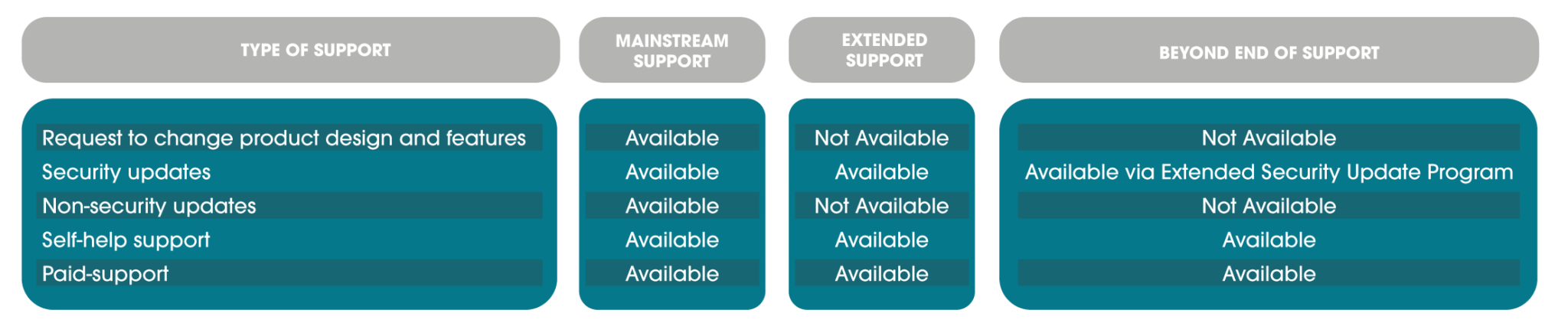
Mainstream Support

This is the main life of a product, you can expect to see cumulative updates occasionally and have the ability to request design changes and new features. Additionally, you can open support tickets, get security updates, security support, non-security fixes and so on.

Extended Support

During this phase, you can open paid support tickets and get security updates but no non-security fixes, features or design changes will be acted upon. There are no updates released during this period.

You can read more about what the fixed lifecycle looks like at Microsoft in this policy: Fixed Lifecycle Policy | Microsoft Docs

Extended Security Update Programme

There is a last resort for organisations who need to run legacy applications past even extended support. This is the Extended Security Update (ESU) programme. It only includes critical and sometimes important security updates and is for a maximum of three years past the end of extended support date.

This programme is purchased and not available for all products, it currently includes some Windows Server versions and no BizTalk Server versions. Details can be found here. FAQ – Extended Security Updates | Microsoft Docs

Other Modernisation Factors

Aside from access to support and security, there are two other large drivers in modernising. The key is of course the latest features and functionality available in newer versions.

The second is that due to the nature of BizTalk, it is interacting with and may depend on a large range of other applications which may not be supported by an older BizTalk version. As time passes, this becomes more of a factor, with newer software being designed to make the most of the latest BizTalk features and increased functionality in newer applications no longer being compatible with older BizTalk versions.

Keeping this in mind, you can see why you do not want to find yourself on BizTalk Server 2006, depending on Windows Server 2003!

A note about BizTalk Modernisation

Due to the nature of the updates, you cannot always make a leap from an old BizTalk Server version to the most recent, for example from BizTalk Server 2003 to BizTalk 2020. You may find you require a migration to BizTalk 2016 first, and then from there, the migration to BizTalk 2020 becomes possible. Or perhaps at that point, making the jump to the cloud and Azure Integration Services would be on the horizon.

BizTalk Migrations at Transparity

With Windows Server 2012 and BizTalk Server 2013 recently out of support, we have been undertaking a wide range of BizTalk migrations. 

However other clients have BizTalk servers dating as far back as 2006. With this type of migration, all older versions are being brought up to BizTalk 2016 and then addressed from there.

[mwai_chatbot id="chatbot-8s20vg"]
Skip to content