
The way we deploy infrastructure has changed. Over the last few years, there has been a big shift in the mentality and how Infrastructure is deployed in Projects and managed in BAU operations. Traditionally, when deploying services in a Public or Private Cloud service like Azure, AWS, GCP, Hyper-V or VMware you would use the Portal experience now known as ClickOps to stand up your Virtual Machine or Network or use Python Scripting to deploy services in VMware Hypervisors.
Why this matters to Executives within an organisation is that though these deployment mechanisms do serve the purpose of provisioning what is expected, it does introduce potential trip hazards or operational risks:
To address these concerns, Infrastructure as Code (IaC) using DevOps Frameworks (CI/CD) is being adopted by companies of all sizes (small to enterprise businesses) simply not as a bolt on but as their only method of deploying and managing Infrastructure.
In short, Infrastructure as Code means defining Cloud Infrastructure via version control in a file repository rather than building it manually through Web Portals.
IaC Tooling in the Microsoft Cloud space consists of 3 main products:
Selecting the suitable tool out of the above depends on your requirements but Terraform appears to be increasingly adopted in most sectors but it is also common to use multiple IaC tools for different Platforms or resources.
The use of IaC has seen Engineers adopt a Software Delivery Development / Lifecycle mindset and CI/CD Delivery tooling and frameworks as opposed to traditional Infrastructure, nuts and bolts.
The learning curve for this is steep but Engineers can upskill by completing the variety of Courses, learning materials and Certification Paths that are out there but it is advised that you simply just start small.
When IaC has been adopted both technically and operationally, organisations can gain the following benefits:
Although IaC does come with a variety of positives and wins for organisations, it does introduce a number of problems if not adopted fully within your Technical Teams and delivery models.
The following principles of IaC must be embedded into Code structure and repository:
K.I.S.S – Keep It Simple Stupid: Keep the code as simple as possible without convoluted structures and mechanisms. Overcomplication leads to single point of failure, poor scalability and weak adoption among engineers.
D.R.Y – Do Not Repeat Yourself: This principle avoids hard coding resources into your code that would be better stored in a variable that can be called throughout your code base rather than statically entered across multiple lines of code, change becomes easier to manage with D.R.Y is embedded.
To adopt IaC, unless you’ve brought in experienced expertise (DevOps Engineers) then start small, deploy simple and low impact services via a Pipeline, ensure the code is repeatable, simple and easy to adopt.
If an organisation cannot hire these skills but wish to adopt, then it is key to learn the CI/CD Lifecycle and Frameworks, so you understand how IaC environments operate and are managed.
Transparity among others in the Microsoft Partner Eco-System have IaC-as-a-Service offerings who can help with code changes and releases.
In this blog series, we discuss Governance in Azure and how to ensure you have covered all aspects and thought about the most valuable areas for your business and the way you work. This blog looks at how Azure Tagging plays a significant part in establishing a strong Governance posture in your Azure subscriptions. Tags are similar to clothing tags, in that the tag would be used to identify a brand, colour, size, cost, record of demand, and ultimately its value to your business.
By utilising Tags in Azure, you can gain insights into your workloads, usage, associated costs, owner, and even orphaned resources.
When considering your Azure Tag strategy, it is sensible to consider the following:
Once you have defined your Tag Strategy, you should use Azure Policy to apply your Tags to ensure that all resources that support newly deployed Tags and/or create a remediation task to apply Tags to existing resources. There are multiple options within Azure Policy where you can apply Tags based on a Resource Group and subsequently the resources within can inherit the Tags.
Your Tag Strategy should be defined at the start of your Landing Zone design however these are common Tags that are frequently used as a baseline:
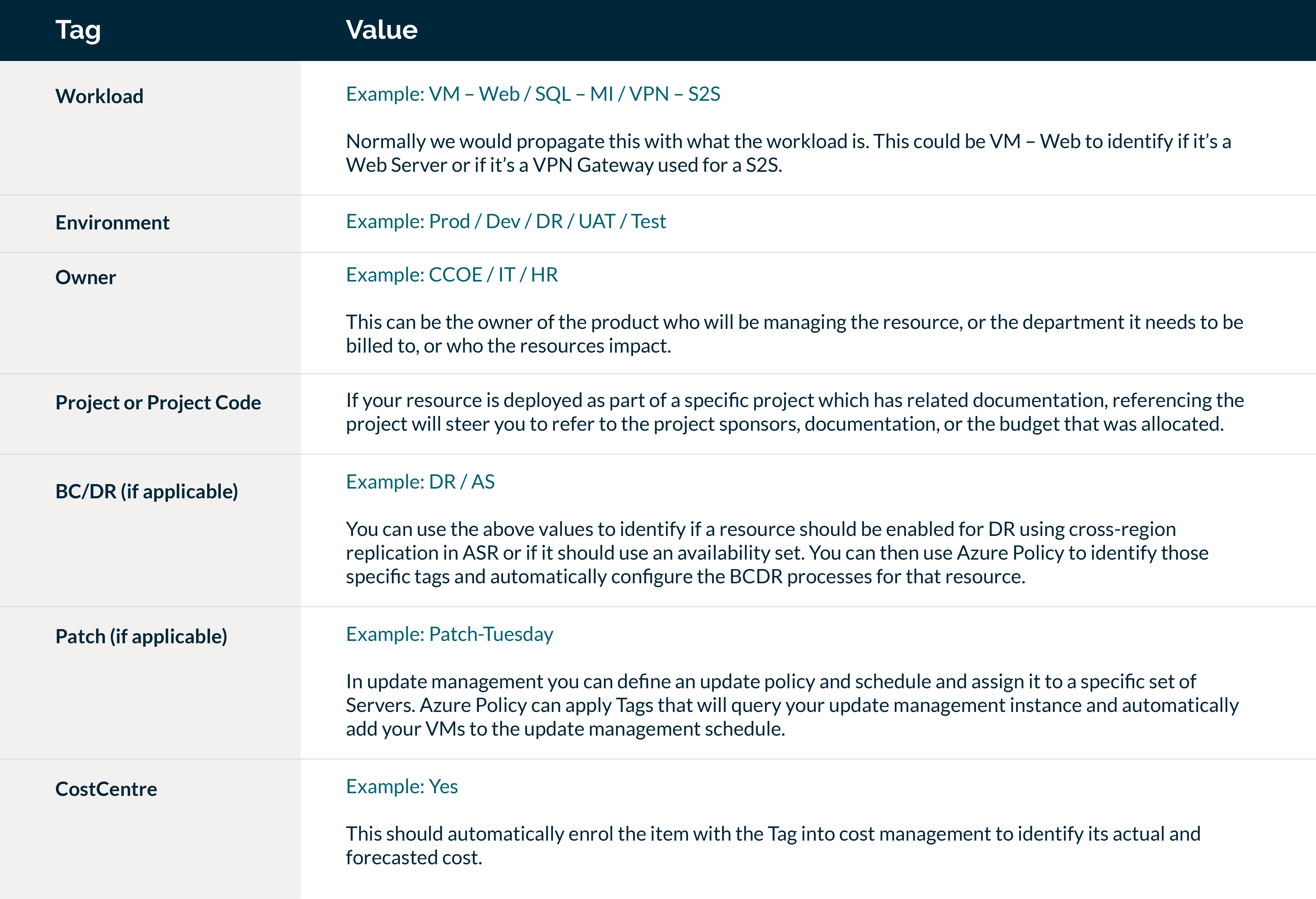
For fellow cloud engineers out there, here are the policies I have used in Azure to enforce Tags across Resource Groups and subsequent resources:
Policy 1: Add Tag to Resource Groups
In the table above there are 7 Tags we wish to apply. However you should consider this as 14 values altogether as you need to set both Tag name and value. These will be categorised together in Azure Policy as follows:
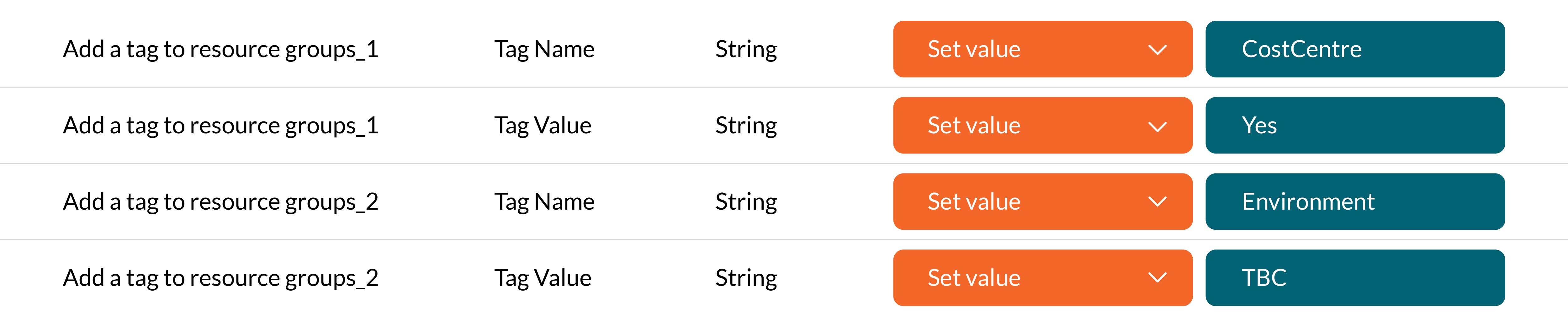
This will add the Tag to the Resource Group for CostCentre and its value being Yes – and for Environment and TBC as its value.
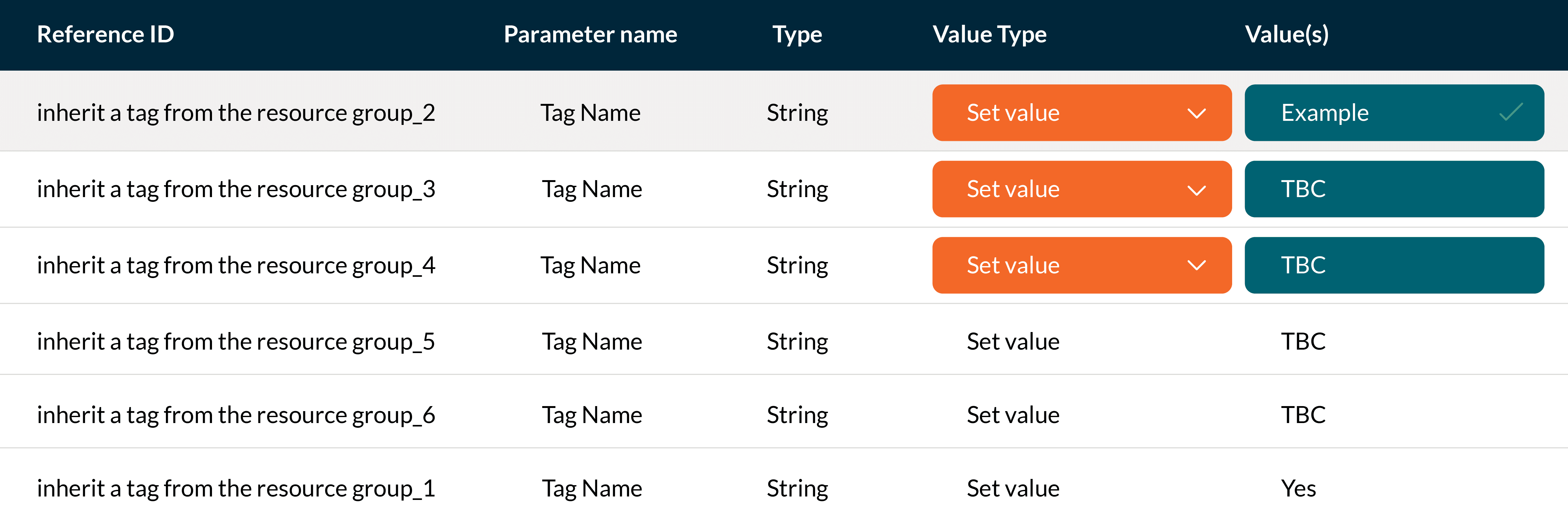
Policy 2: Inherit a Tag from the Resource Group
Once you defined what Tags you want to add to the Resource Groups you then need to configure the inheritance of the tags to ensure it is applied to the resources within the Resource Group.
The inherit tag policies will incorporate the same numbering that machines the numbers above and enforces the value against the Tag.
To summarise, Azure Tags provide us with the ability to categorise our Resources and allow us to use automation tools such as Azure Policy to fully automate standardisations across your Azure environment. By defining a robust and strict Tagging strategy, best practices can be implemented as standard and organisations can ensure their resources are embedded with cost optimisations and compliance within their subscriptions.
Four key takeaways
Future blogs in this series will cover the following:
