
In October 2025, Microsoft will officially end support for Windows 10, marking a major shift for millions of users and organisations worldwide. Since its launch in 2015, Windows 10 has been the backbone of modern workplaces, powering everything from personal devices to enterprise-grade systems. As Microsoft pivots towards more secure, AI-enabled, and cloud-centric computing, organisations must prepare for the next phase: upgrading to Windows 11 or exploring cloud-native solutions like Azure Virtual Desktop (AVD).
This transition brings both opportunity and urgency. In this post, we’ll explore the key implications of Windows 10 end of support, the options available, and how organisations can navigate the shift without disruption.
Windows 10 was released in July 2015 and was covered under mainstream support until October 2020. Since then, it has been covered by extended support. This extended support finishes in October 2025. As the end of extended support means no further security updates, patches, features or bug fixes, this is considered the official end of life for Windows 10.
While the operating system will continue to function, the lack of security updates alone poses a serious risk, particularly for organisations in regulated industries or those handling sensitive data. Unsupported systems quickly become low-hanging fruit for cybercriminals, and compliance auditors won’t be forgiving.
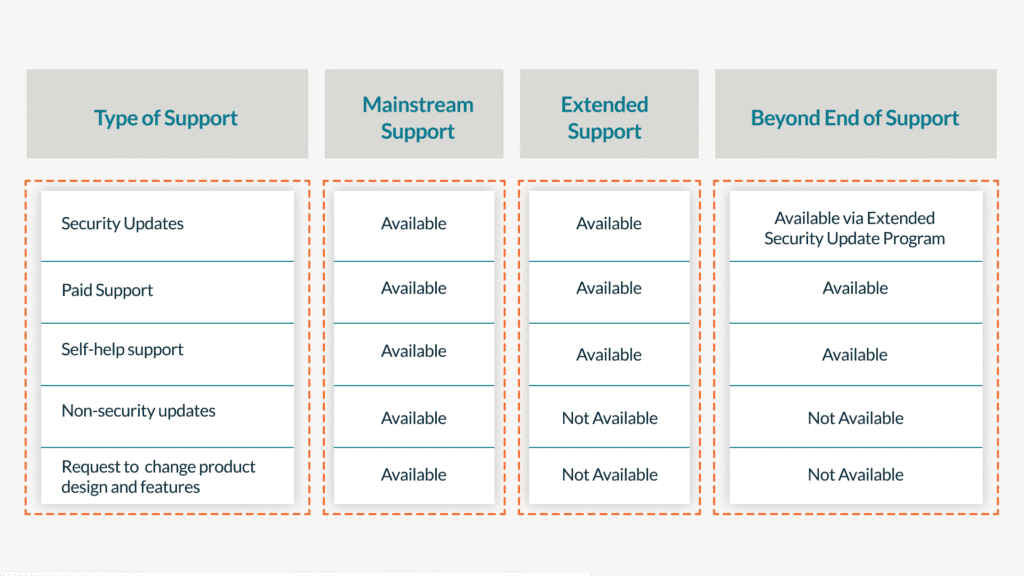
For more details on Microsoft’s fixed lifecycle, read the policy here: Fixed Lifecycle Policy | Microsoft Docs.
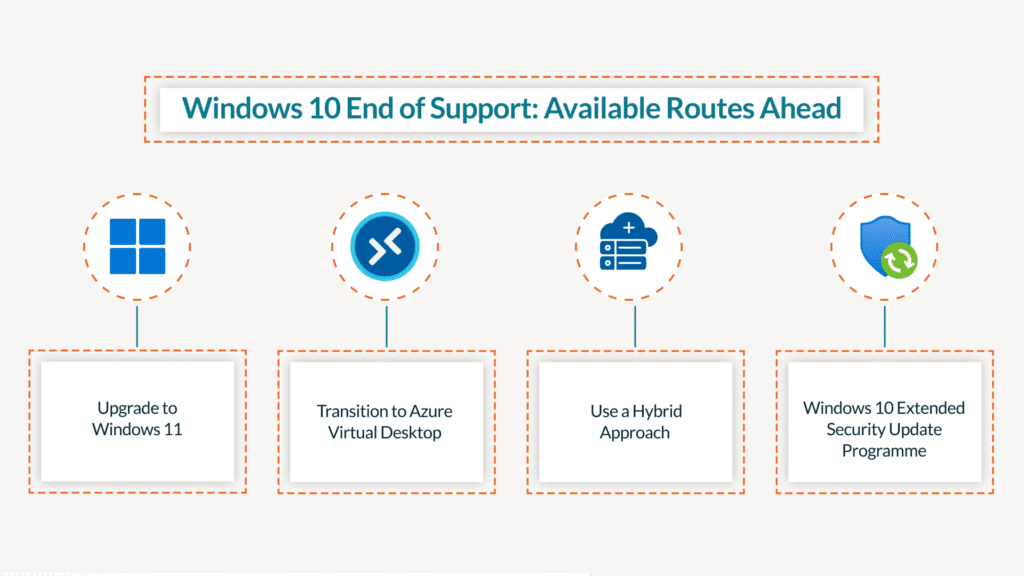
Windows 11 is Microsoft’s newest operating system, aimed at enhancing hybrid work, security, and productivity. It features an updated user interface, improved virtual desktop support, and enhanced integration with Microsoft 365 and AI tools such as Copilot.
If you have modern, compliant hardware and operate primarily in a traditional desktop environment, upgrading to Windows 11 is the most straightforward option.
Azure Virtual Desktop is Microsoft’s cloud-based desktop and application virtualisation platform. It enables users to securely access a Windows desktop from any device, anywhere, with centralised management and built-in scalability.
Many organisations may find a hybrid approach of the above two options more practical—upgrading frontline and core devices to Windows 11 while migrating part of the workforce (such as contractors, remote staff, or offshore teams) to AVD.
This allows you to:
Organisations that require continued use of Windows 10 beyond October 2025 have one final temporary option: the Extended Security Update (ESU) program. This program provides critical security updates for up to three additional years after the conclusion of the extended support date.
This programme is available for purchase for Windows 10 for those who don’t manage to migrate off in time. You can find more information on the Windows extended security update programme here.
Key Benefits:
As Windows 10end of support looms, organisations face a critical decision: to migrate to a newer operating system or to deal with the complex challenges of maintaining outdated software. While the Extended Security Update (ESU) program offers temporary relief, it is neither a long-term solution nor a cost-effective one for most. Delaying the transition can have far-reaching effects, impacting security, compliance, and operational efficiency.
Delaying the transition from Windows 10 introduces multiple risks:
A smooth transition begins with strategic planning. As organisations prepare to migrate off Windows 10, a well-structured approach is essential to navigate the potential challenges and make the most of the opportunities that come with modernising IT infrastructure.
Here’s a basic roadmap:
Windows 10 end of support is an important moment for businesses to enhance their user experience by transitioning to secure and modern solutions. Whether you’re planning a Windows 11 upgrade or exploring options like Azure Virtual Desktop, now is the right time to begin.
Start planning early, involve the right stakeholders, and use this opportunity to align your device strategy with the future of work.
If you’re unsure where to begin, get in touch to receive guidance on your assessment and deployment strategy. Whether it’s licensing advice, infrastructure optimisation, or full-scale migration support, expert help can save time and avoid costly missteps.
