In this blog, we look at the different BizTalk Server versions along with the corresponding end of support and the overall BizTalk lifecycle. The first BizTalk Server was released in the year 2000 and since then we have seen regular releases until the latest release – BizTalk Server 2020.

Organisations who have been using BizTalk Server for a while may have lost track of which version they are using, when support has run out, if and until when extended support is available and so on. So we are going to catch all these end-of-support dates here.

The BizTalk Lifecycle – BizTalk Server Versions

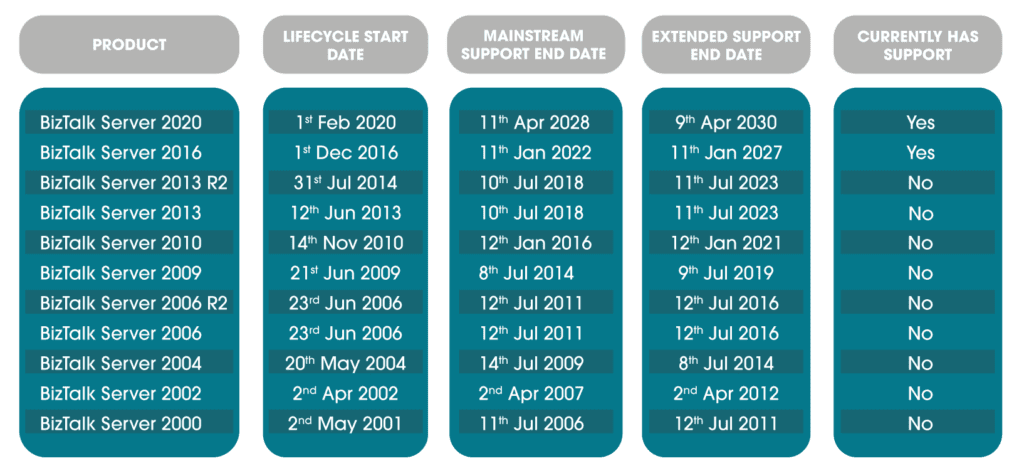
This is a complete summary of each BizTalk Server version, its release date, end of mainstream support and end of extended support, also known as end of life. You can also note rapidly which versions are currently being supported.

BizTalk Server and Windows Server

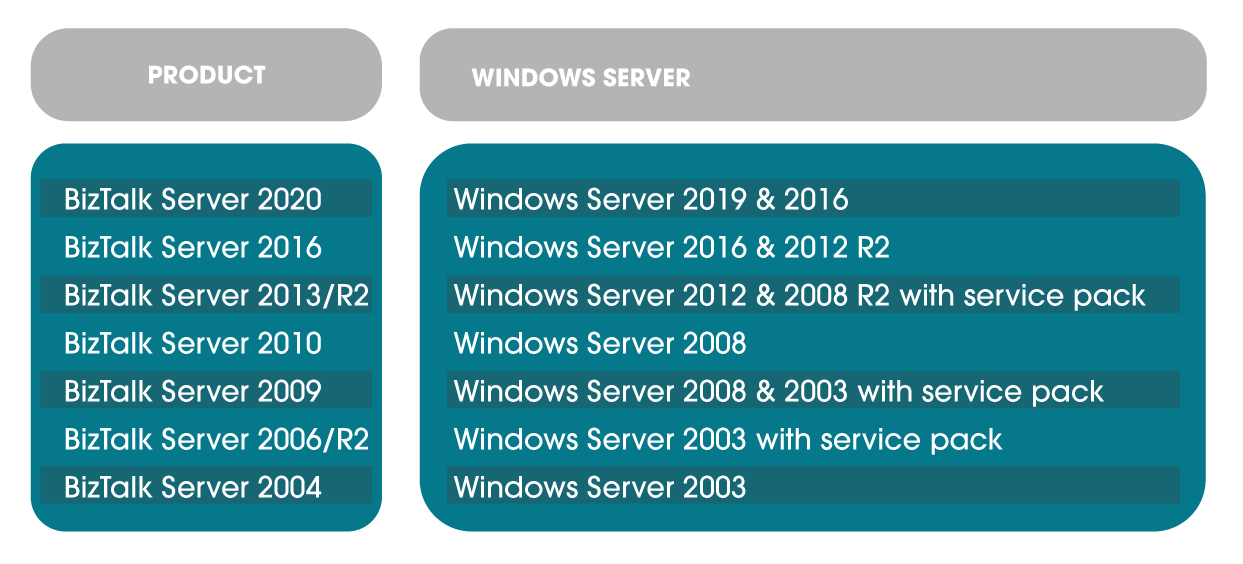
Being on old unsupported BizTalk servers is one issue, but BizTalk is stable and often the bigger issue is that old BizTalk servers run on even older Windows Server versions and this is a greater support problem. Below is a convenient guide on which Windows Server each BizTalk Server version supports.

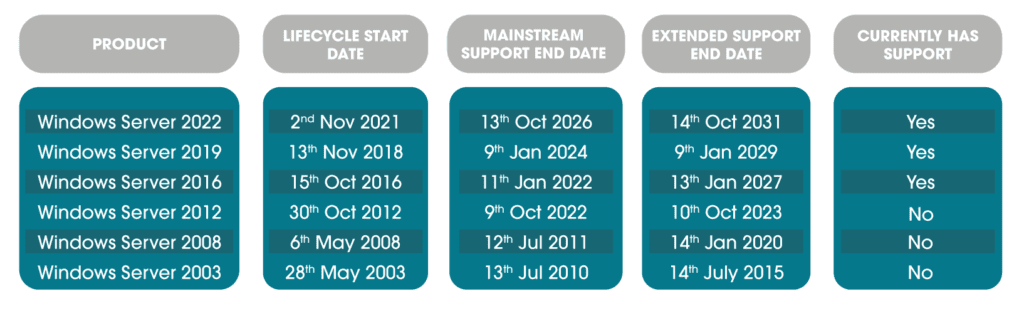
Here is a roundup of each Windows Server version, its release date, end of mainstream support and end of extended support, also known as end of life. You can also note rapidly which versions are currently being supported.

Your BizTalk Server Roadmap – When and How to Modernise

Using the information above and following the instructions in this document as required (What Version of BizTalk Server Do I Have? | Microsoft Docs) you will be able to see if you are using an out-of-support version of BizTalk or the accompanying Windows Server.

Anything earlier than this is not within support or extended support, which means applications are at risk. Let’s look at exactly what you may be missing.

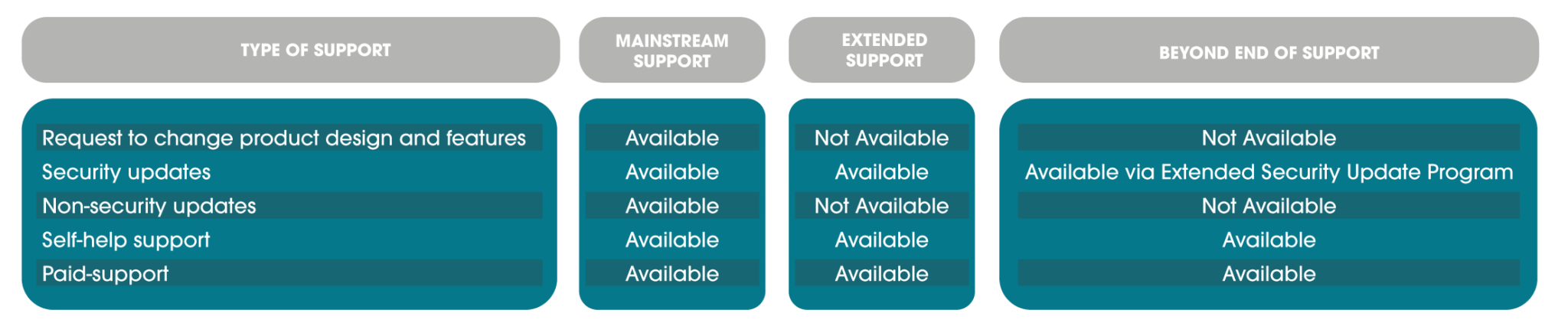
Mainstream Support

This is the main life of a product, you can expect to see cumulative updates occasionally and have the ability to request design changes and new features. Additionally, you can open support tickets, get security updates, security support, non-security fixes and so on.

Extended Support

During this phase, you can open paid support tickets and get security updates but no non-security fixes, features or design changes will be acted upon. There are no updates released during this period.

You can read more about what the fixed lifecycle looks like at Microsoft in this policy: Fixed Lifecycle Policy | Microsoft Docs

Extended Security Update Programme

There is a last resort for organisations who need to run legacy applications past even extended support. This is the Extended Security Update (ESU) programme. It only includes critical and sometimes important security updates and is for a maximum of three years past the end of extended support date.

This programme is purchased and not available for all products, it currently includes some Windows Server versions and no BizTalk Server versions. Details can be found here. FAQ – Extended Security Updates | Microsoft Docs

Other Modernisation Factors

Aside from access to support and security, there are two other large drivers in modernising. The key is of course the latest features and functionality available in newer versions.

The second is that due to the nature of BizTalk, it is interacting with and may depend on a large range of other applications which may not be supported by an older BizTalk version. As time passes, this becomes more of a factor, with newer software being designed to make the most of the latest BizTalk features and increased functionality in newer applications no longer being compatible with older BizTalk versions.

Keeping this in mind, you can see why you do not want to find yourself on BizTalk Server 2006, depending on Windows Server 2003!

A note about BizTalk Modernisation

Due to the nature of the updates, you cannot always make a leap from an old BizTalk Server version to the most recent, for example from BizTalk Server 2003 to BizTalk 2020. You may find you require a migration to BizTalk 2016 first, and then from there, the migration to BizTalk 2020 becomes possible. Or perhaps at that point, making the jump to the cloud and Azure Integration Services would be on the horizon.

BizTalk Migrations at Transparity

With Windows Server 2012 and BizTalk Server 2013 recently out of support, we have been undertaking a wide range of BizTalk migrations. 

However other clients have BizTalk servers dating as far back as 2006. With this type of migration, all older versions are being brought up to BizTalk 2016 and then addressed from there.

Charities are facing a unique set of challenges as they work to adapt to an increasingly digital world. Balancing limited budgets and fundraising obstacles to the new world of remote working and volunteers spread across the country and beyond. In addition to this, many not-for-profit organisations are working hard to serve communities and causes from a range of locations and with varying levels of digital access.

Many not-for-profit employees want to embrace the benefits of flexible or hybrid working, with 68% of charities planning to adopt it long-term. However, charities are faced with the challenges of hybrid working too, for team members, volunteers and the causes they serve.

There are two key challenges charities are contending with; keeping teams and volunteers connected and ensuring the people who need them aren’t excluded by technology. In this article we’ll explore how not-for-profits can get the best of both worlds and develop more inclusive services.

Maintaining the connection

With team members, volunteers and donors in a range of locations, keeping everyone informed and connected is vital. From the day-to-day activities of team members to organising volunteer events and keeping donors engaged and up-to-date – the right tools are essential.

Microsoft Teams goes beyond basic chat features, offering all you need to stay connected with the people and teams you need most. Teams transforms your workflow straight out of the box with instant chats, video meetings, file collaboration, and channels to keep everything organised. Set up channels for specific priorities, projects and initiatives and invite both internal and external stakeholders to keep everything you need filed in the same place for easy access, updates and discussions. Check in and chat in the main channel feed and add Planner to the mix to assign tasks and manage upcoming events and deadlines.

Although Teams’ capabilities don’t end there, our Modern Communications experts can expand on the platform to include Teams-powered desk phones, Teams meeting rooms and even Teams-enabled contact centres. By bringing your communications under the roof of Teams, you can consolidate your licenses and reduce expenses. In fact, according to a Microsoft report, 64% of nonprofit CFOs have said that adopting the newer cloud technology methods would cut operational costs by about 20%.

Plus, you can be sure your communications are organised, secure and accessible to the right people from anywhere.

Digital inclusion

In an increasingly online world vulnerable people are at risk of being left behind. For not-for-profits serving these communities, digital inclusion is at the top of the priority list. According to the Charity Digital Skills Report 2021, more than half of charities are worried about excluding some people or groups.

While online support is a fantastic option for many not-for-profit organisations, for some there’s nothing like picking up the phone and speaking to someone. For charities serving vulnerable communities, call centres are a key part of how they remain available to the people they support and are a more accessible option.

Landline-based contact centres are limited by a fixed location and a significant lack of data insights, which can be used to improve service delivery. Teams-based contact centres offer the ability to answer calls from anywhere while tracking key data points like call volumes, response times and other insights. Armed with this information charities can see things like when call volumes peak and adjust the number of team members answering calls accordingly.

With any Teams-powered solution you can be sure that your communications and files are managed securely, both for internal teams and your community of volunteers and donors.

What’s the next step for not-for-profits?

Putting these solutions to work is easy and hassle-free, with our Modern Communications managed services. We work in partnership with you and Anywhere365 to deliver the Teams-powered tools not-for-profits need to stay connected with their communities and ensure everyone is included.

Get started on your modern communications journey and find out all your need to know with advice tailored to your needs with a free expert consultation.

[mwai_chatbot id="chatbot-8s20vg"]
Skip to content